Interlace Communications

Category: Social Media Marketing

  • May Is National Small Business Month: Why It Matters More Than You Think

    May Is National Small Business Month: Why It Matters More Than You Think

    You probably know a small business owner. Maybe you are one. Maybe you grew up watching your parents run one from the kitchen table while dinner got cold. Or maybe you became one yourself because somebody once told you your idea was worth trying and you believed them.

    May is National Small Business Month. It has been for decades. But this year it is a little different.

    The Backbone Nobody Talks About

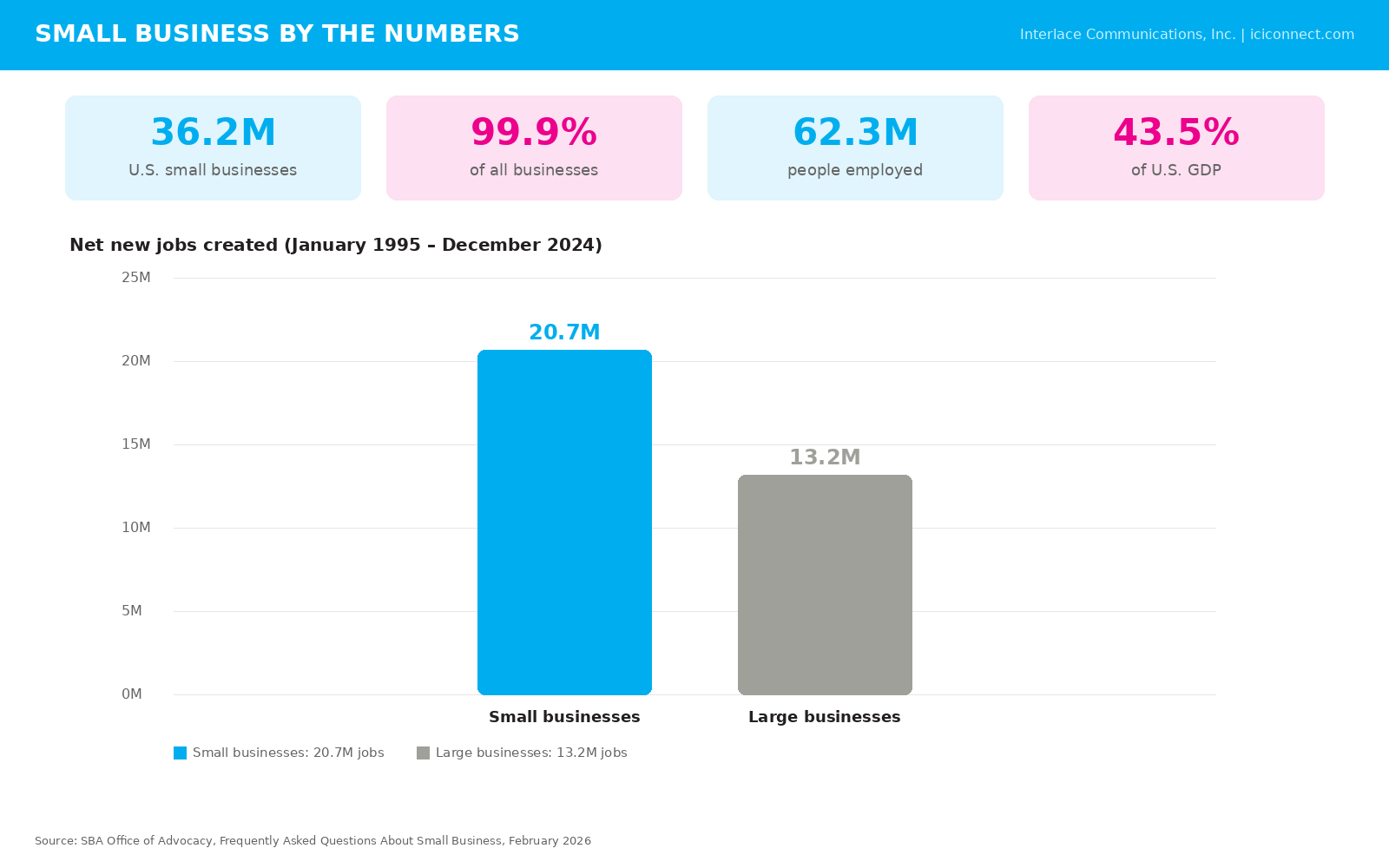
    Here is something that still catches people off guard. Small businesses account for 99.9% of all businesses in the United States. Not a typo. Nearly every business in this country is a small one. They produce 43.5% of the nation’s gross domestic product and over the last three decades they have created more than 20 million jobs. More than half the American workforce clocks in every morning at a small business.

    Those numbers are massive. But they do not tell the whole story.

    What the data misses is the contractor who answers the phone at 9 p.m. because a homeowner has a leak. The accountant who stays late in March so her clients can sleep at night. The print shop that donates flyers for the church fundraiser every single year without being asked. That is what a small business really looks like. It looks like people showing up for their neighbors.
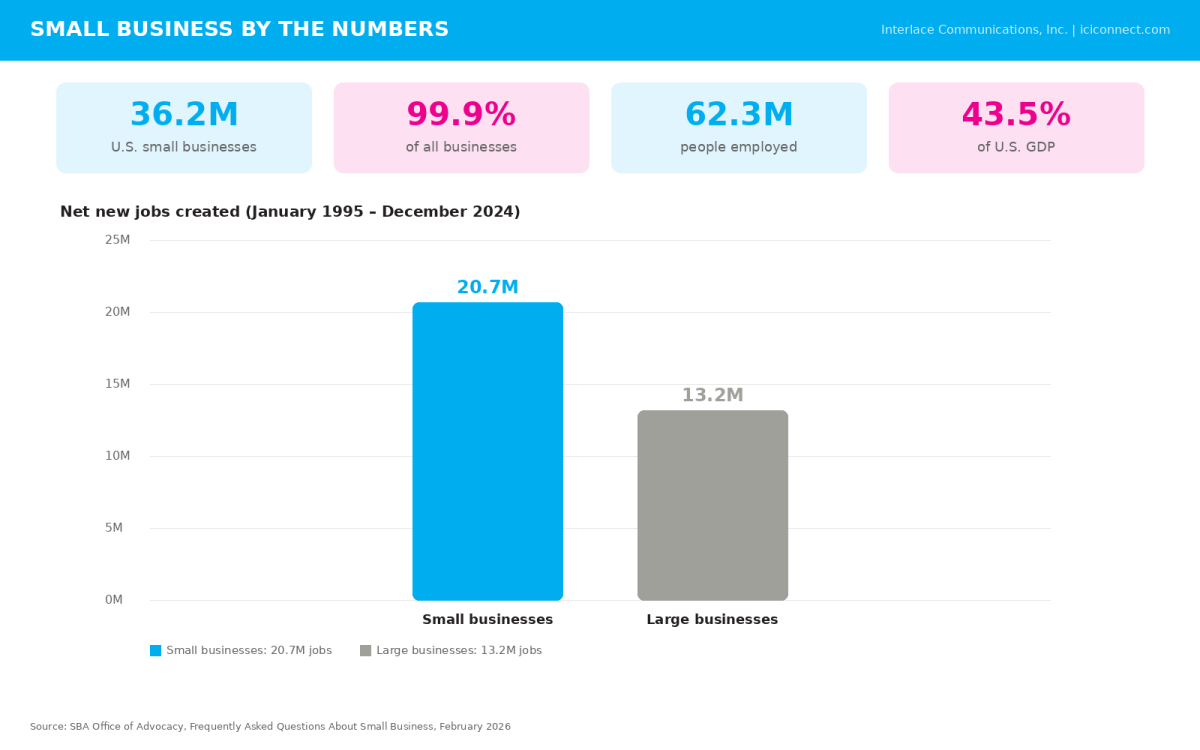
    Small Business by the Numbers: SBA Office of Advocacy, Frequently Asked Questions About Small Business, February 2026 (advocacy.sba.gov)

    This Week is the Big One

    National Small Business Week 2026 runs the first full week of May. The Small Business Administration hosts a free Virtual Summit with workshops on everything from digital marketing to scaling your operations. State or local business organizations often hold events that week or through the month to celebrate on a smaller scale. Check out your own local programs and attend events with your fellow small business owners.

    But honestly the celebration does not need to stop after one week. The entire month of May belongs to the businesses that keep our communities stitched together.

    What This Month Can Do for Your Business

    Take a breath and look at your own operation for a minute. When was the last time you read your own website the way a stranger would? Does it answer the questions people are actually asking before they call you? Are your blogs doing real work or are they just filling space?

    In 2026 the way people find businesses has changed. Search engines and AI tools are reading your content and deciding whether to recommend you. That is not a theory. That is happening right now. Businesses that publish clear and helpful content get discovered. Businesses that stay quiet get passed over. A strong website and a steady blog are not luxuries anymore. They are how you stay visible.

    And here is the thing most business owners forget. You do not need to overhaul everything at once. Start with one blog that answers a question your customers ask you all the time. Update your About page so it no longer sounds like a brochure from 2014. Small moves add up.
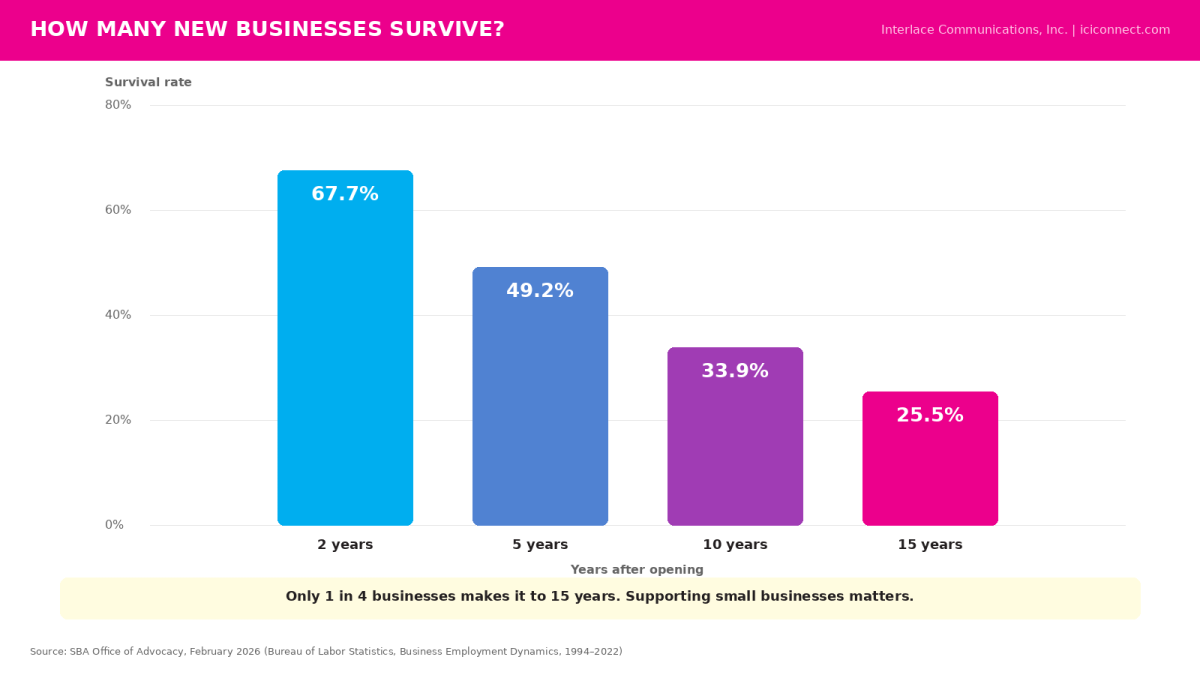
    Survival Rates: SBA Office of Advocacy, February 2026; Bureau of Labor Statistics, Business Employment Dynamics (1994–2022)

    How Everyone Else Can Help

    Not a business owner? You still have a role to play this month. Buy a gift card from a local shop. Leave a review for that restaurant you keep meaning to recommend. Share a post. Tell a friend. Show up at the farmers market this weekend and say hello to the people behind the tables. It costs nothing and it means everything to someone who bet their savings on a dream.

    Frequently Asked Questions About National Small Business Month

    What is National Small Business Month?

    Every May the United States sets aside the entire month to recognize and celebrate the contributions of small business owners. The tradition goes back decades. The U.S. Small Business Administration leads the effort by hosting events and highlighting entrepreneurs who make a real difference in their communities.

    It is time to acknowledge that the backbone of this country’s economy is not Wall Street or Silicon Valley. It is the local businesses on Main Street that hire our neighbors and sponsor our kids’ teams.

    What is National Small Business Week 2026?

    National Small Business Week is the centerpiece of the month. In 2026 it ran from May 3 through May 9. The SBA hosted a free Virtual Summit on May 5 and 6 packed with workshops on topics like digital marketing strategy and business growth. They also announce their annual small business award winners during the week. Whether you attended in person or tuned in online, the week is a solid opportunity to learn something new and connect with other business owners who understand exactly what you are going through.

    If you missed this year, put next year’s dates in your calendar to attend in 2027.

    How can I support small businesses in my community?

    This one is easier than most people think. Buy from a locally owned shop instead of ordering online when you can. Leave a Google review for a business you love. Share their social media posts. Recommend them to a friend. Purchase gift cards from local restaurants and service providers as birthday or holiday gifts. Attend a community event like a farmers market or a local fair where small businesses set up and sell. Every one of those actions puts real dollars and real visibility behind someone who poured their heart into building something from scratch.

    Why does my small business need a blog?

    Because in 2026 your blog is one of the most powerful marketing tools you have. A blog does more than keep your website looking current. It tells search engines and AI-powered search tools what your business knows and who it serves.

    When someone in your area types a question into Google or asks an AI assistant for a recommendation, your blog content is what those systems read to decide whether your business is a good match. Without it you are invisible to a growing number of potential customers. A well-written blog also builds trust with the people who do find you. It shows them you understand their problems before they ever pick up the phone. That kind of credibility is hard to buy with advertising alone.

    The businesses that blog consistently with clear and helpful content see more website traffic and more inquiries over time. It is not magic. It is marketing that works.
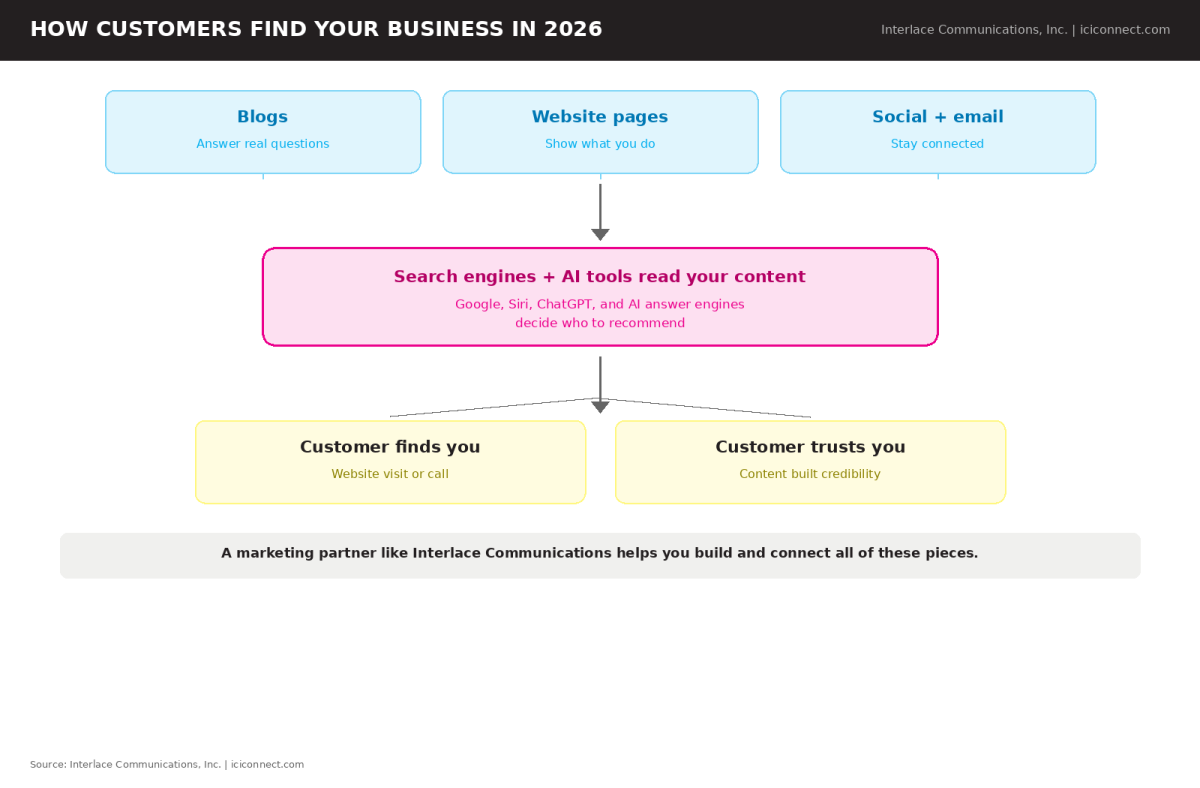
    How Customers Find Your Business in 2026: Interlace Communications, Inc. (original educational graphic)

    How do I make my small business easier to find online?

    Start with the basics. Your website needs to load quickly and look professional on a phone because that is where most people are searching. Your content needs to answer real questions that your ideal customers are asking. Search engine optimization helps your site rank higher on Google and AI-driven answer engines are now pulling directly from well-structured website content to recommend businesses in their results.

    Beyond your website, a consistent social media presence keeps your brand in front of people between searches. Email marketing helps you stay connected with customers who already know you. And do not underestimate commercial printing. Brochures, business cards and direct mail pieces still work especially when they match the same branding your audience sees online. The key is making sure all of these pieces work together instead of operating in silos.

    A full-service marketing partner, like Interlace Communications, can help you build that kind of connected strategy so nothing falls through the cracks.

    Small Shifts Lead to Real Results

    Every big brand started as a small one. Every household name began with someone who had no guarantee it would work. Supporting small businesses is not charity. It is an investment in the neighborhoods and families and communities that make a place feel like home.

    At Interlace Communications, we have spent more than 30 years helping small businesses across Pennsylvania and beyond get found and get remembered using:

    • Website design.
    • Blog management.
    • Search engine optimization.
    • Email marketing.
    • Social media marketing.
    • AI consulting and training.
    • Commercial printing.

    We do all of it because we believe in the people doing the work.

    Let’s talk about what’s possible for your business.

    Reach out to Interlace Communications at 484-709-6564 or visit our Help Desk.

  • Why Does My Content Get Ignored… Even When I’m Posting Consistently?

    Why Does My Content Get Ignored… Even When I’m Posting Consistently?

    If your content isn’t getting attention, it’s not because your message is wrong… it’s because attention has changed. Static posts are easier to scroll past, while motion-based content naturally pauses the eye. A simple shift to scroll stopping content can make the difference between being skipped… or being seen.


    You sit down.
    >You write the post.
    >You share something helpful… maybe even really good.

    And then…

    Nothing.

    A few likes. Maybe a comment. Mostly silence.

    So you wonder…
    “Is it me?”
    “Is it the message?”
    “Am I just not good at this?”

    But here’s the truth.

    It’s not you.

    It’s the way content is being seen… or more accurately, not seen.


    What We Saw in March… And Why It Matters Now

    In March, we focused on something most business owners feel but don’t always say out loud…

    Everything takes too long.

    Creating content. Building presentations. Trying to keep up.

    And once people saw a better way to do it, something clicked.

    Relief.
    Clarity.
    Momentum.

    But then came the next question…

    “Okay… this is faster now. But why isn’t it getting noticed?”

    That’s where things start to change.

    The Problem Isn’t Your Content… It’s Attention

    You’re not competing against bad content.

    You’re competing against everything.

    Every scroll, every distraction, every split-second decision someone makes while looking at their phone.

    And right now…

    Still images just don’t behave the way they used to.

    They don’t stop the scroll.

    They blend in.


    What Happens When Content Blends In

    This is the part that gets frustrating.

    You can be consistent.
    >You can be thoughtful.
    >You can even be doing everything “right.”

    And still…

    • Your posts get skipped
    • Your message doesn’t land
    • Your effort doesn’t turn into action

    Not because it’s wrong.

    Because it never got the chance to be see

    Ever Feel Like Your Posts Just Blend In?

    You share good content. You post regularly. And still… it barely gets noticed.

    It’s not because your message is wrong. It’s because still images don’t behave the way they used to.

    In this workshop, we’ll talk about why movement matters now… why attention pauses for just a few seconds… and how some posts quietly earn that pause while others disappear.

    No filming.
    >No editing skills.
    >No pressure to be on camera.

    Just a smarter way to help your content get seen without starting from scratch.

    Once you understand this shift, static posts won’t look the same again.


    Why Motion Changes Everything

    Static Content Motion-Based Content
    Easy to scroll past Pauses attention
    Blends into the feed Stands out naturally
    Lower engagement Higher interaction
    Often ignored Invites curiosity

    This isn’t about doing more.

    It’s about finally being seen.


    3 Reasons Your Content Isn’t Getting Noticed Anymore

    • The feed is faster than ever
      People react before they read
    • Still images don’t interrupt behavior
      They look like everything else
    • Attention is earned in seconds
      Not minutes… seconds


    A Note From Alyse

    “Most business owners don’t need more content… they need their content to actually be seen. Once you understand how attention works today, what you’re already creating starts working for you in a completely different way.”


    FAQ… Let’s Keep This Real

    Do I have to be on camera?
    No. You don’t need to film yourself to create motion.

    Is this hard to learn?
    Not at all. Once you see it, it makes sense quickly.

    Will this work for my business?
    Yes. Attention works the same way whether you’re a local service, nonprofit, or growing company.

    Here’s What to Do Next

    You don’t need to start over. You just need your content to get a fair shot at being seen.

    Workshop: Scroll Stopping Video Tricks
    📅 April 15, 2026
    🕓 4:00 PM (EST)
    👉 https://ici4u.com/ScrollStoppingVids

    And should you want help applying this to your business… not just learning it…

    Because when your content gets noticed… everything else starts to follow.

  • How Can You Get Your Name Out There Through Online Advertising?

    How Can You Get Your Name Out There Through Online Advertising?

    Updated: October 2024

    Getting your name out there through online advertising is crucial for brand recognition and business growth. By leveraging the right platforms, strategies, and targeting, businesses can effectively reach their ideal audience and make a lasting impression. Whether you’re just starting out or scaling up, the right combination of online ad strategies can propel your brand visibility forward.

    Online advertising is one of the most effective ways to boost brand visibility. By targeting specific audiences with tailored ads on platforms like Facebook, Google, and Instagram, businesses can reach more people and build a recognizable brand. Key strategies include understanding your audience, leveraging social media ads, maximizing Google Ads, and using retargeting techniques.

    In this blog, we’ll look into the best methods for getting your name out there using various online advertising tools and strategies.

    Outline: What You’ll Learn in This Blog

    1. Introduction
      • Overview of the importance of online advertising for brand visibility.
    2. How Can You Get Your Name Out There Through Online Advertising?
      • Answer to the main question.
    3. The Key Steps to Building Your Brand Online Through Advertising
    4. Additional Questions About Online Advertising
      • FAQs addressing common questions about budget, platforms, and success metrics.
    5. Final Thoughts: Building Your Brand Through Online Advertising
      • Summary of strategies and encouragement to start using online ads.

    The Key Steps to Building Your Brand Online Through Advertising

    1. Understand Your Audience

    To create successful online ads, you first need to understand who your target audience is. You can use tools like Facebook Insights, Google Analytics, and industry research to gather demographic and psychographic data on your audience. And if you like to use AI tools, here’s a prompt that can help you understand your audience.

    Why this matters:
    • Helps you create more tailored ad content.
    • Ensures your ads reach the right people, leading to higher engagement and conversions.

    2. Leverage Social Media Ads

    Platforms like Facebook, Instagram, and LinkedIn offer powerful advertising tools that allow you to target specific groups based on interests, behaviors, and demographics. By creating ads with clear calls to action (CTAs) and engaging visuals, you can boost brand visibility on platforms where your audience is most active.

    Pro Tips:
    • Use video content to increase engagement.
    • A/B testing of different ad creatives and formats will help you determine the best format to double down on.

    4. Retargeting Ads

    Retargeting allows you to re-engage with people who have previously visited your website or interacted with your ads. This is a great way to keep your brand top of mind and encourage potential customers to return and take action.

    Retargeting benefits:
    • Increases conversion rates by targeting warm leads.
    • Keeps your brand in front of people who are already familiar with your offerings.

    Additional Questions About Online Advertising

    1. How much should I spend on online advertising to grow my brand?
      Your ad spend will depend on your goals, audience size, and the platforms you use. A good starting point is $300 per month, but you can scale based on your results. For businesses on a tighter budget, starting with as little as $100 per month can still yield positive outcomes.
    2. What platforms are best for online advertising?
      The best platform for your business depends on where your audience spends their time. Facebook and Instagram are excellent starting points for most businesses. LinkedIn is ideal for B2B, Facebook and Instagram for B2C, while TikTok can be effective for younger demographics.
    3. How can I track the success of my online ads?
      Platforms like Facebook Ads Manager and Google Analytics provide in-depth tracking and reporting tools. Key metrics to track include click-through rates (CTR), conversion rates, and return on ad spend (ROAS).
    4. How do I create ads that stand out?
      Focus on clear, compelling messaging, strong CTAs, and eye-catching visuals. Testing multiple creatives and formats is also key to understanding what resonates best with your audience.

    Final Thoughts: Building Your Brand Through Online Advertising

    Getting your name out there through online advertising requires a combination of the right platforms, smart targeting, and continuous optimization. By focusing on understanding your audience and using tools like Facebook Ads, you can efficiently grow your brand, even on a limited budget.

    With these strategies, businesses of all sizes can see significant returns, driving brand recognition and increasing customer engagement. Ready to take the next step? Start experimenting with your online ads today!

    Relevant questions to ask about this subject matter:

    • What are the most effective social media platforms for advertising my business?
    • How can I optimize my Google Business Profile for better visibility?
    • What are some affordable ways to advertise my business online?
    • How do I create a budget for online advertising?


    Share this article:

    [DISPLAY_ULTIMATE_SOCIAL_ICONS]


  • 20 Hooks for Small Business Saturday (Updated for Post Pandemic)

    20 Hooks for Small Business Saturday (Updated for Post Pandemic)

    Revitalizing Small Business Saturday: 20 Modern Hooks for a New Era

    (Blog Updates: We’ve reimagined our “20 Hooks for Small Business Saturday” to cater to the evolving consumer landscape. This updated guide infuses traditional tactics with digital innovation, emphasizing safety, convenience, and community. We hope you will find our modernized strategies that are a blend of the best of both worlds, ensuring your Small Business Saturday is a hit in the post-pandemic marketplace.)

    As we navigate the new normal, Small Business Saturday remains a beacon for local enterprises, symbolizing resilience and community spirit. With the landscape of retail forever changed, it’s crucial to adapt and innovate. Here are 20 refreshed strategies to make Small Business Saturday a triumph in the post-pandemic world.

    Digital Ideas

    1. Digital Thanksgiving Greetings: In the spirit of gratitude, craft heartfelt digital cards to thank your patrons. Embed a mystery discount code that piques interest and drives online traffic. This gesture not only shows appreciation but also integrates a sense of excitement and exclusivity, encouraging customers to engage with your brand online and discover their special offer, leading to increased anticipation and potential sales on Small Business Saturday.

    2. Virtual Scavenger Hunt: Engage customers with a virtual scavenger hunt that cleverly incorporates your product line into puzzles and riddles. Participants can navigate through your website, uncovering clues and learning about your offerings. This interactive journey culminates in discounts or special offers, rewarding their digital adventure and fostering a fun, memorable shopping experience that highlights your brand’s creativity and customer engagement.

    3. Collaborative Online Events: Capitalize on community strength by joining forces with neighboring businesses to host a virtual Small Business Saturday event. This collective effort can amplify your reach, share marketing resources, and create a comprehensive online shopping experience that celebrates the diversity and uniqueness of your local business community.

    4. Late-Night Virtual Sales: Replicate the thrill of midnight sales in the digital realm. Host a ‘Late Night Online Shopping Spree’ where discounts grow as the night progresses. This creates a sense of urgency and excitement, encouraging customers to stay engaged, share the event, and ultimately make more purchases as the deals get better throughout the evening.

    Print Ideas

    5. Direct Mail with a Digital Twist: Marry the charm of direct mail with the convenience of digital access. Send out postcards that carry a QR code, which when scanned, transport customers to a landing page with Small Business Saturday specials. This strategy not only drives online sales but also tracks the effectiveness of your direct mail campaign, offering valuable insights into customer engagement.

    6. Strategic Inserts: Utilize the broad reach of newspaper inserts to get your Small Business Saturday specials into thousands of homes. This method allows you to target specific localities and offers the tactile engagement of physical coupons, which many customers still appreciate and respond to.

    7. Remnant Space Deals: Keep an eye out for last-minute advertising space in local publications, often available at a significant discount. Be prepared with ad copy and a budget to snap up these deals, which can provide an unexpected but welcome boost to your Small Business Saturday marketing efforts.

    Social Media Ideas

    8. Facebook Live Shopping: Utilize the interactive platform of Facebook Live to bring the in-store experience to customers virtually. Showcase products, answer questions in real-time, and offer exclusive deals during the broadcast. This live interaction not only boosts engagement but also allows you to connect with customers on a personal level, enhancing their loyalty to your brand.

    9. Social Coupons: Transform traditional coupons into social media-friendly visuals. Encourage sharing by offering additional discounts for every share or like, turning your customers into brand ambassadors. This not only increases the reach of your promotions but also integrates a social proof element that can be more persuasive than traditional advertising.

    10. Themed Social Posts: Develop a series of themed social media posts that create a narrative leading up to Small Business Saturday. This could be a journey through your product lines, customer testimonials, or the story of your business’s role in the community. Scheduled posts ensure consistent engagement and build a story that culminates in your Small Business Saturday event.

    11. Interest-Specific Campaigns: Design email campaigns that cater to the specific interests of your customer segments. By addressing their unique preferences, you demonstrate an understanding of their needs, which can enhance customer satisfaction and loyalty. This targeted approach ensures that your messages resonate more deeply and can lead to higher engagement and sales.

    Website Ideas

    12. Website Countdown: Create anticipation with a dynamic countdown on your website that teases daily deals leading up to Small Business Saturday. This constant visual reminder keeps customers returning to your site, building momentum, and ensuring that when the big day arrives, your deals are at the forefront of their minds.

    13. Product Highlights: Showcase your flagship products with professional photos and engaging videos across your social platforms. Start conversations around these items and tease special offers available only on Small Business Saturday. This visual storytelling not only highlights your products but also creates shareable content that can extend your reach beyond your immediate followers.

    14. Exclusive Sign-Up Discounts: Encourage new customers to join your mailing list by offering a sign-up discount. This not only grows your email database but also gives customers an immediate reward. Tailor follow-up emails to introduce your brand’s story and values, leading to a deeper connection and increased likelihood of repeat business.

    Email Ideas

    15. Segmented Email Blasts: Craft targeted email campaigns for different segments of your audience based on their interests and past purchases. Personalized emails feel more relevant and can significantly increase engagement rates. Use this approach to highlight products that each segment is likely to be interested in, thereby increasing the chances of conversion.

    16. Social Sharing Incentives: Incentivize customers to share your emails on social media by offering them a discount on their next purchase. This not only increases the reach of your campaign but also leverages the power of word-of-mouth marketing. As friends and family see these shared emails, your brand gains credibility and potential new customers.

    17. Concise Subject Lines: In a world where inboxes are cluttered, a concise and catchy subject line can make all the difference. Aim for brevity and wit to grab attention and entice opens. Remember, the subject line is the first impression—make it count to ensure your email content gets the viewership it deserves.

    Other Ideas

    18. Charitable Incentives: Combine commerce with charity by offering discounts to customers who donate to a local cause. This not only incentivizes purchases but also builds a positive brand image. Customers feel good about their purchases, knowing they’re contributing to a worthy cause, and your business stands out as a community-conscious brand.

    19. Pop-Up Yard Signs: Use the simplicity of yard signs to catch the eye of passersby. Strategically place them in high-traffic areas with bold, readable fonts and a clear call-to-action. This old-school tactic can effectively drive local traffic to your online and physical storefronts, creating a buzz in the community.

    20. Digital Billboards: Adopt the billboard’s visual impact in your digital marketing. Create graphics that mimic billboards for use in online ads and social posts. These should be bold, straightforward, and create a sense of curiosity, much like the iconic road signs that entice travelers with promises of upcoming attractions.

    Ready to Ignite Your Small Business Saturday Sales?

    Transforming these ideas into reality requires creativity, precision, and a touch of marketing magic – that’s where we come in. At Interlace Communications, we specialize in crafting marketing strategies that resonate with your brand’s voice and your customers’ desires. Don’t let another Small Business Saturday pass by as just another day on the calendar. Make it a day that boosts your sales, builds your customer base, and elevates your brand.

    Whether you’re looking to captivate with digital greetings, engage with a virtual scavenger hunt, or create buzz with social media savvy, we have the expertise to bring these ideas to life. Our team is ready to help you personalize these strategies, ensuring they align perfectly with your business goals and customer expectations.

    Take the first step towards a record-breaking Small Business Saturday. Fill out the form below to get in touch with us. Let’s collaborate to make this Small Business Saturday not just successful, but spectacularly so. Your business deserves it, and so do your customers.

    Share this article:

    [DISPLAY_ULTIMATE_SOCIAL_ICONS]


    Connect with Us – Let’s Make Magic Happen

    [gravityform id=”20″ title=”true”]

    Need more resources to help you prepare for Small Business Saturday? Visit these websites, too.


  • Using Emojis for Marketing Purposes

    Using Emojis for Marketing Purposes

    Emoji’s are a nifty way of communicating with friends and family while using funny facial expressions. Ever since 2010, they’ve been used more and more since most people have access to a variety of them from phones and computers. Although, just because emojis are funny and popular doesn’t mean they are always used in the right way or overused. We want to give you a few tips on using emojis and what you should also avoid when using them.

    Before trying to use them, you should decide for yourself if the platform you’re on and the audience you appeal to would like them or not. Using emojis can improve open rates of emails, improve engagement with users, and can help interactions on content. However, if your audience would find them off-putting or childish, it’s best to refrain. At the end of the day, it may take some time to decide if emojis are making an impact, but you’ll need to test them out in different scenarios to determine that for yourself.

    Now we should cover the do and don’ts of using emojis:

    Dos Don’ts
    – Connect the emoji with the topic of your content or business.
    – Use the right ones to engage with your audience.
    – Use to tell a story.
    – Create a game for users.
    – Overuse them in every online marketing piece.
    – Avoid using ones that don’t make sense for your business.

    A few websites we like to use for getting emojis:
    emojipedia.org/ (our #1 choice)
    getemoji.com/

    Emojis are a great addition to how we communicate over the internet nowadays. However, if you’re new to them, you should be paying close attention. Your message may seem clear to you, but that doesn’t do anything if the recipient is confused on what you were trying to say. We’ve used emojis on guides and videos before. So, if you want us to take a look at something you want to send out or you have more questions about emojis, we’re a phone call away!

    Share this article:

    [DISPLAY_ULTIMATE_SOCIAL_ICONS]


  • Why you shouldn’t just take a photo from a Google search

    Why you shouldn’t just take a photo from a Google search

    You heard all throughout school about the penalties of plagiarizing your work. Well, the same rules apply for business owners, social media promoters, and content creators. Whether you’re trying to create a nice thumbnail, finding a photo for a blog, or more, you need to identify if you have permission to use the image. We want to cover why using a picture without permission isn’t a risk worth taking.

    The first thing you need to know is: using a picture without permission could leave you with hefty fines or worse. As great as the internet is, it reveals opportunities to steal work. It’s often difficult to tell if a site has permission to use pics/art. Other than a nice request for you to take the image down, there are other consequences that could result in much worse than embarrassment.

    Some of these include, but are not limited to, a lawsuit, SEO rankings being negatively affected, ruining of your brand and reputation, and more! Depending on the situation, some photographers won’t be as hard as others, but that doesn’t create any excuse for you to steal their work. Fines can range from small fees to thousands of dollars, along with possible time in jail. Do you really think it’s worth the risk of finding yourself in a troublesome situation when stock photos can be purchased for a few dollars or even free?

    What are stock photos?

    What are stock photos? Stock photos are images available for use from certain distributor websites. All you have to do is pay a fee for the photos. What sounds better to you, paying a very small price for photos, or dealing with the penalties we stated above?

    We want to recommend a few stock photo websites for you to use.

    Two stock photo websites we personally have experience with include Pixabay.com and Depositphotos.com. We’ve used these for plenty of projects. They both have a wide variety of images you can choose from. Pixabay.com offers free stock photos, so you are free to use them without paying for them, but if you’re looking for a specific photo, you may not find it on Pixabay. Depositphoto.com does charge a fee, and offers more professional photos to purchase. It’s best for you to check these websites and see what they have to offer. Some other popular stock photo websites include Shutterstock, Getty Images, and there are more you can find online with an easy Google search.

    Unless you took the photo yourself or you paid for it, we recommend avoiding using any photo without permission.

    Share this article:

    [DISPLAY_ULTIMATE_SOCIAL_ICONS]


  • Creating Facebook Events

    Creating Facebook Events

    Facebook is one of the, if not the most, largest social media platforms available throughout the world. With this platform comes the ability to promote and create events for others to attend. This is a great way to attract attention and get some information out about your event. We want to share with you how you can create a Facebook event.

    Creating a Facebook event is fairly easy. There are two different types available, private and public. The main difference with a private event is that as a host, you need to invite guests and they can accept or decline the invitation. Outside of the invitations you sent out, other users can’t respond or interact with the private event. On the other hand, public events are available for anyone to view and learn about. With both types of events, you’re able to invite other users, edit the event details such as time and date, and promote each one to your own desire.  You can find the events option in the left menu on Facebook and once you click “create event” it’s straightforward from there.

    Now that you know how to create an event, what would you use this feature for? Well, there are plenty of events you can promote with Facebook. Personally, I’ve seen car meets, festivals, graduation parties, and plenty more! One of the biggest concerns when creating a Facebook event is monitoring the responses. When a user finds an event, they have two options to respond. This can either be that they’re interested, or they’re going. Although, even if a user responds, we know life can be unpredictable and something may come up or they don’t feel like going.

    Don’t worry about users who can’t make it though, if you want a strong gathering, you’ll need to promote your event! Promoting is just as important as setting up the event itself. Besides from posting, there are more ways to spread awareness about your event. This includes creating a hashtag for your event, asking others to help share your event, sharing content related to your event, and boosting your event. The earlier you get started only improves your chance of having a bigger attendance at the event.

    Remember, the responses don’t determine how many people are in attendance, you do! Invite guests and keep promoting it. If you need some help trying to promote your event, contact us! We’re glad to work with you and try to improve advertising for your event.

    Share this article:

    [DISPLAY_ULTIMATE_SOCIAL_ICONS]


  • Understanding Facebook Premiere

    Understanding Facebook Premiere

    Live streaming has become such a huge way to interact with your audience. It’s also a creative way to share information when engaging with the community. So much so that we have an entire blog to cover the reasons why you should go live on social media! We want to teach you what Facebook Premiere is and how it’s a useful way for you to “go live.” You can even go live without having to actually be on a live video.

    Essentially, Facebook Premiere is a way for you to record a video, edit it, upload to Facebook, and schedule it. It acts very similar to Facebook Live. Firstly, it gives you the ability to interact with users in the comments or through direct messages if you see them reacting to your video. Even if users cannot tune in, it turns into a post that can be seen over and over again. Most Facebook Premieres also allow your audience to set up a Watch Party and invite their friends, family, customers and coworkers to preview the Facebook Live at their convenience.

    The only real difference between Facebook Live and Facebook Premiere is that you don’t have to be present for the video to play. Although, we do recommend you tune in to see reactions and possible comments users will have. It really isn’t necessary.

    What reasons would you have for using Facebook Premiere over Facebook Live though? Well, there are several reasons why this may be a better option for you!

    Pros of Using Premiere

    • Going live can sometimes cause anxiety for people and fear they will stumble over the topic. Facebook Premier gives you the opportunity to create your video ahead of time and eliminate that anxiety.
    • Facebook Premier allows you the ability to record your video ahead of time and schedule it, which will save you the pressure of feeling you need to go live at the exact time you told your viewers you would be presenting a FBLive.
    • Having the ability to edit the video ahead of time gives you the time to remove any unnecessary sections, as well as add transcripts and filters as you see fit.

    If you need to know more about Facebook Premiere, don’t hesitate to give us a call. We’re here to help with all of your marketing needs, including video creation!

    Share this article:

    [DISPLAY_ULTIMATE_SOCIAL_ICONS]


  • Importance of Using Videos

    Importance of Using Videos

    Having a variety of content on your website is a great way to increase traffic and keep users on your site. Using the same style of content time after time — again — gets boring. Although other forms of content may take time to create, they provide more benefits to your business. One form of content we recommend using on your website is videos. If you’re worried about time spent trying to create them, just know that the benefits they bring to your site can outweigh the time needed to create them.

    Over the years, we’ve started to consume information in a faster and easier way than simply reading text. That’s easily proven by YouTube being the second largest search engine on the internet, even though it’s the largest online video network. More people find it convenient to consume information through videos. That’s why creating videos may drive more traffic to your website and help users remember you!

    The Pros of Videos

    If someone has the option between a video and written post, they’re more likely to open the video. For many people, it takes more effort to read a post when they could watch a quick video about the topic. Additionally, a visual component can help with retention. That means if you include videos on your website regularly, you may drive people to keep coming back which will ultimately have a benefit on your SEO. Another great part of videos is that it gives you the opportunity to edit and fine-tune with the video to increase the quality.

    With a better quality of production, videos have the ability to spark more thoughts and even emotions to the viewer. Same as television shows and movies, videos have the power to change how we feel whether it be for better or worse. Videos are a powerful tool and if you don’t have any on your website, what are you waiting for? You could even branch out and create a channel on YouTube so you can post your videos there, too!

    Videos of All Types

    Videos will give you the ability to bring to life dozens of different business opps. Besides introductions, you can create tutorials, tell stories, show off ways to use a product, and how your service works. There are plenty of ways in which you can use videos to show users information or express a certain message you want to get across. With this article is a video showing a variety of website styles we create. This is a great tool for us to use to help provide a visual for interested clients.

    If you’ve never tried your hand in creating a video, we have a team who can help you from production, editing, and distribution of your videos! Contact us today and let’s get started!

    Share this article:

    [DISPLAY_ULTIMATE_SOCIAL_ICONS]


  • Why Should You Encourage People to Engage?

    Why Should You Encourage People to Engage?

    In our last blog, Engaging with Your Audience, we covered why and how you should engage with your audience. In this blog we want to discuss why you should encourage people to engage with your content.

    Do you often wonder why you have so few interactions with your posts? While many people can view your post, only a few may actually consider commenting. That’s why you need to take extra steps to encourage people to engage with your business!

    The more interaction your post receives, the more engagement and reach it will have. This means you should encourage your audience to react, comment, or share your posts daily! Try not to spam their feed with the same message. An example might be, you are viewing a lot of videos on YouTube, you may have seen a video where the creator asks people to like, comment, and share the video. In a sense, this is the same thing you want to do.

    A creative way to ask for reactions and shares might be to ask them questions in posts where they may want to express their opinion. It could be simple and minimal questions such as, what’s your favorite movie right now, how are you doing, and what do you like doing on the weekends. These questions may seem unimportant, but it is a simple way to engage with your audience to have them share their answer and drive more engagement.

    At times, you might want to include more important questions. These questions should focus on receiving feedback about your content and what your audience wants to see next! Ask them what they thought about your blog or what they want to see next. This could even give you more ideas of what you want to work on for the future. See what works best and hopefully you’ll get some slight increases in engagements on your posts.

    It isn’t only a direct question that can drive engagement on your post. Quality content that has messages or information for your audience can be enough to generate comments or questions. Not every post will be a smash hit. Always make an effort to provide a message for your audience to trigger engagement.

    If you’re having trouble getting your audience to engage with your content or you need help figuring out what to post, let us know! We know writer’s block can be a major obstacle. We can help.

    Share this article:

    [DISPLAY_ULTIMATE_SOCIAL_ICONS]


  • Engaging with your Audience

    Engaging with your Audience

    As a business, you should be giving your all to interact and engage with your audience as it grows. That’s one of the biggest accomplishments when marketing your business, growing your name, and when you’re just starting out it may be hard to engage with a small audience. That’s why we want to focus on how to find your target audience and what you should do when engaging with them!

    Importance to respond to your audience?

    It doesn’t only create a better outlook of your business for the individual you’re engaging with, but it also shows others what your response may be. You want to do your best to ensure you’re committed to focusing on what they have to say in a positive and professional way.

    Before trying to engage with your audience, are you sure you’re on the right platform?

    With the dozens of different social media platforms created, you want to stick to those which provide you with the correct audience. One question to ask yourself is, are you business-to-business or business-to-consumer? If you’re business-to-business you should create an account and business page on LinkedIn, if not you are free to find a social media platform which will work best for you!

    Now that we’ve addressed those questions, we can discuss how to interact with your audience.

    No matter what content you provide on your social media, whether it be pictures, videos, or a livestream, you should always reply to a question, reaction or comment. Not only is your reply going to be seen by the person who commented, but everyone who reads the reply. This means you should be focused, professional, and concerned with what your audience has to say. If it’s a major issue, you can even privately message them to discuss with them in a less visible setting. Minimal as it may seem, one bad reply could develop into a major issue if not addressed.

    Remember, you want to also encourage your audience to engage with your posts and you should use hashtags. Interested in knowing more about hashtags? Learn more at Understanding Hashtags and Why They’re Important.

    Need help to choose the right social media platform or to find your own audience? We have experience on multiple platforms and how to reach your audience.

    Share this article:

    [DISPLAY_ULTIMATE_SOCIAL_ICONS]


  • Understanding Hashtags and Why They’re Important

    Understanding Hashtags and Why They’re Important

    When you’re posting content, do you ever include a hashtag along with it? If you answered no, you may be missing out on extra attention to your post. If you don’t understand what a hashtag even does, we have you covered. We’re going to discuss what hashtags are and what they can do for your content on social media.

    Depending on the platform, they may help you in the long run! Social media platforms such as Twitter and Instagram group posts that include specific hashtags into a group. These groups and sometimes called folders can be viewed if someone searches for that specific hashtag, so your post may be found among plenty of others. Other platforms such as Facebook and Snapchat don’t utilize hashtags to their full extent. These platforms do not group together posts which means that if you don’t use hashtags it will not reduce performance.

    Hashtags allow you to stay on top of what’s trending, providing a boost in traffic heading to your posts. Same as encouraging audience members to share posts, hashtags can increase your audience. Identify what may work out in your favor. Do not overuse hashtags for the sake of using them. This can have a negative affect as well.

    When using hashtags, remember to use ones that are relevant to your business and/or the content of your post. Using a bunch of meaningless ones only looks unprofessional and makes your account look like a spam account. You should figure out what hashtags are being searched for and try to connect them to your business if they work. If they don’t work, don’t push them meaninglessly.

    If there is a certain event going on that you want to create a voice for your business, research what hashtags are being used and trending and then include them. Voicing your business’ opinion on certain topics or events may be beneficial to your business!

    If you need any form of social media assistance, don’t hesitate to contact us. We are here to help market your business both through online and print marketing.

    Share this article:

    [DISPLAY_ULTIMATE_SOCIAL_ICONS]


  • The Pros and Cons of Advertising on Facebook

    The Pros and Cons of Advertising on Facebook

    One of the biggest platforms online is Facebook, which is used by billions of individuals all over the world. Not only is it for daily social media users and organizations, it also can be used by your own business to take advantage of their advertising options and reach the audience you want. Although other social media platforms may work better depending on the audience you want to reach, Facebook may be the platform you want to choose to round out your marketing.

    Facebook provides two options when it comes to advertisements: Facebook Ads and Facebook Boosts. We’ll discuss each of the options and their pros and cons.

    Facebook Ad

    When creating a Facebook ad, there are several options to define and explore to reach the specific audience that you want.

    • Placement – Decide where to place your ads. Locations can include the Facebook News Feeds, Facebook Messenger, and Instagram.
    • Lookalike Audiences – Depending on the size of your audience, you can find a similar audience with demographics Facebook can provide to you by matching your current audience.
    • Scheduling – Choose the time and days when you want to deliver your ad. You can test this to find out what time works best.
    • Customer Conversion Tracking – Allows the ability to follow tracking of clicks that come to your website.

    Facebook Boost

    After posting to Facebook, if you notice a post is doing better than others, you can decide to “boost” it. Boosting will push your post to more users who may enjoy your content. Quick note, some posts don’t have the option, such as events, controversial items such as tobacco and guns, and political candidate endorsements, just to name a few. When you decide on a post to boost, before you finish confirming the boost, you can edit options such as what your budget will be and how long you want it to appear. You can even add more to your budget and extend a boosted post if you see it is doing very well and want more of a reach. Note, once a post is boosted you can not edit the content of the actual post.

    Pros and Cons

    So, is Facebook advertising right for your business?  Here are a few pros and cons.

    PROS CONS
    • Ad Tracking
    • Audience Options
    • Easy to Use
    • Improves Audience Engagement
    • Budget Settings
    • No Guaranteed Reach
    • Users Ignoration
    • Possibly High Costs
    • Running out of advertising space

    When looking at Facebook, it’s a very populated platform for you to get started on, but success may vary. You can’t always expect a successful return when advertising or boosting posts, so you have to work with it to find out what your audience likes while also trying to reach new people. Test it out and see how it works for your business, explore your options and mess around with the content you provide your audience.

    If you want to get started, but think you may need extra help taking that first step, contact us and we can help. Even if you’re stuck or have certain problems you can’t find a solution, let us know and we can be of assistance!

    Share this article:

    [DISPLAY_ULTIMATE_SOCIAL_ICONS]


  • Last Minute Holiday Tips

    Last Minute Holiday Tips

    Among the dozens of different businesses trying to make the most out of the holiday, you want to create ways to market your business and create top-of-mind awareness about your business. You’re not the only person trying to take advantage of the holiday season, To help you plan your marketing for the holidays we put together a booklet of helpful last-minute holiday tips.

    For those last-minute shoppers

    Create a plan on what type of sales you plan to offer for last minute shoppers and how you’re going to attract more customers into your establishment!

    Below are a variety of ideas:

    • Choose a cause for your business to support for the holidays and include a donation button on your website for the charity
    • Create interesting specials that intrigue the shoppers
    • Create a 12 days of special deals event
    • Put together a mystery box, shoppers will gravitate towards the offerings

    Remember to push, push, and push! The more you market your business holiday activities, the more likely people will see them. In our Last-Minute Holiday Tips Booklet, we provide you with templates to use for these ideas and more! All you have to do is print them out and fill them out!

    On one last note, make sure you involve your team and get their feedback. Multiple heads are better than one, your team can even think of more ideas that we may not have thought of! If some of your strategies work, mark them down as successful and use them next time. Experimenting with different ideas helps show you what works with customers and what you should stay away from.

    The holiday season is busy enough as it is, with all the shopping, cooking, cleaning, and other priorities we have, but we only have 24 hours in a day! Fill out the form we have provided to receive our Last-Minute Holiday Tips booklet to help ease some of that holiday crunching. If you need more help, you can give us a call. We’re here to help you.

    The more you get into the holiday spirit and spread your name around, the more chance you’ll see new faces at the store and more purchases online!

    Download Your Copy of our Last Minute Holiday Tips

    [gravityform id=”7″ title=”false” description=”false”]

    Interested in learning more about how we can assist you with marketing? Contact us today.

    Share this article:

    [DISPLAY_ULTIMATE_SOCIAL_ICONS]


  • How to Prepare for a Live Video

    How to Prepare for a Live Video

    If you plan on live streaming, before you jump right into it, we wanted to fill you in on a few key tips and what you can do to prepare. Starting a live stream is as easy as ever, but you still want the quality to be as best as possible, and if you’re a new user you may stumble upon a few issues.

    Before starting, you want to be prepared such as if it’s a business meeting. It may not be that serious, but being prepared only improves your chances for having a professional and high-quality live stream which audience members will want to view. Let’s dive into what you can do, first, get started.

    Topics

    Before you even begin, the first thing you need to decide on is the topic of your livestream, especially if you plan on doing these regularly!

    Where to Stream

    Once you have decided on the topic, the next thing is to decide where you want to stream. There are several platforms you can now livestream on. Depending on the topic may help you narrow down what platform you want to use to stream.

    Equipment to use

    You’ll want to make sure you have the proper equipment for live streaming. Your smartphone may be just fine, but you can also take it up a notch with higher quality items, which will help you produce a higher quality live stream.

    If you want to improve sound and video quality you should consider a few factors. Conduct your stream in a quiet environment, with minimal interruptions or external issues to worry about, such as cars making noise outside or coworkers coming through the door. You should also ensure your internet connection is secure and strong. The worst part of livestreaming is if you start to freeze up or delay while it is going on!

    Prepare for Streaming

    You won’t be reading from a script, you should have notes jotted down on what you want to cover and have it where you can glance at during your livestream, should you need it. You also want to make sure you’re engaging with the audience. Have a topic that allows you to engage with your users and respond to a few of the questions or comments that you may encounter.

    Promote it

    Lastly, create hype around your live stream and promote it before it even occurs. No matter how big your audience is, if you don’t let people know, they may never realize you went live if you don’t tell them! Use posts to promote your live stream and even create an event notification that lets users know what date and time you’ll be live streaming. If you repeatedly tell your audience you’ll be going live, it only improves the possibility that more viewers will tune in once the time hits.

    Not every live stream will go how you want it, there will always be a few problems to take care of, but it’s better to be as prepared as ever. If you need help figuring out how to live stream, let us know! We can help you prepare beforehand and figure out what material you want to cover to keep viewers tuned in.

    Share this article:

    [DISPLAY_ULTIMATE_SOCIAL_ICONS]


  • Why Should I Go Live on Social Media?

    Why Should I Go Live on Social Media?

    Media platforms are always introducing new ways for you to engage with your audience. Overtime, more platforms such as Facebook and Instagram have been introducing the ability to live stream to your audience, whether it be for fun or to cover a topic in mind. There’s been major success in live streaming on popular websites such as Twitch and YouTube over the years. We want to cover why people live stream and how it can benefit you.

    Simple

    Platforms have made it simple and easy for you to live stream to your audience. Even with your phone, you’re given the ability to start a broadcast. You should consider preparations before live streaming to have a more quality driven stream. The main purpose is to attract viewers and show the value of your product and service to them. If they stick around for only a few minutes, it’s worth it!

    Creative

    Not only is live streaming a creative way for you to do something new with your business, it also gives you the opportunity to engage with your audience. If you create a routine, this lets you communicate and discuss with users what they want to see and what you may be able to cover the next time you live stream. The biggest obstacle however, is trying to start or keep users tuned in. Not everyone may work out how you planned, but you can focus on certain information you want users to know or just check in on your audience.

    Plenty of Reasons

    There are plenty of other reasons for you to go live too! You can use live streams to introduce a new product or service you have coming up, promote special events, conduct a Q&A, demonstrate how to use your product, and more! The opportunity for live streaming is endless, you just have to focus on pulling in users with your exciting idea. Even if users don’t get to watch it while you’re live, they can still check it out later when they have more time. You can even encourage users to check out other content relating to what you’re performing, which can let them learn more and get your content more attention.

    Drive engagement for your business

    If you want to drive more engagement for your business, live streaming is a great new idea for you to put in the works. On Facebook, it’s shown that it increases engagement and interactions from users, so what are you waiting for? In another blog, we’ll cover what you should do to prepare for a live stream, but when you’re starting out you can test what works for you. It’s not rocket science when starting out, platforms provide plenty of further information on how to stream to your audience.

    If you need help implementing live streaming into your business, you can ask us for help. We have experience, so we can help you improve your equipment set up or help figure out more ideas to stream about.

    Share this article:

    [DISPLAY_ULTIMATE_SOCIAL_ICONS]


  • Social Media Image Sizes

    Social Media Image Sizes

    When adding photos to your social media page, you want them to look as clear and professional as possible. This means your photos shouldn’t look blurry and they shouldn’t be cut off at the wrong spots. That’s why it’s important to understand the pixel dimensions of each social media platform.

    We want to share a list of photo dimensions of the popular social media platforms you may use, but we must note that sizes may change depending on the platform. Should you notice a social media platform made changes, revisit our website for the updated information. When viewing the dimensions, they are set by width x height. If there is a byte storage capacity next to the dimensions, that means the image file size can’t be greater than that.

    Google My Business

    Profile Image: 250 x 250
    Cover Image: 1080 x 608
    Post Image: minimum size of 400 x 300

    The maximum file size that can be used is 5 MB.

    Facebook

    Cover Image: 820 x 312 (minimum 400 x 150)
    Profile Image: ≥180 x 180
    Shared Post Image: 1200 x 630
    Shared Link Preview Image: 1200 x 628
    Event Image: 1920 x 1080

    For desktop images, your profile image will appear 170 x 170. As a thumbnail for your Facebook posts, it will appear 32 x 32.

    Twitter

    Header Image: 1500 x 500 with a maximum file size of 5 MB.
    Profile Image: 400 x 400 with a maximum file size of 2 MB.
    In-Stream Image: 440 x 220

    Even though your profile image will appear as 200 x 200 on most devices, try to upload a photo that is 400 x 400. It will provide a better quality image.

    Instagram

    Profile Image: 110 x 110
    Image Thumbnail: 161 x 161
    Shared Photos: 1080 x 1080
    Shared Videos: 1080 pixels wide

    Instagram Stories: 1080 x 1920 (minimum 600 x 1067) with a maximum file size of 4 GB.

    Pinterest

    Profile Image: 165 x 165 with a maximum file size of 10 MB.
    Board Cover Image: 222 x 150 (minimum 55 x 55)
    Pinned Image Preview: 236 pixels wide

    LinkedIn

    Banner Image: 1584 x 396 with a maximum file size of 4 MB.
    Profile Image: 400 x 400 (minimum 200 x 200) with a maximum file size of 10 MB.
    Company Cover Image: 1536 x 768
    Shared Image: 350 pixels wide
    Shared Link Preview: 180 x 110
    Company Logo Image: 300 x 300 with a maximum file size of 4 MB.
    Company Cover Image: 1536 x 768 (minimum 1192 x 220) with a maximum file size of 4 MB.
    Company Page Banner Image: 646 x 220 with a maximum file size of 2 MB.
    Square Logo (appears in company searches): 60 x 60 with a maximum file size of 2 MB.

    YouTube

    Channel Cover Images: 2560 x 1440 with a maximum file size of 4 MB.
    Channel Icon: 800 x 800
    Video Thumbnail: 1280 x 720

    Images at 2560 x 1440 will be optimized for TV screens, while desktop computers will display them at 2560 x 423. Mobile devices will display YouTube cover art at 1546 x 423, while tablets will display them at 1855 x 423

    We hope this quick and easy list is helpful when deciding what image to use next. Remember, dimensions may be changed at any time depending on the platform! If you need any help with your business and post marketing feel free to contact us!

    Share this article:

    [DISPLAY_ULTIMATE_SOCIAL_ICONS]


    Interested in more Creatives Assistance? Get your copy of our Creative Assets Handbook! It is full of information for creating posts and images!

    [gravityform id=”6″ title=”true”]

  • Importance of Proofing and Proofing Tools to Utilize

    Importance of Proofing and Proofing Tools to Utilize

    As youth, we’ve always been told to check our work and proof-read. You may recall hearing it for the first time in English class during your early years of elementary school. Well, guess what? That phrase hasn’t changed and when marketing your business and sharing content it is just as important to remember to double or even triple check the content you plan to share publicly.

    If you haven’t been proofing your content, you need to re-evaluate the process you’re following. Nothing is worse than searching online for a specific topic, and the blog or post you come across may be littered with errors or mistakes.

    Proofing is a sense of ensuring your work is up to par. You take a sense of accomplishment in the content shared. Just as you write the content, you should be thorough in checking for any errors.

    Luckily, you don’t need to simply rely on the minimal built-in tools provided by Microsoft Word or Google Docs. There are plenty of tools online that can make it fast, easy, and efficient to check your work. Don’t forget though, having your team members preview content beforehand is a great idea to receive feedback or thoughts to improve your work.

    Below is a look at two proofing tools that can be used online. Some may provide upgrade plans depending on what you’re looking for.

    Grammarly

    Grammarly is most likely one of the easiest proofing tools to use. You can simply copy and paste in the content and it will evaluate the work and highlight errors and adjustments that may be necessary. It even goes further by providing different tones it can search for and can make corrections while writing emails, social media content, or other projects!

    Hightail

    Another unique tool is Hightail. Hightail allows you to easily collaborate with other users and work together. In one location you can share your files and team up with friends or coworkers to work together on a project at hand. This tool also includes the ability to manage what projects your team is on task, the ability to work with mobile devices, and multiple plans to choose from which upgrade storage and add more features.

    There are plenty of other tools on the market, but these two are some of the most well-known and highly rated tools that can be utilized for your proofing needs.

    Having a writer’s roadblock? We are also here to help you determine what you should share to market your business. Give us a call.

    Share this article:

    [DISPLAY_ULTIMATE_SOCIAL_ICONS]


  • Benefits of Using Hootsuite for Social Media Scheduling

    Benefits of Using Hootsuite for Social Media Scheduling

    Social media is a major part of marketing your business and creating a vision for your brand. Hundreds to thousands of people see your business online so you want to be able to keep up with your social portrait. One tool that is efficient and helpful to use across multiple social media channels is Hootsuite!

    These are the benefits of using Hootsuite and the reason why we recommend using it!

    Track Social Media Channels
    It’s hard keeping up with all the different platforms your business may be found on. Hootsuite allows you to keep your eye on multiple platforms at the same time! This means you can check in on major platforms such as Instagram and Facebook, but at the same time look at other platforms you may be just beginning to use. This includes the ability to schedule posts for certain channels, engage with your audience you have on each platform, and hold all your social content in one place!

    Connect with your Audience
    Besides scheduling posts, you can even converse with and support customers that may initiate a connection with you or have a problem about a product or service. Instead of needing to open various windows and log into multiple accounts, you can use Hootsuite as your home hub to not only reply to individuals, but to also track your audience across each platform.

    Involve your Team
    If you think you need to manage Hootsuite alone, you’re mistaken! It may be tricky to learn at first. Once you learn it you can bring your team into the mix to help manage your social media and provide a single voice for your social media message. One key detail when inviting other members on your team is that you can not only work together with them, but you can set up a mini calendar of sorts for tasks you’ve given them, you can make sure they’re working on the right content by locking access to areas they don’t need to be, and you can communicate together to help improve workflow and connect ideas!

    Hootsuite provides several payment plans for you to choose, along with a free trial for the first month if you want to explore the “professional” or “team” option! Before you make any final decision, make use of the free trial and compare the different plans they provide to figure out which one fits your needs! Let us know how it goes and if you have more questions about Hootsuite or how to manage your social media profiles contact us to discuss your marketing strategies!

    Share this article:

    [DISPLAY_ULTIMATE_SOCIAL_ICONS]


  • Importance of Online Reviews

    Importance of Online Reviews

    Ever since the internet came about, there have been dozens of ways for you, as a business owner, to market and promote your service to hundreds of thousands of individuals, and, it’s just as easy for customers, clients, and scammers to leave nasty reviews online about your business. Some businesses may think online reviews aren’t a huge deal, but they matter more than you may think. In this article, we will focus on why online reviews are important for customers to leave feedback and how they’re also important for you as an owner to grow your business.

    Online reviews have become an asset for new potential customers to learn from your current and past customers about your business, product, or service before they make an initial purchase. You wouldn’t want to spend money on a product or service and come to find out that it wasn’t worth the money? Neither do your customers. Across the internet there are hundreds of review sites available for people to post on. Some of the big names include Google, Facebook, and Yelp. Whether the review they leave is positive or negative, that review is available to other users to see, and can drastically affect whether or not they decide to purchase or work with you. How many times have you found yourself checking the reviews before buying something?

    Online reviews are also a unique tool for businesses to help grow their business, make improvements, and find out what works. You should push yourself to explore these review sites and learn how to use them so you can reply to customers and help relieve any negative reviews! If there is an issue, you can reach out to the customer to gain further insight into the problem and try to make any fixes necessary. Not every problem has a solution, but it’s always worth it to try and make amends with an unhappy customer. You should also keep in mind that some users may post negative reviews without reasoning to discourage businesses and lower the overall rating. These are defined as “internet trolling”. In our blog entitled “How To Respond to Negative Reviews Online”, we recommend ways to respond to negative reviews and how to reach the best solution.

    As important as it is to learn about online reviews, you should also encourage your customers to leave one! When you receive positive reviews, they provide a better outlook of your business to other potential customers. Should you receive any negative reviews, that provides you the opportunity to make amends and pinpoint any possible issues that may need improvements.

    When it comes to online reviews, by all means, don’t ignore them. Overtime, even a few negative reviews can have drastic results on the outlook of your business. We know you want to look your best for potential customers who may be willing to spend money with your establishment. We hope we gave you further insight into the importance of online reviews and we encourage you to try and use online reviews to your advantage to help improve your business experience.

    Share this article:

    [DISPLAY_ULTIMATE_SOCIAL_ICONS]


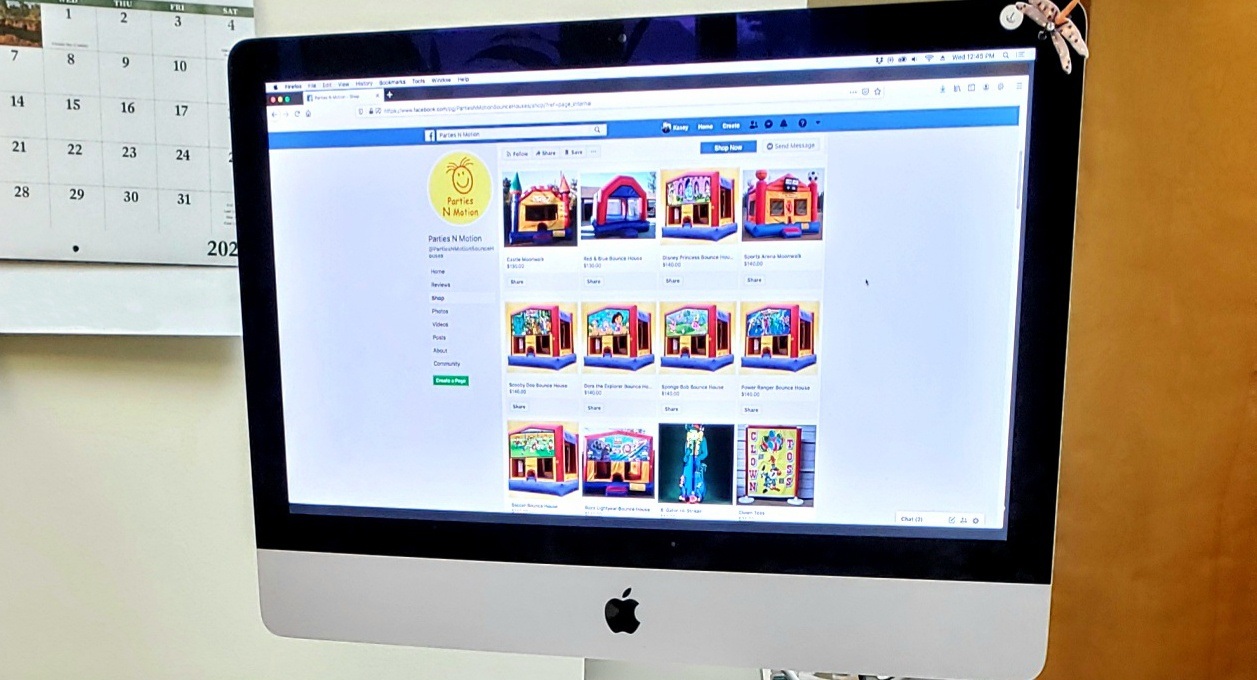
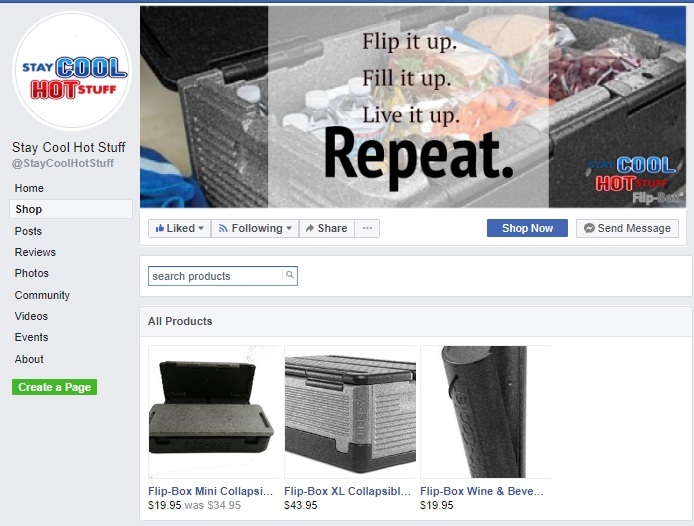
  • Learn about Facebook and Instagram Shops

    Learn about Facebook and Instagram Shops

    Online shopping has become bigger and more adaptable over the past few months. Now Facebook & Instagram are getting in on the action by providing a simple and free feature to help sell your products. Let’s dive into how this shop feature works and why it’s a great step forward to provide your customers with the convenience of shopping where they are.

    Let’s look at shops on Facebook and Instagram.

    The feature provides you the functionality to sell on both platforms from one easy to manage location. Along with managing your shop in one place, it provides you with the ability to customize your shop how you want so you can reach customers around the world. We’ll cover some parts of how the shop feature works for you in slightly more detail.

    If you want to create your own shop, you’ll first have to check out the commerce manager on Facebook. It should prompt you to fill out required information to start the set up. Commerce manager will also be the main place where you’ll manage your sales, data, and other options later on.


    Commerce manager also lets you create collections. This is an important feature to not only pull customers in, but also help them find the product they’re looking for. Collections allow you to set three main things. First is a title name, then a description of what’s found in the collection. Finally, the cover media which lets you provide photos of different products within that collection. Once you’re satisfied with the collection you made, it will be checked through commerce policies and will take about 24 hours to be reviewed.

    Once you create a collection, or even multiple collections, this is where you’re opened up to a wider availability of customization options. In commerce manager, you can edit the layout and the style of your shop and collections. You want to edit your shop to look attractive, but also match the type of business you’re presenting yourself as. The commerce manager is the main location for all of your shop options and customization needs.

    We recommend linking your Facebook shop and Instagram profile to provide a user-friendly experience for potential customers across both platforms. To target more individuals, linking your accounts allows them the opportunity to find your business if they reside on a specific platform or use one more heavily than the other.

    This is a quick and easy overview of what Facebook and Instagram shops are. For more information, contact us to assist in taking a deeper look into more in depth details and step by step guides to getting started and creating your shop. We’ll help you to learn more about their unique features.

    Share this article:

    [DISPLAY_ULTIMATE_SOCIAL_ICONS]


  • How to Respond to a Negative Review Online

    How to Respond to a Negative Review Online

    AARGH!!! A NEGATIVE REVIEW!

    You’ve discovered a negative review left about your business, oh no, what do you do? It’s best to act swiftly and accordingly to help the disgruntled customer and find out what went wrong. When responding, you should be very mindful when responding to a negative review. It is best to take a positive direction with your response because of the fact that visitors to the site can see the negative review. Along with your reply and remediation of the problem at hand. Situations we’ve experienced with clients have created a few do’s and don’ts to responding to negative reviews and how to overcome this unforeseen obstacle.

    First, we want to let you know what you shouldn’t do when responding to a negative review.

    • Ignore the Review – This allows the negative review to grow and create a bigger problem, even possibly pushing into your personal life on a social media platform.
    • Fight Fire with Fire – Never reply to a negative review with criticism about what they said. This could escalate the situation and push potential customers away who see your reply.
    • Disregard the Customer’s own Online Reputation – Some users get a rise out of purposely leaving negative reviews without valid reasoning. Check their background on the internet and see if they have a tendency to leave harsh reviews for others. In most cases, these “internet trolls” aren’t worth dealing with.

    Next, we want to let you know what we consider some of the best reactions to negative reviews.

    • Encourage Reviews – You want to efficiently gain more positive reviews to overlook the negative ones and to hopefully form a better impression of your business.
    • Interact with Users Positively and Professionally – Always respond with a positive reply that keeps your interest in the customer and focuses on the problem at hand.
    • Leave a Reply that Satisfies Other Potential Customers – Since other potential customers can see the negative review, make sure you provide a thoughtful response that engages how you’ll solve the issue and thank the reviewer for their time.
    • Respond to Spam – Some individuals may leave dozens of negative reviews on different sites for all sorts of businesses, whether the person had any interaction with them or not. If it seems you have been spammed, acknowledge that you don’t know them and indicate you will be contacting them to let them know they might have the wrong business.

    Customers are a major priority in business and you should always be aware and focused on the response they leave for your business. A good step is setting up a Google My Business Profile that allows customers to leave reviews. You can even provide them with a link that directs them to where they can leave a review. Remember, encourage all customers to leave a review and let them know how appreciative you are of any feedback! If you have any problems with negative reviews and are stuck trying to handle them, let us know and we have helped others in the same situation and certainly can help you!

    Share this article:

    [DISPLAY_ULTIMATE_SOCIAL_ICONS]


  • Marketing Through COVID-19

    Marketing Through COVID-19

    It is without a doubt different times. The changes that are happening during the coronavirus pandemic will stay with us and affect our business for more than several months. Keeping your business afloat and profitable during these times may not seem possible some days. But it is!

    During this time, our staff has taken some extra time to continue training and learning on how we are to approach the coming months for marketing. If you think marketing is going to be the same after all of this is over, think again. Businesses will be run differently. Consumers will react differently. With this, we need to evolve with our marketing and find new ways to get your name out there.

    In all of our training, one thing is consistent, don’t stop advertising! Many of our customers are finding more traction on their online advertising because of the fact that more people are at home and either finding projects they need to do around the house, just making purchases in their free time, or dreaming and planning of things they want to do in the future.

    Too Many Calls…
    One of our customers is a landscaper, he markets his business on home advisor. He started noticing such an increase in good leads that he had to pause his account because he couldn’t keep up with the response.

    Keeping Your Name Out There…
    Another one of our customers does permanent make-up and skin care, even though she can’t continue working, when we asked if she wanted to pause her Google Ads, she was persistent in saying absolutely not! She understands the importance of keeping her name out there.

    While you may be thinking, my business is closed, I am not making any sales, I can’t really be spending money on marketing. Get creative in finding ways to bring money in now!

    Launch The Ability To Purchase Gift Cards…
    One of our customers is a local orchard, they recently launched the ability to purchase gift cards online. With these gift cards they are offering discounts after you spend a certain amount. By doing this, they are bringing money into their business now so they can keep their business running, and this guarantees they will have customers coming when they open their summer events.

    Even if you can’t afford to spend extra money, take this extra time to do some marketing yourself. One way is to keep yourself on social media:

    • Do a post telling your customers you miss them.
    • Share something that happened in your daily life.
    • Keep your customers updated with changes you are making due to new regulations.
    • Share thank you posts for our frontline workers.
    • Do checking in posts to see how your customers are doing.

    In the end, while marketing will be changing as we start the enter re-opening, one thing holds true don’t let your customers (and potential customers) forget your name!

    If you find you need assistance with your marketing, contact us today.

    Share this article:

    [DISPLAY_ULTIMATE_SOCIAL_ICONS]


  • Automate Your Engagement Funnel

    Automate Your Engagement Funnel

    Needless to say, to create an engagement funnel requires a strategic plan to determine the funnels and what will be offered to further engage with them and eventually do business with you. A good email marketing system is necessary to make this all work.

    Ask yourself these questions:

    What is the goal of my email and how do I want them to engage? Think of three different needs your clients have to use your product or service. Within the email provide them the ability to choose which one makes sense for them.

    Next, make certain when they have engaged with you, you are able to deliver something that provides added value. Allow me to expound on that thought. We work with a franchise company whose vertical is coffee shops. For them when a person discovers them online, they want them to learn about their business model and to become a business owner of their franchise. We have the goal, now let’s look at what they might want to know more about.

    Let’s take you down one of the three funnels.

    My favorite one is How much does it cost

    For this page they could go into detail on what the various investments and expenses are involved with owning a coffee business. Their added value item from this could be a worksheet for them to use to calculate their own expenses.

    What could follow as subsequent emails
    to this subject to engage with them going forward might be:

                            • Ideal credit score and how to improve theirs.
                            • Where to find funding for their Coffee Business
                            • How to get started

    What if they lose interest in this subject?

    Take them down another path by offering them another three choices and an added value item. Make sure that one of the three choices is still within the wheelhouse of what was their initial choice.

    Do this until one of three things happens:

                            1. They decide to get started and contact you
                            2. They refuse to engage
                            3. They opt-out of your engagement funnel.

    Do not overwhelm them with too many emails. These two steps could deliver an email each day for 2 to 3 weeks. If they aren’t engaging and they didn’t opt-out. Engage with them once a month after the initial engagement funnel campaigns. Keep yourself top-of-mind.

    We hope you have found this article to be helpful in creating your own engagement funnel. If you want to learn more about email marketing, we can help you with that!

    Share this article:

    [DISPLAY_ULTIMATE_SOCIAL_ICONS]

  • The Power of Words Through Blog Writing

    The Power of Words Through Blog Writing

    Hello and thank you for joining us to learn more about how to blog effectively to help your business be found in Google searches.

    Let’s first review the article which led you here.

    First, did you watch the YouTube video we mentioned in the article?

    Power of Words by Purple Feather Media. If you didn’t, please do.

    www.youtube.com/watch?v=Hzgzim5m7oU .

    Next, did you purchase the book “They Ask You Answer” by Marcus Sheridan? Please do that as well. I was fortunate to be able to attend his two-day class. I make no royalties in recommending either one of these to you. Just the satisfaction of knowing you will learn some very important facts about inbound marketing.

    So how do you go about discovering what questions to write about?

    Ask Google.

    Some of you might be saying, I have no idea what questions people are asking.

    So here are the steps:

    1. Write down a list of your products or services you offer. Let’s use our business for example.
      1. Website Design
      2. Blog Management
      3. Social Media Marketing
      4. Digital Marketing
      5. Email Marketing
      6. Direct Mail
      7. Logo Design
    2. Do a search on Google with just these three words and the service or product you have.
      1. how
      2. what
      3. should

    See the results of these three searches. Google provides actual searches people have done using these three words.

    What you see in the first search of “What Logo Design” is the following:

    First is a paid ad for logojoy.com. They are serious about being found for searches like this and are willing to pony up some money for the search.

    Me…

    I’d rather write a blog and attract people to my website.

    power of words, ask google, blogging


    So, what is in this search that will provide you with the titles for your blogs?


    Below LogoBee you see a section in the search entitled:


    People also ask. That’s where the gold is. You will find your titles there. But what if there isn’t anything that makes sense to write a blog about for your business? Let’s move onto the next series of screenshots.


    So what if there isn’t anything in these suggestions that will work for your business?

    If you click on the last suggestion’s down arrow and close the window, Google will provide more choices. Nothing there that you like? Continue to click on the down arrow and close the window and Google will continue to provide even more suggestions.

    See what I mean with these three screenshots.

    Interested in learning about our blog writing service? Contact us today.

    Share this article:

    [DISPLAY_ULTIMATE_SOCIAL_ICONS]