Interlace Communications

Category: Websites

  • Why Your Blog Isn’t Getting Found (and How to Fix It Without Writing More)

    Why Your Blog Isn’t Getting Found (and How to Fix It Without Writing More)

    Have you been posting blogs… but your phone still isn’t ringing from your website?

    You update pages.
    You share posts on Facebook.
    You know people are searching for what you do.

    Yet a competitor you barely recognize keeps appearing first. You’re not failing at blogging. You’re dealing with a visibility issue — and it’s affecting a surprising number of established, reputable businesses.

    For years the advice was simple: “Keep publishing content and Google will reward you.”

    That advice quietly expired because search engines changed what they reward.

    Why your blog isn’t getting found:

    Business blogs don’t rank when they act like company updates instead of customer answers. Modern Google and AI search prioritize structured explanations, question-based headings, and topic authority. Visibility now depends on clarity and organization — not posting frequency.


    What’s Actually Happening

    Here is the pattern Interlace sees every month: A company builds a website. They occasionally post blogs like:

    • project photos
    • announcements
    • seasonal reminders
    • company news

    The website looks active, but to a search engine the business has never clearly demonstrated expertise.

    Google still answers your customers’ questions. Just not using you.

    You keep referrals.
    You stay busy.

    But the people searching today — the ones who don’t already know you — never find you. And that produces a very specific problem:

    Your reputation exists offline.
    Your discoverability does not exist online.


    Why Search Changed

    Search engines now evaluate credibility using E-E-A-T: experience, expertise, authority, and trust. In plain terms, Google is asking “Would this business teach a confused customer clearly?”

    At Interlace, we explain it this way: Blogging is no longer a promotion. It is an explanation.

    The businesses that explain problems best get introduced to customers first. That is also how AI Overviews choose who to reference.

    For example:

    A roofer publishing a blog like, “How long does a roof replacement take in Berks County?” will consistently outrank one posting, “We completed another roof this week.”

    Same work. Different visibility.


    Why Writing More Won’t Fix It

    What Businesses Do What Search Needs
    Frequent posts Clear answers
    Service descriptions Customer questions
    Isolated articles Connected expertise
    Activity Guidance

    One well-organized article answering real questions will outperform months of scattered updates.


    The Quiet Cost

    Here’s the part most owners don’t notice: Nothing breaks.

    Your business continues and you remain busy, but your growth ceiling lowers.

    Someone else becomes the online expert in your field — not because they’re better at the service, but because search engines understand them better. Visibility compounds. So does invisibility.


    How Smart Businesses Are Using Blogs Now

    Businesses gaining traction treat blogs as a knowledge library, not a news feed.

    They:

    • answer common customer questions,
    • connect related topics,
    • improve older articles,
    • and reuse content across email, social, and training.

    That is exactly what the recent Interlace workshop “Blogs That Bring You Business” taught.

    And it leads directly to the next step.

    Once your knowledge is structured, AI tools can instantly turn it into presentations, proposals, and client education — which is the focus of the upcoming workshop:

    “Spent 3 Hours on a Presentation? There’s a Better Way.”

    The same structure that helps customers find you also gives you your time back.


    When Owners Recognize the Problem

    Many owners eventually say: “My website looks professional… but it doesn’t bring in new customers.”

    That’s not a design problem, it’s a visibility system problem.

    Interlace doesn’t just create posts. They build a framework where your expertise continues working even while you’re running the business. You can learn to implement it through the workshops, or you can have it handled.

    Both options exist because business owners usually reach the same conclusion:

    Understanding the strategy and having time to execute it are two very different things.


    FAQ

    Do I need to blog weekly?
    No. Organized authority matters more than frequency.

    Will AI replace websites?
    No. AI pulls answers from well-structured websites.

    How long before results?
    Typically 2–4 months once content answers real customer questions consistently.

    Can social media replace blogs?
    No. Social media spreads awareness. Blogs create discoverability.


    The Next Step

    If strangers aren’t contacting you through your website, effort probably isn’t the issue. Search engines simply don’t yet recognize your expertise. Once they do, they begin introducing your business to customers you’ve never met — automatically.

    And that’s when a website stops being a brochure…

    …and starts quietly becoming your most consistent source of new opportunities.

  • Are Your Blogs Quietly Determining Whether AI Recommends Your Business in 2026?

    Are Your Blogs Quietly Determining Whether AI Recommends Your Business in 2026?

    Many business owners believe their website exists to describe what they do.

    Services page.
    About page.
    Maybe a few photos.

    And somewhere on the site — a blog.

    The blog often feels optional. Something useful for SEO, something nice to have when time allows, but not essential to day-to-day operations.

    That assumption used to be harmless. In 2026, it isn’t.

    Today, potential customers often don’t start by visiting websites at all. They start by asking a question into Google, Siri, or an AI search tool:

    • “Who fixes foundation cracks near me?”
    • “What does a business liability policy actually cover?”
    • “Do I need a medical billing service for a new practice?”

    Instead of showing ten blue links, modern search systems increasingly provide direct answers — and within those answers, they choose which businesses to reference, recommend, or lead a user toward contacting.

    Those recommendations do not come from advertisements. They come from content.

    In 2026, blogs are no longer simply marketing content. They act as discovery signals that help search engines and AI systems understand what a business actually knows and when it should be recommended. Clear, structured blog articles allow search systems to connect specific customer problems with the businesses best suited to solve them.

    Why This Change Matters More Than It Appears

    Search behavior has shifted from keywords to questions. Years ago, a homeowner might search “roof repair cost.” Now they ask: “Why is water dripping from my ceiling after snow melts?”

    AI-assisted search tools look for content that directly explains real situations. They are not trying to rank websites. They are trying to choose trustworthy explanations.

    This is where many businesses unknowingly create a problem for themselves.

    A typical service page says what you do. A blog article shows what you understand.

    AI systems can interpret explanations far more easily than promotional descriptions. If your website only lists services, search engines know you exist. If your website consistently explains real customer problems, search engines understand when you should be discovered.

    That difference directly affects who gets recommended.

    What do Blogs Signal to Search Systems?

    When a business publishes useful articles, it creates recognizable patterns:

    • The types of problems it solves
    • The situations customers encounter
    • The level of expertise demonstrated
    • The clarity of communication

    AI systems do not “decide” who is credible. They evaluate who consistently explains things well. A business that regularly answers real questions becomes easier for search systems to match with real searches. A business that rarely publishes helpful content becomes harder to interpret.

    Visibility is no longer driven only by rankings. It is influenced by understanding.

    As Alyse Mitten, President of Interlace Communications explains:

    “Blogging is no longer about filling space on a website. It helps search engines and AI systems recognize what you actually do and when your business should be recommended.”

    Passive Websites vs. Interpretable Websites

    Passive Website Interpretable Website
    Describes services Explains customer situations
    Static pages Ongoing education
    Limited discovery Expanded search visibility
    Harder for AI to reference Easier for AI to recommend

    Search engines evaluate relevance, AI evaluates clarity, and customers evaluate trust. Blog content is one of the few assets that influences all three simultaneously.

    Common Blogging Habits That Limit Results

    Many businesses post blogs consistently and still see little impact. The issue is rarely because of effort — it is the approach.

    Typical patterns include:

    • Writing posts without a specific customer question in mind
    • Repeating general industry advice found everywhere online
    • Focusing on word count instead of usefulness
    • Publishing content once and never using it again

    Blogging works best when each article performs a clear function: answering a real question a real customer would ask before contacting you.

    FAQs

    Do Smaller Businesses Benefit?

    Yes — often more than large companies.

    Large organizations rely heavily on advertising. Smaller businesses rely on being discovered at the moment a person needs help. Clear content gives search engines and AI systems confidence connecting those moments to your business.

    How Often Should You Publish?

    Consistency matters more than frequency. A predictable schedule signals reliability to search systems. Sporadic bursts followed by long silence provide little interpretive value.

    Turning a Blog into a Business Asset

    Once businesses understand this shift, the next challenge becomes practical:

    • What should you write about?
    • How long should articles be?
    • How do you choose topics customers actually search?
    • How do you structure an article so search engines and AI can interpret it correctly?

    To address those questions, Interlace Communications is hosting a workshop:

    Blogs That Bring You Business
    February 18, 2026, 4:00 PM EST
    Register Online

    Cost: $27 (MAP clients attend free)

    The session focuses on topic selection, article structure, and how modern search systems interpret business content.

    Because today a blog is often the mechanism that determines whether your business is discovered — or your competitor’s is.

  • How Can You Optimize Your Blogs for Both SEO and AEO?

    How Can You Optimize Your Blogs for Both SEO and AEO?

    Whether you’re running a B2B or B2C company, are you wondering how to effectively optimize your content for both Search Engine Optimization (SEO) and the new Answer Engine Optimization (AEO)? The key lies in creating high-quality, targeted content that not only ranks well in search engines but also provides direct answers to user queries, particularly as AI-powered platforms become increasingly prevalent in our digital landscape.

    To optimize blogs for SEO and AEO, create high-quality, targeted content that answers user queries directly. Focus on keyword research, use structured headings, and aim for featured snippets. Additionally, prioritize conversational language for voice search, use schema markup, and update content regularly for relevance. By balancing SEO’s comprehensive approach with AEO’s focus on direct answers, your content can rank higher in search engines and AI-driven platforms alike.

    Understanding AEO: The Next Frontier in Digital Marketing

    Answer Engine Optimization (AEO) is about creating content that directly answers user queries, optimized for AI-powered platforms and voice assistants. It’s an evolution of SEO that focuses on providing immediate, concise answers to user questions.

    Now, let’s look into how you can create content that satisfies both SEO and AEO requirements for your business.

    First things first: What’s AEO?

    AEO stands for Answer Engine Optimization. It’s all about optimizing your content to provide direct answers to user queries, especially for AI-powered platforms and voice assistants. Think of it as SEO’s cooler, more direct little sibling.

    When I first heard about AEO in a recent podcast, my ears perked up. I’ve been curious with how to be found on AI platforms like Chat, Gemini, Claude, and Perplexity. I’m not treating this like another buzzword. No sir, this is going to be a game-changer in how we approach content creation. In fact, our latest blogs have all been created using the strategies provided for dual optimization.

    Now, you might be wondering, “Do I really need to worry about both SEO and AEO?” The short answer is: absolutely!

    Here’s why:

    SEO ensures your content ranks well in traditional search results, driving organic traffic to your site. AEO, on the other hand, helps your content appear in featured snippets, voice search results, and AI-generated answers. You do this right, and your blogs and website content is going to be a powerhouse duo that can skyrocket your online visibility.

    So, how do we create content that satisfies both SEO and AEO? Let’s break it down:

    1) First and foremost, Know Your Audience Avatar. 

    Do you know what makes your client/customer click? What are their pains and frustrations? What do they worry about that keeps them awake at night?
    What are their goals and desires? What are their dreams and aspirations?

    Don’t know these answers? Find out by running one of my favorite prompts to identify your avatar. 

    2) Start with Killer Keyword Research

    This is the foundation of both SEO and AEO. But don’t just focus on short, generic keywords. Look for long-tail keywords and, more importantly, questions your audience is asking. I always say, ‘Don’t guess what your audience wants to know – find out!’ Tools like AnswerThePublic are goldmines for question-based keywords. Just an FYI, a long-tail keyword is a phrase of 3 to 5 words specific to your business.

    3) Structure Your Content Smartly

    For SEO, use clear headings (H1, H2, H3) to organize your content. For AEO, structure your content to directly answer specific questions. A great trick is to use a question as your H2 and provide a concise answer immediately after. Be careful to never use more than one H1 on a page. More than one will adversely affect your ranking on Google.

    4) Optimize for Featured Snippets

    Featured snippets are the holy grail of AEO. To increase your chances of landing one:

    • Use clear, concise language
    • Provide direct answers to questions
    • Use bullet points or numbered lists where appropriate
    • Include relevant data and statistics

    5) Create In-Depth, Authoritative Content

    While AEO focuses on direct answers, don’t forget the depth that SEO requires. Expand on your topics to demonstrate expertise and authority. Remember my lunch and learn about E.E.A.T.? Remember, you’re not just answering a question—you’re becoming the go-to resource in your niche.

    6) Implement Schema Markup

    Schema markup is like a secret handshake with search engines. It helps them understand your content better, which is crucial for both SEO and AEO. See how the tools we use for SEO complement AEO, too.

    7) Focus on User Intent

    Understanding why people are searching for specific topics is key. Are they looking for information? Trying to make a purchase? Tailor your content to address these needs directly. It’s important to pay attention and ask questions. Be curious about your client’s needs.

    8) Optimize for Voice Search

    With the rise of voice assistants, optimizing for voice search is crucial for AEO. Use natural, conversational language and focus on answering questions clearly and concisely.

    9) Keep It Fresh

    Regularly update your content to ensure it remains relevant and accurate. This is important for both SEO rankings and AEO accuracy.

    10) Don’t Forget Technical SEO

    While we’re focusing on content, don’t neglect technical SEO aspects like page speed, mobile-friendliness, and secure connections (HTTPS). These factors affect both SEO rankings and AEO performance.

    11) Create Multi-Format Content

    Don’t limit yourself to text. Incorporate images, videos, and infographics. This not only enhances the user experience but also increases your chances of appearing in various search features.

    By implementing these strategies, you’ll create content that’s optimized for both traditional search engines and emerging answer engines. It’s a win-win!

    Remember, the key is to strike a balance. You want to provide quick, direct answers for AEO while still offering comprehensive, valuable content for SEO. It might seem tricky at first, but with practice, it’ll become second nature.

    “The future of content creation isn’t about choosing between SEO and AEO – it’s about mastering both.”

    To help you get started, here’s a handy checklist for creating SEO and AEO-friendly content:

    • Run the prompt to identify your ideal avatar
    • Conduct thorough keyword research, including question-based queries
    • Structure your content with clear headings and subheadings
    • Include a concise answer to the main question early in your content
    • Optimize for featured snippets with clear, direct answers
    • Expand on topics to provide in-depth, authoritative information
    • Implement relevant schema markup
    • Use natural, conversational language
    • Incorporate long-tail keywords throughout your content
    • Create multi-format content (text, images, videos, infographics)
    • Optimize for voice search with conversational phrases
    • Ensure your content is mobile-friendly and loads quickly
    • Include relevant internal and external links
    • Regularly review and update your content for accuracy and relevance

    There you have it – your guide to creating content that shines in both SEO and AEO. Remember, it’s not about perfection, it’s about progress. Start implementing these strategies today, and you’ll be amazed at the results.

    Wondering what other questions you could ask about AEO or SEO?

    Try one of these:

    What are the best practices for creating SEO-friendly content?
    How can I ensure my blog posts rank higher in search engine results?
    What tools can help me optimize my blog for AEO?
    How do I measure the success of my SEO and AEO efforts?
    What are some examples of successful SEO and AEO strategies?

    Happy optimizing, folks!


    Follow Us:

    Listen to the conversation between two bots about the topic. They have some very interesting comments.

    Source: NotebookLM

  • How Can You Get Your Name Out There Through Online Advertising?

    How Can You Get Your Name Out There Through Online Advertising?

    Updated: October 2024

    Getting your name out there through online advertising is crucial for brand recognition and business growth. By leveraging the right platforms, strategies, and targeting, businesses can effectively reach their ideal audience and make a lasting impression. Whether you’re just starting out or scaling up, the right combination of online ad strategies can propel your brand visibility forward.

    Online advertising is one of the most effective ways to boost brand visibility. By targeting specific audiences with tailored ads on platforms like Facebook, Google, and Instagram, businesses can reach more people and build a recognizable brand. Key strategies include understanding your audience, leveraging social media ads, maximizing Google Ads, and using retargeting techniques.

    In this blog, we’ll look into the best methods for getting your name out there using various online advertising tools and strategies.

    Outline: What You’ll Learn in This Blog

    1. Introduction
      • Overview of the importance of online advertising for brand visibility.
    2. How Can You Get Your Name Out There Through Online Advertising?
      • Answer to the main question.
    3. The Key Steps to Building Your Brand Online Through Advertising
    4. Additional Questions About Online Advertising
      • FAQs addressing common questions about budget, platforms, and success metrics.
    5. Final Thoughts: Building Your Brand Through Online Advertising
      • Summary of strategies and encouragement to start using online ads.

    The Key Steps to Building Your Brand Online Through Advertising

    1. Understand Your Audience

    To create successful online ads, you first need to understand who your target audience is. You can use tools like Facebook Insights, Google Analytics, and industry research to gather demographic and psychographic data on your audience. And if you like to use AI tools, here’s a prompt that can help you understand your audience.

    Why this matters:
    • Helps you create more tailored ad content.
    • Ensures your ads reach the right people, leading to higher engagement and conversions.

    2. Leverage Social Media Ads

    Platforms like Facebook, Instagram, and LinkedIn offer powerful advertising tools that allow you to target specific groups based on interests, behaviors, and demographics. By creating ads with clear calls to action (CTAs) and engaging visuals, you can boost brand visibility on platforms where your audience is most active.

    Pro Tips:
    • Use video content to increase engagement.
    • A/B testing of different ad creatives and formats will help you determine the best format to double down on.

    4. Retargeting Ads

    Retargeting allows you to re-engage with people who have previously visited your website or interacted with your ads. This is a great way to keep your brand top of mind and encourage potential customers to return and take action.

    Retargeting benefits:
    • Increases conversion rates by targeting warm leads.
    • Keeps your brand in front of people who are already familiar with your offerings.

    Additional Questions About Online Advertising

    1. How much should I spend on online advertising to grow my brand?
      Your ad spend will depend on your goals, audience size, and the platforms you use. A good starting point is $300 per month, but you can scale based on your results. For businesses on a tighter budget, starting with as little as $100 per month can still yield positive outcomes.
    2. What platforms are best for online advertising?
      The best platform for your business depends on where your audience spends their time. Facebook and Instagram are excellent starting points for most businesses. LinkedIn is ideal for B2B, Facebook and Instagram for B2C, while TikTok can be effective for younger demographics.
    3. How can I track the success of my online ads?
      Platforms like Facebook Ads Manager and Google Analytics provide in-depth tracking and reporting tools. Key metrics to track include click-through rates (CTR), conversion rates, and return on ad spend (ROAS).
    4. How do I create ads that stand out?
      Focus on clear, compelling messaging, strong CTAs, and eye-catching visuals. Testing multiple creatives and formats is also key to understanding what resonates best with your audience.

    Final Thoughts: Building Your Brand Through Online Advertising

    Getting your name out there through online advertising requires a combination of the right platforms, smart targeting, and continuous optimization. By focusing on understanding your audience and using tools like Facebook Ads, you can efficiently grow your brand, even on a limited budget.

    With these strategies, businesses of all sizes can see significant returns, driving brand recognition and increasing customer engagement. Ready to take the next step? Start experimenting with your online ads today!

    Relevant questions to ask about this subject matter:

    • What are the most effective social media platforms for advertising my business?
    • How can I optimize my Google Business Profile for better visibility?
    • What are some affordable ways to advertise my business online?
    • How do I create a budget for online advertising?


    Share this article:

    [DISPLAY_ULTIMATE_SOCIAL_ICONS]


  • 20 Hooks for Small Business Saturday (Updated for Post Pandemic)

    20 Hooks for Small Business Saturday (Updated for Post Pandemic)

    Revitalizing Small Business Saturday: 20 Modern Hooks for a New Era

    (Blog Updates: We’ve reimagined our “20 Hooks for Small Business Saturday” to cater to the evolving consumer landscape. This updated guide infuses traditional tactics with digital innovation, emphasizing safety, convenience, and community. We hope you will find our modernized strategies that are a blend of the best of both worlds, ensuring your Small Business Saturday is a hit in the post-pandemic marketplace.)

    As we navigate the new normal, Small Business Saturday remains a beacon for local enterprises, symbolizing resilience and community spirit. With the landscape of retail forever changed, it’s crucial to adapt and innovate. Here are 20 refreshed strategies to make Small Business Saturday a triumph in the post-pandemic world.

    Digital Ideas

    1. Digital Thanksgiving Greetings: In the spirit of gratitude, craft heartfelt digital cards to thank your patrons. Embed a mystery discount code that piques interest and drives online traffic. This gesture not only shows appreciation but also integrates a sense of excitement and exclusivity, encouraging customers to engage with your brand online and discover their special offer, leading to increased anticipation and potential sales on Small Business Saturday.

    2. Virtual Scavenger Hunt: Engage customers with a virtual scavenger hunt that cleverly incorporates your product line into puzzles and riddles. Participants can navigate through your website, uncovering clues and learning about your offerings. This interactive journey culminates in discounts or special offers, rewarding their digital adventure and fostering a fun, memorable shopping experience that highlights your brand’s creativity and customer engagement.

    3. Collaborative Online Events: Capitalize on community strength by joining forces with neighboring businesses to host a virtual Small Business Saturday event. This collective effort can amplify your reach, share marketing resources, and create a comprehensive online shopping experience that celebrates the diversity and uniqueness of your local business community.

    4. Late-Night Virtual Sales: Replicate the thrill of midnight sales in the digital realm. Host a ‘Late Night Online Shopping Spree’ where discounts grow as the night progresses. This creates a sense of urgency and excitement, encouraging customers to stay engaged, share the event, and ultimately make more purchases as the deals get better throughout the evening.

    Print Ideas

    5. Direct Mail with a Digital Twist: Marry the charm of direct mail with the convenience of digital access. Send out postcards that carry a QR code, which when scanned, transport customers to a landing page with Small Business Saturday specials. This strategy not only drives online sales but also tracks the effectiveness of your direct mail campaign, offering valuable insights into customer engagement.

    6. Strategic Inserts: Utilize the broad reach of newspaper inserts to get your Small Business Saturday specials into thousands of homes. This method allows you to target specific localities and offers the tactile engagement of physical coupons, which many customers still appreciate and respond to.

    7. Remnant Space Deals: Keep an eye out for last-minute advertising space in local publications, often available at a significant discount. Be prepared with ad copy and a budget to snap up these deals, which can provide an unexpected but welcome boost to your Small Business Saturday marketing efforts.

    Social Media Ideas

    8. Facebook Live Shopping: Utilize the interactive platform of Facebook Live to bring the in-store experience to customers virtually. Showcase products, answer questions in real-time, and offer exclusive deals during the broadcast. This live interaction not only boosts engagement but also allows you to connect with customers on a personal level, enhancing their loyalty to your brand.

    9. Social Coupons: Transform traditional coupons into social media-friendly visuals. Encourage sharing by offering additional discounts for every share or like, turning your customers into brand ambassadors. This not only increases the reach of your promotions but also integrates a social proof element that can be more persuasive than traditional advertising.

    10. Themed Social Posts: Develop a series of themed social media posts that create a narrative leading up to Small Business Saturday. This could be a journey through your product lines, customer testimonials, or the story of your business’s role in the community. Scheduled posts ensure consistent engagement and build a story that culminates in your Small Business Saturday event.

    11. Interest-Specific Campaigns: Design email campaigns that cater to the specific interests of your customer segments. By addressing their unique preferences, you demonstrate an understanding of their needs, which can enhance customer satisfaction and loyalty. This targeted approach ensures that your messages resonate more deeply and can lead to higher engagement and sales.

    Website Ideas

    12. Website Countdown: Create anticipation with a dynamic countdown on your website that teases daily deals leading up to Small Business Saturday. This constant visual reminder keeps customers returning to your site, building momentum, and ensuring that when the big day arrives, your deals are at the forefront of their minds.

    13. Product Highlights: Showcase your flagship products with professional photos and engaging videos across your social platforms. Start conversations around these items and tease special offers available only on Small Business Saturday. This visual storytelling not only highlights your products but also creates shareable content that can extend your reach beyond your immediate followers.

    14. Exclusive Sign-Up Discounts: Encourage new customers to join your mailing list by offering a sign-up discount. This not only grows your email database but also gives customers an immediate reward. Tailor follow-up emails to introduce your brand’s story and values, leading to a deeper connection and increased likelihood of repeat business.

    Email Ideas

    15. Segmented Email Blasts: Craft targeted email campaigns for different segments of your audience based on their interests and past purchases. Personalized emails feel more relevant and can significantly increase engagement rates. Use this approach to highlight products that each segment is likely to be interested in, thereby increasing the chances of conversion.

    16. Social Sharing Incentives: Incentivize customers to share your emails on social media by offering them a discount on their next purchase. This not only increases the reach of your campaign but also leverages the power of word-of-mouth marketing. As friends and family see these shared emails, your brand gains credibility and potential new customers.

    17. Concise Subject Lines: In a world where inboxes are cluttered, a concise and catchy subject line can make all the difference. Aim for brevity and wit to grab attention and entice opens. Remember, the subject line is the first impression—make it count to ensure your email content gets the viewership it deserves.

    Other Ideas

    18. Charitable Incentives: Combine commerce with charity by offering discounts to customers who donate to a local cause. This not only incentivizes purchases but also builds a positive brand image. Customers feel good about their purchases, knowing they’re contributing to a worthy cause, and your business stands out as a community-conscious brand.

    19. Pop-Up Yard Signs: Use the simplicity of yard signs to catch the eye of passersby. Strategically place them in high-traffic areas with bold, readable fonts and a clear call-to-action. This old-school tactic can effectively drive local traffic to your online and physical storefronts, creating a buzz in the community.

    20. Digital Billboards: Adopt the billboard’s visual impact in your digital marketing. Create graphics that mimic billboards for use in online ads and social posts. These should be bold, straightforward, and create a sense of curiosity, much like the iconic road signs that entice travelers with promises of upcoming attractions.

    Ready to Ignite Your Small Business Saturday Sales?

    Transforming these ideas into reality requires creativity, precision, and a touch of marketing magic – that’s where we come in. At Interlace Communications, we specialize in crafting marketing strategies that resonate with your brand’s voice and your customers’ desires. Don’t let another Small Business Saturday pass by as just another day on the calendar. Make it a day that boosts your sales, builds your customer base, and elevates your brand.

    Whether you’re looking to captivate with digital greetings, engage with a virtual scavenger hunt, or create buzz with social media savvy, we have the expertise to bring these ideas to life. Our team is ready to help you personalize these strategies, ensuring they align perfectly with your business goals and customer expectations.

    Take the first step towards a record-breaking Small Business Saturday. Fill out the form below to get in touch with us. Let’s collaborate to make this Small Business Saturday not just successful, but spectacularly so. Your business deserves it, and so do your customers.

    Share this article:

    [DISPLAY_ULTIMATE_SOCIAL_ICONS]


    Connect with Us – Let’s Make Magic Happen

    [gravityform id=”20″ title=”true”]

    Need more resources to help you prepare for Small Business Saturday? Visit these websites, too.


  • Business Owners: Be Aware of the Domain Listings Scams

    Business Owners: Be Aware of the Domain Listings Scams

    Before you pay to “renew” your domain, make sure you know where your money is going.

    Online business owners have been experiencing a slew of domain listings scams that appear to be legitimate invoices, yet are ploys to get you to spend money on a domain name that does not belong to the company that sent the email. When business owners receive this email, they immediately see the sender as “Domain Listings” or another domain-related title and think that this company must be paid in order to renew their domain name, when in fact this company is not a service at all. They may even trick you into believing that they are the company that keeps your name on Google.

    Here’s how to spot a domain-related scam so that you don’t end up spending on an unnecessary expense:

    Know the real cost

    Before you send any money, you should be aware of the price you have usually paid for your domain name. While there is not a set amount for every website, it is generally around the same price each time. A scam will usually require an amount that is hundreds of dollars more than what you’ve typically paid.

    It’s all in the details

    Pay strict attention to the wording of the invoice you’ve received. Does it use vague language? Does it include hidden words and phrases such as “solicitation” or “this is not a bill?” Or how about any spelling mistakes? If you’ve answered yes to any (or all) of these questions, then this invoice isn’t real and should be sent to the trash can.

    Use your resources, look up the company

    If you’ve examined the cost and word choices and they still seem legitimate, double check the company online. Type in a quick Google search to find out who this company is and why they might be sending you this invoice. If the reviews are negative or customers describe their experience as fraudulent, then you should have your answer.

    It is important to note that there is not one universal name for this scam. These domain listing websites can have all types of variations in their titles, but their goals are the same: to scam you out of your money.

    In summary, make sure you look over any email invoices before you open your wallet.

    Share this article:

    [DISPLAY_ULTIMATE_SOCIAL_ICONS]


  • Why Content is Important for Your Website

    Why Content is Important for Your Website

    We have mentioned it in many other past blogs about the importance of content on your website. In this blog we want to focus on reasons why it is very important.

    Search Engines Can’t Guess

    We often tell our customers, in order to be found for a specific keyword you need to make sure that keyword is on your website. Search engines don’t know what you do without it actually being on your website. They are computers and with that they can’t read minds. Having the right content on your website will ensure your website is found in the searches that you want to be found in.

    Don’t Think Less Content is More

    Search engines will not even pick up a page on your website if it has less than 300 words. There are millions upon millions of web pages for search engines to go through. Because of this, they have to have a few requirements in order to weed a few of them out. Cornerstone pages, which are the most important pages on your website need to have at least 800 words on those pages. While you may be concerned that no one is going to want to read all of that content, we have several ways to make a content-heavy page, not appear so extensive. Contact us today if you would like to discuss how this is achieved.

    Fresh, New Content is Important

    As we had mentioned above there are a multitude of websites on the internet. While search engines love websites that have history, they also want to know that the websites are still active. Adding fresh, new content to your website on a regular basis will help show search engines you are still in business and your website is still active.

    Content Relevant to Your Business

    Something very important to remember is that you want text on your website to be relevant to your business. You just don’t want to throw on random content to get the amount of text you need on a page. Make sure that whatever content you add to your website includes keywords about your business and is relevant to your business.

    In the end, content is very important and key to helping your site to be found. Stumped on what keywords you should use on your site or simply need help? Contact us today. We are here to help!

    Share this article:

    [DISPLAY_ULTIMATE_SOCIAL_ICONS]


  • Why is SEO so important?

    Why is SEO so important?

    Don’t know what SEO is? Let’s help you understand about this very, very important acronym. It stands for search engine optimization and it is one of the most important parts of marketing your business online and driving traffic to your website. SEO also includes strategies, tactics and techniques you need to do when creating content for your website. Follow along and we’ll identify what it is, and we’ll explain why it’s important for you and your business.

    The main goal of SEO is to help rank your website on search engines.

    If your rankings on search engines are good, then that means more users may find your website. When you look up a topic on Google, SEO is playing a major part in what you see. Most of us don’t want to spend much time looking for information online. This means improving your SEO to be closer to the top of a search engine page, or getting on the first page, can benefit your website greatly. SEO may sound confusing and hard to understand, but when it comes down to it, you can improve it easily if you continue to push and create quality content that provides value to users.

    How does SEO affect your rank?

    When dealing with SEO, there are two categories that will play a part in your website ranking, they’re defined as on-page and off-page. We want to give a general sense of the difference between each category.

    On-Page

    On-page SEO is related to your actual website and you can improve this by your own means. This includes the quality of the content you’re publishing, using specific keywords, and improving the speed of your web pages.

    Off-Page

    Off-page SEO is different from on-page because you can’t directly affect it yourself. It also deals with backlinks that direct users to one of your web pages from another. If more people consider your content valuable and helpful, they may share it with others. This means the more links to your page, the higher your pages may rank in search engines. The best way to improve it is by creating quality content for your audience and having other figures, such as bloggers, creators, and influencers, link to a page of yours for more to see.

    You can use other methods to try and get more attention on your website, but most of the users finding your website should be coming from search engines. If you want to improve your SEO, contact us and we can help you make the necessary changes to your website.

    Share this article:

    [DISPLAY_ULTIMATE_SOCIAL_ICONS]


  • Coming Up With Blog Topics

    Coming Up With Blog Topics

    Trying to decide what you should write your blog about can be difficult sometimes. Finding the right topic that will entice people to read your blog can take some thought, but you also need to view your blog as a way to get more fresh content and keywords on your website. Let’s discuss a few ways on how to come up with a blog topic.

    Keywords

    Like we had mentioned above, blogs are a great way to get keywords onto your website. When working with us to market your business, we help to create a list of keywords for your website. Making sure you have a blog that is focused on these keywords can help increase your search engine optimization (SEO) and how your website is found in searches. Through research, we identify those keywords which need support. Then we create topics for those keywords to write an article which is called a blog. It is important to note, that you need to your keyword mentioned a few times within the blog but don’t use it to heavily. Google will see it as what is called keyword stuffing.

    Time of Year

    The time of year can help you determine what type of blog to write. For example we work with a cleaning company. Their blogs will sometimes be focused around the season and holidays that are coming up. Another blog we work with is an insurance firm, again depending on the season will depend on what type of blogs to write. You don’t want to write a blog about grilling safety in the middle of winter!

    What is Happening in the World

    A few months ago when COVID-19 was a hot topic, we wrote many blogs for our customers about COVID-19. Be timely with your blogs. If something major occurs that you feel would be good to write a blog for your company with mentioning it, do it. Examples for COVID-19 include cleaning tips on how to deep clean, or for an insurance company what you need to do to protect your business as businesses start to open.

    In the end determining what type of blog topics you want to write can come from several factors. If you find you don’t have time to write a blog or your need help, contact us today. We work with many local businesses to ghost write their blogs. We can provide the same for you.

    Share this article:

    [DISPLAY_ULTIMATE_SOCIAL_ICONS]


  • Why you shouldn’t just take a photo from a Google search

    Why you shouldn’t just take a photo from a Google search

    You heard all throughout school about the penalties of plagiarizing your work. Well, the same rules apply for business owners, social media promoters, and content creators. Whether you’re trying to create a nice thumbnail, finding a photo for a blog, or more, you need to identify if you have permission to use the image. We want to cover why using a picture without permission isn’t a risk worth taking.

    The first thing you need to know is: using a picture without permission could leave you with hefty fines or worse. As great as the internet is, it reveals opportunities to steal work. It’s often difficult to tell if a site has permission to use pics/art. Other than a nice request for you to take the image down, there are other consequences that could result in much worse than embarrassment.

    Some of these include, but are not limited to, a lawsuit, SEO rankings being negatively affected, ruining of your brand and reputation, and more! Depending on the situation, some photographers won’t be as hard as others, but that doesn’t create any excuse for you to steal their work. Fines can range from small fees to thousands of dollars, along with possible time in jail. Do you really think it’s worth the risk of finding yourself in a troublesome situation when stock photos can be purchased for a few dollars or even free?

    What are stock photos?

    What are stock photos? Stock photos are images available for use from certain distributor websites. All you have to do is pay a fee for the photos. What sounds better to you, paying a very small price for photos, or dealing with the penalties we stated above?

    We want to recommend a few stock photo websites for you to use.

    Two stock photo websites we personally have experience with include Pixabay.com and Depositphotos.com. We’ve used these for plenty of projects. They both have a wide variety of images you can choose from. Pixabay.com offers free stock photos, so you are free to use them without paying for them, but if you’re looking for a specific photo, you may not find it on Pixabay. Depositphoto.com does charge a fee, and offers more professional photos to purchase. It’s best for you to check these websites and see what they have to offer. Some other popular stock photo websites include Shutterstock, Getty Images, and there are more you can find online with an easy Google search.

    Unless you took the photo yourself or you paid for it, we recommend avoiding using any photo without permission.

    Share this article:

    [DISPLAY_ULTIMATE_SOCIAL_ICONS]


  • Importance of Using Videos

    Importance of Using Videos

    Having a variety of content on your website is a great way to increase traffic and keep users on your site. Using the same style of content time after time — again — gets boring. Although other forms of content may take time to create, they provide more benefits to your business. One form of content we recommend using on your website is videos. If you’re worried about time spent trying to create them, just know that the benefits they bring to your site can outweigh the time needed to create them.

    Over the years, we’ve started to consume information in a faster and easier way than simply reading text. That’s easily proven by YouTube being the second largest search engine on the internet, even though it’s the largest online video network. More people find it convenient to consume information through videos. That’s why creating videos may drive more traffic to your website and help users remember you!

    The Pros of Videos

    If someone has the option between a video and written post, they’re more likely to open the video. For many people, it takes more effort to read a post when they could watch a quick video about the topic. Additionally, a visual component can help with retention. That means if you include videos on your website regularly, you may drive people to keep coming back which will ultimately have a benefit on your SEO. Another great part of videos is that it gives you the opportunity to edit and fine-tune with the video to increase the quality.

    With a better quality of production, videos have the ability to spark more thoughts and even emotions to the viewer. Same as television shows and movies, videos have the power to change how we feel whether it be for better or worse. Videos are a powerful tool and if you don’t have any on your website, what are you waiting for? You could even branch out and create a channel on YouTube so you can post your videos there, too!

    Videos of All Types

    Videos will give you the ability to bring to life dozens of different business opps. Besides introductions, you can create tutorials, tell stories, show off ways to use a product, and how your service works. There are plenty of ways in which you can use videos to show users information or express a certain message you want to get across. With this article is a video showing a variety of website styles we create. This is a great tool for us to use to help provide a visual for interested clients.

    If you’ve never tried your hand in creating a video, we have a team who can help you from production, editing, and distribution of your videos! Contact us today and let’s get started!

    Share this article:

    [DISPLAY_ULTIMATE_SOCIAL_ICONS]


  • Adding Content to Your Website

    Adding Content to Your Website

    Content is a very important part of your website and you need to ensure it’s one of your top priorities. That being said, it may be difficult to write a blog if you’re unsure of what to include. Let’s help you identify the types of content that should be found on your website and what to include.

    Blogs

    One of the most common types of content is blogs. Blogs provide a great way to improve search engine optimization while also providing solutions or information to readers. Many websites dedicate an entire section of their site for the blogs they create overtime. This lets users check out older blogs which still provide valuable content worth the read. Remember though, for blogs to help with SEO, you need to increase keywords located in them, link to other websites, and have a minimum of 300 words for them to be found. We highly recommend having monthly blogs to focus on different topics that you consider important for users to know.

    Video Content

    If you want something more creative, there are plenty of other forms of content for you to create. This includes memes, videos, animations, and slide shows. You can use these forms of content to not only present a product or service and how it works, but to also tell a story, address changes to the website, tutorials, and more! They may take longer to create depending on the topic, but many users will enjoy a nice and clean visual.

    FAQ Pages

    When talking about tutorials, sometimes customers may have questions about a product or service and with that comes an FAQ Page. FAQ pages are great especially if you find you are having the same questions being asked often. Condense these questions into one page on your website and include your answer with each question.

    Reviews

    While you don’t necessarily need to have a full page dedicated to reviews. (They can be featured on the homepage or even your sidebar.) Reviews are still a great way to get extra content on your website not only for SEO but also for potential customers to read reviews from your customers and their experience with your product and service or just working with you.

    When trying to discover what you can add to your website, there is much more than the basic pages that define what your product or service is. One last note, an about page is insightful for users to read into how your business was created and what goals you have! If you need more help to add content to your website, give us a call. We have a team who can help you with ideas! Check out our website for more information and contact us when you feel the need.

    Share this article:

    [DISPLAY_ULTIMATE_SOCIAL_ICONS]


  • Last Minute Holiday Tips

    Last Minute Holiday Tips

    Among the dozens of different businesses trying to make the most out of the holiday, you want to create ways to market your business and create top-of-mind awareness about your business. You’re not the only person trying to take advantage of the holiday season, To help you plan your marketing for the holidays we put together a booklet of helpful last-minute holiday tips.

    For those last-minute shoppers

    Create a plan on what type of sales you plan to offer for last minute shoppers and how you’re going to attract more customers into your establishment!

    Below are a variety of ideas:

    • Choose a cause for your business to support for the holidays and include a donation button on your website for the charity
    • Create interesting specials that intrigue the shoppers
    • Create a 12 days of special deals event
    • Put together a mystery box, shoppers will gravitate towards the offerings

    Remember to push, push, and push! The more you market your business holiday activities, the more likely people will see them. In our Last-Minute Holiday Tips Booklet, we provide you with templates to use for these ideas and more! All you have to do is print them out and fill them out!

    On one last note, make sure you involve your team and get their feedback. Multiple heads are better than one, your team can even think of more ideas that we may not have thought of! If some of your strategies work, mark them down as successful and use them next time. Experimenting with different ideas helps show you what works with customers and what you should stay away from.

    The holiday season is busy enough as it is, with all the shopping, cooking, cleaning, and other priorities we have, but we only have 24 hours in a day! Fill out the form we have provided to receive our Last-Minute Holiday Tips booklet to help ease some of that holiday crunching. If you need more help, you can give us a call. We’re here to help you.

    The more you get into the holiday spirit and spread your name around, the more chance you’ll see new faces at the store and more purchases online!

    Download Your Copy of our Last Minute Holiday Tips

    [gravityform id=”7″ title=”false” description=”false”]

    Interested in learning more about how we can assist you with marketing? Contact us today.

    Share this article:

    [DISPLAY_ULTIMATE_SOCIAL_ICONS]


  • Importance of Proofing and Proofing Tools to Utilize

    Importance of Proofing and Proofing Tools to Utilize

    As youth, we’ve always been told to check our work and proof-read. You may recall hearing it for the first time in English class during your early years of elementary school. Well, guess what? That phrase hasn’t changed and when marketing your business and sharing content it is just as important to remember to double or even triple check the content you plan to share publicly.

    If you haven’t been proofing your content, you need to re-evaluate the process you’re following. Nothing is worse than searching online for a specific topic, and the blog or post you come across may be littered with errors or mistakes.

    Proofing is a sense of ensuring your work is up to par. You take a sense of accomplishment in the content shared. Just as you write the content, you should be thorough in checking for any errors.

    Luckily, you don’t need to simply rely on the minimal built-in tools provided by Microsoft Word or Google Docs. There are plenty of tools online that can make it fast, easy, and efficient to check your work. Don’t forget though, having your team members preview content beforehand is a great idea to receive feedback or thoughts to improve your work.

    Below is a look at two proofing tools that can be used online. Some may provide upgrade plans depending on what you’re looking for.

    Grammarly

    Grammarly is most likely one of the easiest proofing tools to use. You can simply copy and paste in the content and it will evaluate the work and highlight errors and adjustments that may be necessary. It even goes further by providing different tones it can search for and can make corrections while writing emails, social media content, or other projects!

    Hightail

    Another unique tool is Hightail. Hightail allows you to easily collaborate with other users and work together. In one location you can share your files and team up with friends or coworkers to work together on a project at hand. This tool also includes the ability to manage what projects your team is on task, the ability to work with mobile devices, and multiple plans to choose from which upgrade storage and add more features.

    There are plenty of other tools on the market, but these two are some of the most well-known and highly rated tools that can be utilized for your proofing needs.

    Having a writer’s roadblock? We are also here to help you determine what you should share to market your business. Give us a call.

    Share this article:

    [DISPLAY_ULTIMATE_SOCIAL_ICONS]


  • Why do customers abandon their cart?

    Why do customers abandon their cart?

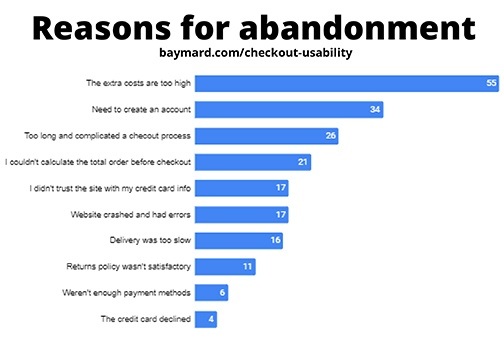
    In a report from Baymard Institute we learn the reasons why customers abandon their cart on mobile checkout. This report was distilled and disseminated from 7 studies, 9,221 participants, and 37,000+ hours of ecommerce UX research. I would say the facts shared have been studied and processed to provide us with solid reasons to fine-tune and make changes to your ecommerce experience for your clients.

    This article is only a snapshot of their findings. I encourage you to read through their whole report to learn all the facts they shared.

    70% of mobile carts are abandoned

    Oh my, why?

    https://view.highspot.com/viewer/5d5dacd1b7b7394d30e3573c

    Let’s look at the number one reason. It’s not that the ordering experience is the problem or the website is too clunky, no. It’s because of those end fees for taxes, service charges, and shipping.

    Fees are Too High

    55% of those in the study indicated that their number one reason for abandoning the cart was because of the extra costs being too high. These are fees you have complete control over.

    Here’s an example of exactly this. As we began to work with a client who wanted an ecommerce site, he complained how people would leave his site to go to Amazon to complete their purchase even though the items on Amazon were more expensive. The reason was clear to us that the reason they were doing this was because of their Amazon Prime accounts and free shipping. When we increased their price to reflect Amazon prices and eliminated shipping on their site, we created no reason to buy from Amazon.

    Creating Accounts

    The next reason, having to create an account. They want to shop as a guest just like when they are in any brick and mortar store. Think about it, when you shop at any store, you don’t need to share any personal information with them, not even your email address. When you go to check out and swipe your credit card, there is no need to provide a phone number or email address. Depending on your type of product, it may be a once and done experience. Let them shop as a guest.

    A Complicated Process

    The third reason, too long and complicated a checkout experience. Again, this is something you can control for them. Categories of items, individual items with sizes and colors, when selling products with variables like that keep it as simple as possible. Test it with some of your best clients before going live with the final checkout experience. Keep everything relevant, too. Don’t bog down the customer’s experience with products that might not apply to their interests. Less product choices of the right products = more products in the cart.

    The fourth reason goes back to the number one reason, they couldn’t see those additional prices and be able to calculate what they were going to be before they checked out. That, frankly, is an error in the set up of the checkout process, point blank. You need to discuss this with your website developer to finetune this process. Again, think about your experience at a brick and mortar store. You know there will be tax, yes, but what about the shipping cost. Oh, there isn’t any.

    The fifth reason is, lack of trust in your credit card processing system. By making certain the set up for the information required for their credit card appears like it would on their card, they will feel more comfortable completing the process of payment. Having logos of the credit card processing choices such as Authorize.net, Paypal, Stripe, and Square also reassures them of the process. More important as well is having a privacy policy and readily accessible to them to see is another reassurance that you are in compliance with GDPR Privacy Laws. We make a point of including the privacy page for all clients without any cost for the build of the page on their site.

    Other reasons for abandonment include:

    • Website had errors and crashed
    • Delivery was too slow
    • Return policy wasn’t satisfactory
    • There weren’t enough payment methods
    • The credit card was declined

    Checklist to finetune your customer’s buying experience

    This report also identified ten ways companies can improve a shopper’s checkout experience on mobile web and app.

    1. Offer Guest Checkout and Make it Prominent
    2. Provide Appropriate Touch Keyboard Layouts
    3. Auto-Format Space in Credit Card Field to Match with Display on Physical Credit Card
    4. Format the Credit Card Expiration Date Fields to Match Physical Card
    5. Display a Progress Indicator
    6. Set Billing Address = Shipping Address by Default
    7. Show Order Total Before Asking for Payment
    8. Include a ‘Place Order’ Button at the Top of Order Review Step
    9. Don’t Ask for Duplicate Information
    10. Provide Third-Party Payment Options

    Learn more about the additional reasons for abandonment and the ways to finetune your customer experience by downloading their complete report by (1) downloading their report here or give us a call and we’ll meet to discuss these and what we can do to help you.

    1. https://pages.amazonpayments.com/Mobile-Optimization-Report.html

    Share this article:

    [DISPLAY_ULTIMATE_SOCIAL_ICONS]


  • Machine Learning and True Fairness

    Machine Learning and True Fairness

    What can be done?


    Brands have come a long way throughout the years. With help from new technology, they’re able to grow and reach more consumers than ever. Although, technology isn’t perfect. Recently, Google and other individuals took a dive into these machines and the algorithms they use. Their findings showed these devices try to assume who we are as buyers, and some of these assumptions are able to distort the customers interested in a brand.

    The technical term for this issue is called data bias. In most cases, machine learning is used to benefit customers, but unfortunately machine learning bias can create a negative outlook on the brand and push consumers away. This all stems from the type of data put into the machine and how it interprets it. For example, if 100 people buy a product, and only 10 of the buyers are female, the machine will take this data and assume that more male customers will buy the product. Machines don’t have a brain or conscience to consider what’s right or wrong, they base their moves on the data received. This creates larger issues for a wider range of customers. Similar issues may happen with customers of different races and age.

    Knowing this to be the case, how are brands supposed to combat data bias? 

    Simple. You need physical human teams to consider, find, and fix these problems. It’s up to these teams to implement different ways for machine learning to consider every individual interested in a brand. Brands are not trying to specifically target certain groups or create other demographic. That’s developing because of the data the machines have received throughout usage. While these issues are tackled, it’s important for the human teams to collaborate with their customers to let them know they are aware of the issues and to be transparent.

    The best way to correct these issues are by including more individuals in helping correct machine learning. More minds can help create and test more solutions while more data can help correct data bias. We’re fighting discrimination more than ever, and even with our data there are reminders of these issues. Facts like these examples should never be assumed: a black customer may not be poor, a white customer may not be rich, a male customer may not want female products, a female customer may not want male products, and so on. Each person is different from one another, with their own interests, hobbies, preferences, lifestyle, and feelings.

    It’s up to businesses, brands, and, frankly, everyone to correct issues like these. It’s not the goal of the brand to bring upon the situations of bias. Instead, it’s beneficial to find solutions so we can correct the ways of machine learning and true fairness.

    Machine Learning and True Fairness

    Interested in learning more about machine learning and true fairness, go to Think with Google and take a look at some of the research papers on the subject.

    Share this article:

    [DISPLAY_ULTIMATE_SOCIAL_ICONS]


  • Benefits of Blogs on Websites

    Benefits of Blogs on Websites

    If you have worked with us to build your website, chances are we may have talked to you about blogs. Blogs are a great way to insert keywords on your website as well as keep it fresh with new content, which are two important ways that will help your website be found on Google.

    Google loves websites that are fresh and current, and by adding blogs to your website you are showing Google that your business is alive and active. In the end, your blogs will help with your Google rankings.

    When writing blogs, there are a few things you need to use as rules:

    • Make sure it is at least 300 words.
    • Make sure the keyword you are focusing on in each blog is mentioned not more than 5% of the whole content. If it starts to be repeated too often, Google may flag your website for keyword stuffing.
    • Make sure the keyword appears in the title.
    • Make sure the keyword is in the first sentence.

    Adding blogs to your website offers more ways than just getting content on your website. One blog can be repurposed in a multitude of ways.

    A few examples include:

    • Social Media Posts – Take your blog and divide it into a variety of posts. Encourage people to go back to your website to read the rest of the blog.
    • Email Marketing – Blogs can be added to your monthly emails to customers. Provide a snippet of the blog or a description that leads them back to read more.
    • Videos – Turn your blog into a video to share on social media or vice versa.
    • Infographic – If the topic of your blog can be turned into an infographic for people to share, do it!

    In the end, if you’re not blogging, you should be! They can provide you with so many benefits and help increase your search on Google.

    If you’re not a writer, we can help! Here at Interlace Communications, we ghost write for a variety of industries. Contact us today to discuss your own blog ideas.

    Share this article:

    [DISPLAY_ULTIMATE_SOCIAL_ICONS]


  • How to Have Your Website Be Found On Google in a Sea of Websites

    How to Have Your Website Be Found On Google in a Sea of Websites

    (Updated in April 2024)

    When it comes to building a website, you can’t just build it and hope it will start coming up in Google Searches. Ranking high in results takes time. Generally for a new website, we find it takes anywhere from 6 months to 18 months to appear in the first 15 results.

    Many people ask us why this is, your site is one in millions upon millions of websites on the internet. With that, everyone is trying to get the first position for their keywords. This is why it takes time and energy to be found on Google.

    In this blog, we’re going to share three ways your website can be found on Google in a sea of competition.

    Positioning Your Business for Organic Searches

    When being found in organic searches, it’s all about SEO or Search Engine Optimization. We like to describe SEO like the Match Game. The Match Game has you turning over pairs of cards in the goal of memorizing the matches. The person who gets the most matches at the end wins. Just like the Match Game, try to match the content on your website to the keyword phrases potential clients search. The better you do at matching the searches to your website content, the better you will move to the first page.

    Something you can do on your website to better help your keywords to be found is blog writing. Watch for our upcoming blog on “Blog Writing” for more details on the does and don’ts of blog writing. Should you need assistance, don’t hesitate to contact us!

    Google My Business Profile – Get Your Business Online

    Google wants to help you be found and one thing they offer is a FREE profile. This profile helps you be found on Google Maps as well as searches. If your business has been in business for several years, there is a possibility there is a profile already created for you. All you need to do is simply claim it. It’s very easy to claim it! Check out our blog on “How to Claim your Google Listing” and everything you want to do within your Google listing to utilize it to its max!


    At Interlace Communications we are here to help you build your website and to be found on Google. Contact us today to discuss how we can assist you in any way with your website and how to be found on Google.

    Share this article:

    [DISPLAY_ULTIMATE_SOCIAL_ICONS]


  • Setting Up Your Google My Business Profile

    Setting Up Your Google My Business Profile

    Google offers a great opportunity to be found through your Google My Business profile, which is absolutely FREE to set up and manage! This is the profile that helps you to be found on Google Maps and can also help you to be found in Google searches.

    If your business has been in business for quite some time, chances are there is already a profile set up for you, all you have to do is claim it. This is easy to do. All you need to do is follow these three simple steps:

    Step 1 – Claim your listing.

    You must have a Gmail email account to do this. Hey, it’s a Google Freebie, don’t expect them to let you use your AOL account. And, guess what, your Gmail account is FREE, too. Note, if you have a GSuite account for your business, you can also use this email to set up your Google Profile.

    Step 2 – Complete ALL your information.

    Must include a physical address even if you are a home based business. No Post Office Box and not the address of the Post Office, either. Sorry, they want to know that you are really a business.

    Step 3 – Claim your listing

    Once you claim the listing, Google will send you a postcard in the mail to validate your address. Yes, it will arrive in your mailbox. When it arrives, add the code provided to your GYBO account.

    Your Listing Is Complete…Now What?

    Go through your profile and add as much information as you can. Depending on your business type will depend on what sections they have available for you to complete. Below are ones you may find on your Google Profile:

    • Hours of Operation (Note they also allow you to add hours for holidays. Keep these up-to-
      date as well.)
    • Service Area
    • Phone Number
    • Website Address
    • Menu Link
    • Menu (This is where you can input your menu right within your Google Profile.)
    • Products
    • Services
    • Attributes: Accessibility and Amenities
    • Business Description

    Once you have all of your information completed, add photos to your profile. Again, what type of business you are will depend on what type of photos you want to add. Every business should add their logo. Restaurants, be sure to add photos of your menu items. If you’re a business with products, you can add photos of your products. If you’re a business with services, find ways to add photos showing your services at work.

    The more information you add to your Google Profile, the more information that is delivered to potential customers! Should you find you need assistance with set up or editing your Google Profile, give us a call. We provide Google assistance to businesses throughout the United States!

    Share this article:

    [DISPLAY_ULTIMATE_SOCIAL_ICONS]


  • Is it Time to Set Up an Online Store?

    Is it Time to Set Up an Online Store?

    During COVID-19, online shopping is becoming a bigger deal and companies such as Amazon, Walmart, and many more, are trying to keep up with the high volume of customers they are receiving. You most likely had to make adjustments while running your business, too. One of the smartest moves retail owners have made is to transition their sales to online stores. Let’s focus attention on you and your business, what would this mean for your business if you were to do the same and what can you and your business do to provide an efficient, effective and swift experience to your customers.

    What should you consider key points to building an online store?

    You should note that you want to optimize your site so it will draw customers in and ensure they have a smooth transaction on your site with minimal hassle. There are several ways to do this and use technology to your advantage to provide a better online experience for daily customers and potential future customers.

    This can start from simply boosting the speed of your site, as well as creating bots that can help your customers. No customer wants to waste time waiting for a website to load, especially if it takes them longer to load pages then to actually takes to buy the product. Keeping a stable and quick speed on your website, with a fast checkout, will drive home initial purchases from customers.

    If a customer does stumble upon an issue or has a question about something specific, you can use technology to support them. By creating support bots or an FAQ page you can help customers solve their issue, no matter how insignificant it is. Remember to include your contact information and respond to any emails or calls as fast as you can to let the customer know you’re listening to their needs.

    Besides having a well-designed site, you want to use it to enhance the vision of your business and provide benefits for your shoppers. Let them know how your business is adjusting due to the situation, and what your online store is providing in terms of services, products, and extra deals that could be available for them. There’s no point in bringing customers to your site if you’re not going to seal the deal when they finally arrive.

    Some helpful information to include on your site is letting customers know what your physical locations are doing since social distancing went into effect, what products may be running low, and if there are any delays in delivery time. All of these tips and more can reassure customers of the safety measures you have in place as well as how you can help them while they’re stuck at home trying to make ends meet.

    Nobody knows how long our current pandemic will last, but the best thing for you to do as a business owner is to adapt to the situation and learn from it for the future. Should you need any help with your current website to add COVID-19 messages to the site or would like to talk about building a Ecommerce website or need any help, please contact us!

    Reference – https://www.thinkwithgoogle.com/marketing-resources/experience-design/coronavirus-retail-website-strategy/


    Share this article:

    [DISPLAY_ULTIMATE_SOCIAL_ICONS]


  • Automate Your Engagement Funnel

    Automate Your Engagement Funnel

    Needless to say, to create an engagement funnel requires a strategic plan to determine the funnels and what will be offered to further engage with them and eventually do business with you. A good email marketing system is necessary to make this all work.

    Ask yourself these questions:

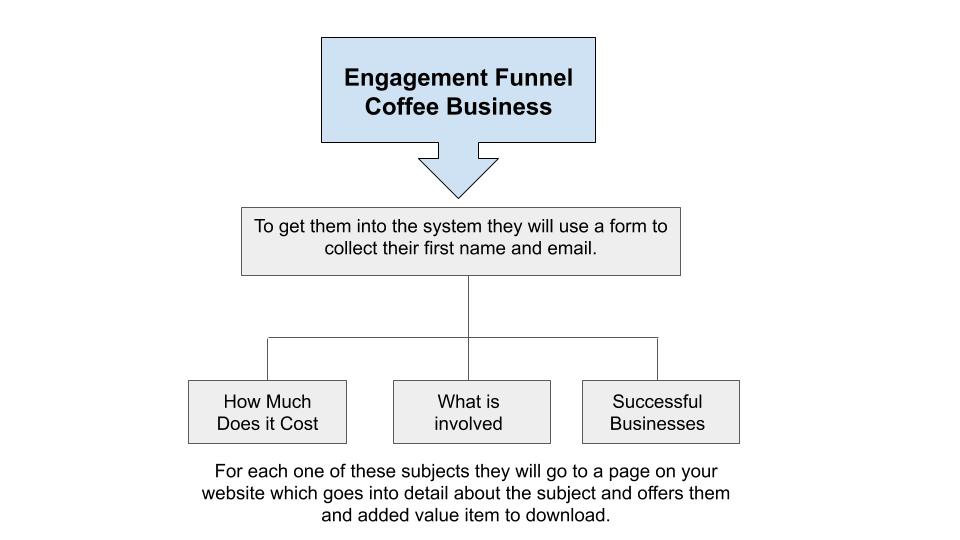
    What is the goal of my email and how do I want them to engage? Think of three different needs your clients have to use your product or service. Within the email provide them the ability to choose which one makes sense for them.

    Next, make certain when they have engaged with you, you are able to deliver something that provides added value. Allow me to expound on that thought. We work with a franchise company whose vertical is coffee shops. For them when a person discovers them online, they want them to learn about their business model and to become a business owner of their franchise. We have the goal, now let’s look at what they might want to know more about.

    Let’s take you down one of the three funnels.

    My favorite one is How much does it cost

    For this page they could go into detail on what the various investments and expenses are involved with owning a coffee business. Their added value item from this could be a worksheet for them to use to calculate their own expenses.

    What could follow as subsequent emails
    to this subject to engage with them going forward might be:

                            • Ideal credit score and how to improve theirs.
                            • Where to find funding for their Coffee Business
                            • How to get started

    What if they lose interest in this subject?

    Take them down another path by offering them another three choices and an added value item. Make sure that one of the three choices is still within the wheelhouse of what was their initial choice.

    Do this until one of three things happens:

                            1. They decide to get started and contact you
                            2. They refuse to engage
                            3. They opt-out of your engagement funnel.

    Do not overwhelm them with too many emails. These two steps could deliver an email each day for 2 to 3 weeks. If they aren’t engaging and they didn’t opt-out. Engage with them once a month after the initial engagement funnel campaigns. Keep yourself top-of-mind.

    We hope you have found this article to be helpful in creating your own engagement funnel. If you want to learn more about email marketing, we can help you with that!

    Share this article:

    [DISPLAY_ULTIMATE_SOCIAL_ICONS]

  • The Power of Words Through Blog Writing

    The Power of Words Through Blog Writing

    Hello and thank you for joining us to learn more about how to blog effectively to help your business be found in Google searches.

    Let’s first review the article which led you here.

    First, did you watch the YouTube video we mentioned in the article?

    Power of Words by Purple Feather Media. If you didn’t, please do.

    www.youtube.com/watch?v=Hzgzim5m7oU .

    Next, did you purchase the book “They Ask You Answer” by Marcus Sheridan? Please do that as well. I was fortunate to be able to attend his two-day class. I make no royalties in recommending either one of these to you. Just the satisfaction of knowing you will learn some very important facts about inbound marketing.

    So how do you go about discovering what questions to write about?

    Ask Google.

    Some of you might be saying, I have no idea what questions people are asking.

    So here are the steps:

    1. Write down a list of your products or services you offer. Let’s use our business for example.
      1. Website Design
      2. Blog Management
      3. Social Media Marketing
      4. Digital Marketing
      5. Email Marketing
      6. Direct Mail
      7. Logo Design
    2. Do a search on Google with just these three words and the service or product you have.
      1. how
      2. what
      3. should

    See the results of these three searches. Google provides actual searches people have done using these three words.

    What you see in the first search of “What Logo Design” is the following:

    First is a paid ad for logojoy.com. They are serious about being found for searches like this and are willing to pony up some money for the search.

    Me…

    I’d rather write a blog and attract people to my website.

    power of words, ask google, blogging


    So, what is in this search that will provide you with the titles for your blogs?


    Below LogoBee you see a section in the search entitled:


    People also ask. That’s where the gold is. You will find your titles there. But what if there isn’t anything that makes sense to write a blog about for your business? Let’s move onto the next series of screenshots.


    So what if there isn’t anything in these suggestions that will work for your business?

    If you click on the last suggestion’s down arrow and close the window, Google will provide more choices. Nothing there that you like? Continue to click on the down arrow and close the window and Google will continue to provide even more suggestions.

    See what I mean with these three screenshots.

    Interested in learning about our blog writing service? Contact us today.

    Share this article:

    [DISPLAY_ULTIMATE_SOCIAL_ICONS]


  • How much does it cost to build a website?

    How much does it cost to build a website?

    How much, you ask? As I was thinking about the answers to this question, my first thought is to thank you for reading this. You realize there should be a cost to building a website. With all the website building programs available where they say, “You can build your own website.” The fact that you want to learn what’s the difference between building your own website or using a professional website developer is important to you.

    Let’s first address the value of YOUR time. You know your business, you have a passion and skills which is your strength and where you should focus your time. When you are drawn into building your website, is it a good use of your time? That is a question only you can answer.

    A Website is Your Online Marketing Presence

    So, let’s look at the difference between a professional building a website and you building your website. First, and foremost, when meeting with our team, we will ask you questions to dig into what makes your business unique. They will become your USP (unique selling proposition) which will set you apart from your competition. When we build your website, it is not just pages of content, this content will be unique to you. When we discover websites where information has been copied from another source we are quick to point out how this affects your positioning on the internet and how search engines, like Google, will actually penalize you for copying the information. We build your website with marketing your business at the core of its content.

    Beyond the website build

    When building your website, you worry about the look of it but what about all the other elements you need to be concerned about? You say, “What other elements?” Well, if you are recreating your website to replace your current website? Are there going to be new pages to replicate the pages on the current website? Are you going from html to php? If you don’t take care of these changes properly you will tumble down in your current ranking on Google. You’re finished building your website. You’re ready. But are you? Google, Ask, Bing, Yahoo, and all those directories that are out there to know you build a website have no clue. Are you going to rely on them to find it or do you push it? There are many procedures that need to follow and be done once a website is built. You can either take your chances the Google will find your website or rely on the professionals to take care of them.

    How much will it cost?

    Now that you know why you should consider a professional to build your website, let’s talk about the cost. I’m sure you will agree the only single answer for this question is, “It depends.” There are several different types of websites to consider for your business. There are landing pages when featuring a single product to market. There are one-page websites if you are just getting started and don’t have a lot of content for a multiple page website. A website with multiple pages is the most popular style on the internet. And, last but certainly not least, an ecommerce website.

    So, let’s look at each of these types of websites styles.

    Landing Page: A landing page can be a single page on your current website. It can also be a subdomain. The best solution is decided upon once we discuss the goal of the landing page and how people will react to the page once there. If it is meant to collect data, a single page on your website will be the best solution. If there are multiple steps taken once they arrive at the page, setting up a subdomain will be the best solution. The cost for a landing page could begin as low as $202 and increase based on the goals you have for the landing page.

    One-Page Website: A one-page website can have the look and feel of a normal website. How it works is that all the content is on one page and the menu jumps to the area that it refers to. It’s a great solution for a business that has a limited amount of products or a single service. Websites of this nature have the look and feel of a large website from information about your business, information about your product or service, your social media connections and a way to contact you. Along with this information, we include all the procedures needed to be found by the search engines. So, along with the one-page build and preparation to be found by the search engines, you are looking at a cost of anywhere from $680 to $1200.

    Business Website: Have enough products and services to support building a business website? We will sit down with you, look at your current website and make suggestions should it need to be consolidated to less pages. Mobile devices have affected the structure of websites. What would be considered as part of a business website? It would include: a home page to feature you and your products, product and service pages, about page, and contact page to mention just the major pages. Of course, along with building the website it will be very, very necessary to reach out properly to the search engines and announce your website’s existence. The cost for a business website can range anywhere from $1200 to $4000.

    Non-Profit & Religious Website: Our websites for many of our nonprofit and religious websites are very similar to our business websites with a couple of features from handling membership dues and the ability to restrict pages just for members. It also provides the ability to build in an event calendar to share what’s happening with the organization or church. Their newsletter can be provided directly through the website with flip page programs allowing them with a way to save money on postage and still providing its members with the look and feel of a printable newsletter. Nonprofits and religious websites benefit from our discounted fees making the site very affordable.

    Ecommerce Website: Ecommerce websites, this is a major website build for your business. There are a variety of products and services from single products, multiple styles and types of products, as well as products with multiple choices to build the products. A lot of details go into building an ecommerce website which includes shipping and taxes. Like the business website it will include the normal pages as mentioned above. Talk about a website that will depend on what it will include. We are looking at the cost of the website on the low side costing $2000 and more. There will be additional costs for security, hosting, and marketing.

    Let’s get together and discuss your website needs by filling in the below form.

    [gravityform id=”11″ title=”true”]


    Updated: August 2020


    Share this article:

    [DISPLAY_ULTIMATE_SOCIAL_ICONS]

  • Monthly Website Maintenance to Monthly Optimization for your Website

    Why the change?

    by Alyse Mitten, Owner of Interlace Communications, Inc.

    For the past four years we have dubbed our monthly focus on your website’s integrity and SEO as Monthly Maintenance. Recently, we have included some speed checks and added even more search engine optimization to your site to what we are doing on a monthly basis and have really ramped up the optimization portion of what we do.

    Then came the dah moment.

    The other day we were explaining monthly maintenance to a new client and they said, “If you are building my new site, why do you already need to maintain it?” Wow!!!! You are right, why do we call it monthly maintenance when merely 5 to 10 minutes is spent to update plugins, themes, and software while the majority of the time is spent optimizing your site to be found in searches. With that said and to better represent what we do for you each month we have changed its name to Monthly Optimization or MO for short.

    So, what is it that we add to your website? It’s words, photos, videos, new blogs, changes that make sense to attract all the search engines to your website. The most important thing is that each month we are doing something and making little changes here and there. Yes, Google likes that. They like to see changes on your site. It doesn’t need to be every day or every week. Just once a month is VERY IMPORTANT!

    So how do we find out what to add to your website? Sometimes, it’s just asking you what you would like to see changed on the site or receiving a note indicating that you want to add some information*. When you don’t have anything to add we turn to some tools that provide us with actual facts about when and for what your website is coming up in searches. Doesn’t mean you are coming up on the first page but it does guide us with the right keyword phrases that will move you up in those searches. It’s information directly from Google. Recently, we set up keyword phrases for a new client straight from the Google Search Engine Console. My feeling is it will give us better feedback than had we asked the client to give us his feedback. It’s sort of like reverse engineering the research for keyword phrases. Another tool we use to check your own website is called SEO Quake. What this does is provides us with the check and balance to make sure we are matching what is provided in the Google Search Engine Console. 

    Our Monthly Optimization program is a very unique way of checking on the effectiveness of your keyword phrases. Yes, we could take short cuts with tools like Google Analytics and Yoast but, frankly, this actually is how people are finding you and I can’t justify providing you with information that you can’t replicate. The way I see it is a search is proof. Oh, and for those living outside of Berks County, rest assured we take all measures to make sure when doing the searches that Google has no idea where we are living by using what’s called the Private Window” on Firefox. You can use that, too. Try it. Go to the three dots to the extreme right side of your search menu bar. Click and you will see that you can choose a “Private Window”.

    *About adding information, allow me to stress something here that is very, very, very important. If you find an article or information on another website that you would like it included on your site, leave it there and link to it. DO NOT INSIST THAT WE NEED TO USE SOMEONE ELSE’S CONTENT. Google frowns on that. Instead write your own words describing whatever it is and backlink to their article.

    So Monthly Maintenance is no longer the name for what we do with your website on a monthly basis. It’s all about Monthly Optimization.

    Share this article:

    [DISPLAY_ULTIMATE_SOCIAL_ICONS]