Interlace Communications

Author: Iciconnect

  • Social Media Image Sizes

    Social Media Image Sizes

    When adding photos to your social media page, you want them to look as clear and professional as possible. This means your photos shouldn’t look blurry and they shouldn’t be cut off at the wrong spots. That’s why it’s important to understand the pixel dimensions of each social media platform.

    We want to share a list of photo dimensions of the popular social media platforms you may use, but we must note that sizes may change depending on the platform. Should you notice a social media platform made changes, revisit our website for the updated information. When viewing the dimensions, they are set by width x height. If there is a byte storage capacity next to the dimensions, that means the image file size can’t be greater than that.

    Google My Business

    Profile Image: 250 x 250
    Cover Image: 1080 x 608
    Post Image: minimum size of 400 x 300

    The maximum file size that can be used is 5 MB.

    Facebook

    Cover Image: 820 x 312 (minimum 400 x 150)
    Profile Image: ≥180 x 180
    Shared Post Image: 1200 x 630
    Shared Link Preview Image: 1200 x 628
    Event Image: 1920 x 1080

    For desktop images, your profile image will appear 170 x 170. As a thumbnail for your Facebook posts, it will appear 32 x 32.
    Twitter

    Header Image: 1500 x 500 with a maximum file size of 5 MB.
    Profile Image: 400 x 400 with a maximum file size of 2 MB.
    In-Stream Image: 440 x 220

    Even though your profile image will appear as 200 x 200 on most devices, try to upload a photo that is 400 x 400. It will provide a better quality image.
    Instagram

    Profile Image: 110 x 110
    Image Thumbnail: 161 x 161
    Shared Photos: 1080 x 1080
    Shared Videos: 1080 pixels wide

    Instagram Stories: 1080 x 1920 (minimum 600 x 1067) with a maximum file size of 4 GB.

    Pinterest

    Profile Image: 165 x 165 with a maximum file size of 10 MB.
    Board Cover Image: 222 x 150 (minimum 55 x 55)
    Pinned Image Preview: 236 pixels wide
    LinkedIn

    Banner Image: 1584 x 396 with a maximum file size of 4 MB.
    Profile Image: 400 x 400 (minimum 200 x 200) with a maximum file size of 10 MB.
    Company Cover Image: 1536 x 768
    Shared Image: 350 pixels wide
    Shared Link Preview: 180 x 110
    Company Logo Image: 300 x 300 with a maximum file size of 4 MB.
    Company Cover Image: 1536 x 768 (minimum 1192 x 220) with a maximum file size of 4 MB.
    Company Page Banner Image: 646 x 220 with a maximum file size of 2 MB.
    Square Logo (appears in company searches): 60 x 60 with a maximum file size of 2 MB.

    YouTube

    Channel Cover Images: 2560 x 1440 with a maximum file size of 4 MB.
    Channel Icon: 800 x 800
    Video Thumbnail: 1280 x 720

    Images at 2560 x 1440 will be optimized for TV screens, while desktop computers will display them at 2560 x 423. Mobile devices will display YouTube cover art at 1546 x 423, while tablets will display them at 1855 x 423

    We hope this quick and easy list is helpful when deciding what image to use next. Remember, dimensions may be changed at any time depending on the platform! If you need any help with your business and post marketing feel free to contact us!

    Share this article:

    [DISPLAY_ULTIMATE_SOCIAL_ICONS]


    Interested in more Creatives Assistance? Get your copy of our Creative Assets Handbook! It is full of information for creating posts and images!

    [gravityform id=”6″ title=”true”]

  • Importance of Proofing and Proofing Tools to Utilize

    Importance of Proofing and Proofing Tools to Utilize

    As youth, we’ve always been told to check our work and proof-read. You may recall hearing it for the first time in English class during your early years of elementary school. Well, guess what? That phrase hasn’t changed and when marketing your business and sharing content it is just as important to remember to double or even triple check the content you plan to share publicly.

    If you haven’t been proofing your content, you need to re-evaluate the process you’re following. Nothing is worse than searching online for a specific topic, and the blog or post you come across may be littered with errors or mistakes.

    Proofing is a sense of ensuring your work is up to par. You take a sense of accomplishment in the content shared. Just as you write the content, you should be thorough in checking for any errors.

    Luckily, you don’t need to simply rely on the minimal built-in tools provided by Microsoft Word or Google Docs. There are plenty of tools online that can make it fast, easy, and efficient to check your work. Don’t forget though, having your team members preview content beforehand is a great idea to receive feedback or thoughts to improve your work.

    Below is a look at two proofing tools that can be used online. Some may provide upgrade plans depending on what you’re looking for.

    Grammarly

    Grammarly is most likely one of the easiest proofing tools to use. You can simply copy and paste in the content and it will evaluate the work and highlight errors and adjustments that may be necessary. It even goes further by providing different tones it can search for and can make corrections while writing emails, social media content, or other projects!

    Hightail

    Another unique tool is Hightail. Hightail allows you to easily collaborate with other users and work together. In one location you can share your files and team up with friends or coworkers to work together on a project at hand. This tool also includes the ability to manage what projects your team is on task, the ability to work with mobile devices, and multiple plans to choose from which upgrade storage and add more features.

    There are plenty of other tools on the market, but these two are some of the most well-known and highly rated tools that can be utilized for your proofing needs.

    Having a writer’s roadblock? We are also here to help you determine what you should share to market your business. Give us a call.

    Share this article:

    [DISPLAY_ULTIMATE_SOCIAL_ICONS]


  • Benefits of Using Hootsuite for Social Media Scheduling

    Benefits of Using Hootsuite for Social Media Scheduling

    Social media is a major part of marketing your business and creating a vision for your brand. Hundreds to thousands of people see your business online so you want to be able to keep up with your social portrait. One tool that is efficient and helpful to use across multiple social media channels is Hootsuite!

    These are the benefits of using Hootsuite and the reason why we recommend using it!

    Track Social Media Channels
    It’s hard keeping up with all the different platforms your business may be found on. Hootsuite allows you to keep your eye on multiple platforms at the same time! This means you can check in on major platforms such as Instagram and Facebook, but at the same time look at other platforms you may be just beginning to use. This includes the ability to schedule posts for certain channels, engage with your audience you have on each platform, and hold all your social content in one place!

    Connect with your Audience
    Besides scheduling posts, you can even converse with and support customers that may initiate a connection with you or have a problem about a product or service. Instead of needing to open various windows and log into multiple accounts, you can use Hootsuite as your home hub to not only reply to individuals, but to also track your audience across each platform.

    Involve your Team
    If you think you need to manage Hootsuite alone, you’re mistaken! It may be tricky to learn at first. Once you learn it you can bring your team into the mix to help manage your social media and provide a single voice for your social media message. One key detail when inviting other members on your team is that you can not only work together with them, but you can set up a mini calendar of sorts for tasks you’ve given them, you can make sure they’re working on the right content by locking access to areas they don’t need to be, and you can communicate together to help improve workflow and connect ideas!

    Hootsuite provides several payment plans for you to choose, along with a free trial for the first month if you want to explore the “professional” or “team” option! Before you make any final decision, make use of the free trial and compare the different plans they provide to figure out which one fits your needs! Let us know how it goes and if you have more questions about Hootsuite or how to manage your social media profiles contact us to discuss your marketing strategies!

    Share this article:

    [DISPLAY_ULTIMATE_SOCIAL_ICONS]


  • Photo & Image Tools To Use

    Photo & Image Tools To Use

    Picture Your Post…

    Tools to create a variety of posts

    When creating your marketing posts or presenting any content to possible customers, you want to be creative and ditch any bland or dry aspect. This should include adding lively photos to help spruce up content! With that said, we wanted to give you two options to choose from if you don’t know where to start. Although there are plenty of image tools online, we recommend you check these out before editing any pictures.

    Canva
    The first tool we want to share with you is Canva [canva.com] Canva has a plethora of capabilities and design possibilities for you to create. One great note about Canva is that it lets you create graphics for a variety of layouts, such as an Instagram post, a restaurant menu, an average presentation, and more! It gives you the ability to not only edit pictures, but use dozens of shapes and fonts to bring your design to life. Of course, it also adds the function to upload your own photos, too.

    Although you can use Canva for free, they have a pro option at $9.95 per month and an enterprise option at $30 per month. Essentially, the more expensive the payment, the more you have access to in regards to creatives and storage. If you’re interested, we encourage you to check out their website, which has plenty of information on how to use Canva, more in depth analysis of pricing options, and plenty of graphics to look at which were made on Canva itself!

    PicMonkey
    The next tool we want to share is PicMonkey [picmonkey.com] Picmonkey has more options editing techniques outside of graphic design, such as branding, events, and social media. Unfortunately, there is no free version available, but you can try a 7-day free trial! The basic version is $7.99 per month, pro is $12.99 per month, and the team version is $33.99 per month. The best part is that many imagery tools aren’t only for professionals, and the same is said for PicMonkey!

    On their website, you can find dozens of tutorials, tips, and advice to help you grow your business and improve the quality of your posts. From the most general of questions, to the very specifics, you can find a multitude of information within their community of users. Don’t let the price scare you away!

    These two tools are some of the most creative, helpful and explorative image tools when it comes to learning how to edit photos and introducing your own style. Users love flare and with both of these tools you can learn, in depth, how to use them and what possibilities you have at hand. If you have questions about these tools or need our help with marketing purposes, give us a call, we’re always here to help!

    Share this article:

    [DISPLAY_ULTIMATE_SOCIAL_ICONS]


    Interested in more Creatives Assistance? Get your copy of our Creative Assets Handbook! It is full of information for creating posts and images!

    [gravityform id=”6″ title=”false” description=”false”]

  • The Importance of a Subject Line for Email Campaigns

    The Importance of a Subject Line for Email Campaigns

    That’s it!

    Three to Five Words

    When working on creating an email to send to customers, one of the most important parts of the email is the subject line. You need to think about how to engage with your audience to encourage them to open it? Most times, this most important part of an email is overlooked and all the focus is placed on the message within your email.

    Are you curious as to why we make this statement?

    We’ll let you in on some information to help you realize why the subject line can be considered the most important part of your email and how to create them.

    First, what do you think your recipients of your emails will notice right off the bat when receiving your emails? The parts of an email that land in your inbox and can be seen are: the sender of the email, the subject line, and the preheader. The subject line should provide a minimally worded phrase as to what the email contains. It should be interesting enough for a person to want to open it. Also, such as the little brother of the subject line, the preheader is presented to help support it. When typing up your email you definitely don’t want to overlook these two crucial parts.

    One rule we follow here at Interlace Communications is ‘The Rule of 3.” The first three words in your subject line should be riveting enough to push an individual to open the email. If you use a boring line that you may use several times such as “Our Monthly Newsletter,” the recipient is likely to trash it. Remember, although you want a compelling subject line, don’t make it too long. Often, the user will be viewing their inbox on a mobile device, which pushes you to find that “short and sweet” phrase.

    If the individual isn’t convinced enough to open the email already, they will read the preheader to gain further insight. Although it acts as a little brother, it’s important to help clarify what’s contained inside the email. However, don’t summarize the email entirely. Remember, you shouldn’t simply copy and paste the subject line or change out a few words. Create a preheader that works together with the subject line to push them to open it.

    You can even ask a few family members, friends, or coworkers what they do when checking their inbox. It may seem like a small part, but you’d be surprised to hear how many may check the subject line and come to a decision of reading or trashing it right then and there. If you have any more questions about email marketing or need help creating impactful email templates, contact us today!

    Share this article:

    [DISPLAY_ULTIMATE_SOCIAL_ICONS]


  • What Email Marketing Platform Should I Choose?

    What Email Marketing Platform Should I Choose?

    Eeny, meeny, miny, moe —
    Which one stays and which ones go?

    Email marketing is one of the main ways to communicate with customers and to increase the number of users who reach your site and use your services. With more users gaining access to the internet daily, you want to take advantage of email marketing. There are a multitude of platforms you can use and they each offer a variety of benefits for reaching out to your customers.

    Each email platform may include similar or different features and tools when comparing one another. With our past experience, we want to focus on three that we consider effective, with plenty of features and benefits you can use to help market to customers.

    Constant Contact

    Here at Interlace Communications, we have a certified solutions provider for Constant Contact on staff. Constant Contact allows easy functionality to help you reach a wider audience. Their pricing is based on the amount of contacts you have as well as the additional features you would like to add. The minimal price to start is only $20/month and has simple and easy actions to help grow your email audience.

    Constant Contact also includes exclusive features such as event marketing, social media marketing, and surveys, These additional features help you reach a much wider audience that may be on other online platforms such as Facebook, Instagram, and LinkedIn. If you’re new to email marketing, Constant Contact is well known to be beginner friendly. They also have mobile capabilities, automation to add individuals to your email list, tracking your emails, and much more! If you’re interested in learning more about Constant Contact give us a call at 484-709-6564.

    Mailchimp

    Mailchimp is a cloud-based email solution. This platform works to centralize your marketing needs in one place and to help focus on the audience at hand. When dealing with email marketing, you want to analyze your data and use this to fine-tune your email messages so it appeals to future customers. MailChimp is a great all-in-one tool to use to grow and progress. The ability to promote your business on a platform that connects to other platforms helps grow your email marketing. Mailchimp is great for those just starting out because they do offer a free version. Keep in mind the free version is limited but maybe what you need to get started! If you would like to discuss Mailchimp further, contact us today.

    Robly

    Robly is an innovator in using AI software to help boost your email marketing audience. It also includes an exclusive feature of photo editing. The AI they use has separate functions that help deliver your email to your audience at the time they normally check their mail. This is so the email isn’t ignored and buried upon dozens of others. The other technology used, OpenGen, allows you to resend an email if it wasn’t viewed the first time. This is a great tool as it helps your open rate increase. They also provide helpful tools to share your emails on social media and how to fine tune the appearance for mobile users. If you’re interested in learning more about Robly or want to sign up, contact us today.

    These three aren’t the only email platforms available for usage, but we highly recommend to check these out first. Whether you’re new to email marketing or have been doing it for some time now, these platforms provide efficient and helpful ways to increase the number of individuals who open your emails. If you need any help, you can contact us. We are here to help you make the best decision for your email needs!

    Share this article:

    [DISPLAY_ULTIMATE_SOCIAL_ICONS]


  • Why do customers abandon their cart?

    Why do customers abandon their cart?

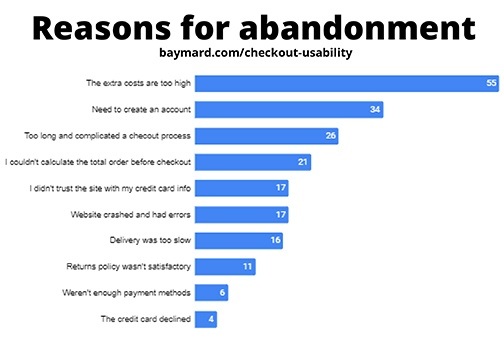
    In a report from Baymard Institute we learn the reasons why customers abandon their cart on mobile checkout. This report was distilled and disseminated from 7 studies, 9,221 participants, and 37,000+ hours of ecommerce UX research. I would say the facts shared have been studied and processed to provide us with solid reasons to fine-tune and make changes to your ecommerce experience for your clients.

    This article is only a snapshot of their findings. I encourage you to read through their whole report to learn all the facts they shared.

    70% of mobile carts are abandoned

    Oh my, why?

    https://view.highspot.com/viewer/5d5dacd1b7b7394d30e3573c

    Let’s look at the number one reason. It’s not that the ordering experience is the problem or the website is too clunky, no. It’s because of those end fees for taxes, service charges, and shipping.

    Fees are Too High

    55% of those in the study indicated that their number one reason for abandoning the cart was because of the extra costs being too high. These are fees you have complete control over.

    Here’s an example of exactly this. As we began to work with a client who wanted an ecommerce site, he complained how people would leave his site to go to Amazon to complete their purchase even though the items on Amazon were more expensive. The reason was clear to us that the reason they were doing this was because of their Amazon Prime accounts and free shipping. When we increased their price to reflect Amazon prices and eliminated shipping on their site, we created no reason to buy from Amazon.

    Creating Accounts

    The next reason, having to create an account. They want to shop as a guest just like when they are in any brick and mortar store. Think about it, when you shop at any store, you don’t need to share any personal information with them, not even your email address. When you go to check out and swipe your credit card, there is no need to provide a phone number or email address. Depending on your type of product, it may be a once and done experience. Let them shop as a guest.

    A Complicated Process

    The third reason, too long and complicated a checkout experience. Again, this is something you can control for them. Categories of items, individual items with sizes and colors, when selling products with variables like that keep it as simple as possible. Test it with some of your best clients before going live with the final checkout experience. Keep everything relevant, too. Don’t bog down the customer’s experience with products that might not apply to their interests. Less product choices of the right products = more products in the cart.

    The fourth reason goes back to the number one reason, they couldn’t see those additional prices and be able to calculate what they were going to be before they checked out. That, frankly, is an error in the set up of the checkout process, point blank. You need to discuss this with your website developer to finetune this process. Again, think about your experience at a brick and mortar store. You know there will be tax, yes, but what about the shipping cost. Oh, there isn’t any.

    The fifth reason is, lack of trust in your credit card processing system. By making certain the set up for the information required for their credit card appears like it would on their card, they will feel more comfortable completing the process of payment. Having logos of the credit card processing choices such as Authorize.net, Paypal, Stripe, and Square also reassures them of the process. More important as well is having a privacy policy and readily accessible to them to see is another reassurance that you are in compliance with GDPR Privacy Laws. We make a point of including the privacy page for all clients without any cost for the build of the page on their site.

    Other reasons for abandonment include:

    • Website had errors and crashed
    • Delivery was too slow
    • Return policy wasn’t satisfactory
    • There weren’t enough payment methods
    • The credit card was declined

    Checklist to finetune your customer’s buying experience

    This report also identified ten ways companies can improve a shopper’s checkout experience on mobile web and app.

    1. Offer Guest Checkout and Make it Prominent
    2. Provide Appropriate Touch Keyboard Layouts
    3. Auto-Format Space in Credit Card Field to Match with Display on Physical Credit Card
    4. Format the Credit Card Expiration Date Fields to Match Physical Card
    5. Display a Progress Indicator
    6. Set Billing Address = Shipping Address by Default
    7. Show Order Total Before Asking for Payment
    8. Include a ‘Place Order’ Button at the Top of Order Review Step
    9. Don’t Ask for Duplicate Information
    10. Provide Third-Party Payment Options

    Learn more about the additional reasons for abandonment and the ways to finetune your customer experience by downloading their complete report by (1) downloading their report here or give us a call and we’ll meet to discuss these and what we can do to help you.

    1. https://pages.amazonpayments.com/Mobile-Optimization-Report.html

    Share this article:

    [DISPLAY_ULTIMATE_SOCIAL_ICONS]


  • Importance of Online Reviews

    Importance of Online Reviews

    Ever since the internet came about, there have been dozens of ways for you, as a business owner, to market and promote your service to hundreds of thousands of individuals, and, it’s just as easy for customers, clients, and scammers to leave nasty reviews online about your business. Some businesses may think online reviews aren’t a huge deal, but they matter more than you may think. In this article, we will focus on why online reviews are important for customers to leave feedback and how they’re also important for you as an owner to grow your business.

    Online reviews have become an asset for new potential customers to learn from your current and past customers about your business, product, or service before they make an initial purchase. You wouldn’t want to spend money on a product or service and come to find out that it wasn’t worth the money? Neither do your customers. Across the internet there are hundreds of review sites available for people to post on. Some of the big names include Google, Facebook, and Yelp. Whether the review they leave is positive or negative, that review is available to other users to see, and can drastically affect whether or not they decide to purchase or work with you. How many times have you found yourself checking the reviews before buying something?

    Online reviews are also a unique tool for businesses to help grow their business, make improvements, and find out what works. You should push yourself to explore these review sites and learn how to use them so you can reply to customers and help relieve any negative reviews! If there is an issue, you can reach out to the customer to gain further insight into the problem and try to make any fixes necessary. Not every problem has a solution, but it’s always worth it to try and make amends with an unhappy customer. You should also keep in mind that some users may post negative reviews without reasoning to discourage businesses and lower the overall rating. These are defined as “internet trolling”. In our blog entitled “How To Respond to Negative Reviews Online”, we recommend ways to respond to negative reviews and how to reach the best solution.

    As important as it is to learn about online reviews, you should also encourage your customers to leave one! When you receive positive reviews, they provide a better outlook of your business to other potential customers. Should you receive any negative reviews, that provides you the opportunity to make amends and pinpoint any possible issues that may need improvements.

    When it comes to online reviews, by all means, don’t ignore them. Overtime, even a few negative reviews can have drastic results on the outlook of your business. We know you want to look your best for potential customers who may be willing to spend money with your establishment. We hope we gave you further insight into the importance of online reviews and we encourage you to try and use online reviews to your advantage to help improve your business experience.

    Share this article:

    [DISPLAY_ULTIMATE_SOCIAL_ICONS]


  • Great Online Experience for Your Customers

    Great Online Experience for Your Customers

    Over time, technology has evolved and the internet has progressed to various lengths we may never have imagined years ago. The internet has become a global network where businesses can grow and strive to be better. For establishments to do better, they have to improve the experience for customers across a multitude of different platforms. We want to cover why delivering a user-first online experience is so crucial and how you can change to accomplish this.

    The End Result is What Matters Most

    More than ever, our everyday routine and schedule always include a digital connection at some point in our day. It could be doing research with your child for schoolwork, working at your job, relaxing at home, and much more. Wherever it is, you expect swift and easy service to accomplish what you need. As our lives become busier, you don’t think much about the service you’re using, but more so the end results that you desire.

    Delivering a Smooth User Experience

    That’s why businesses and companies want to deliver a smooth user experience for you to accomplish what you’re doing. You have a desire or problem you want to resolve, and these services are made to get you what you need as soon as possible. At the same time though, these establishments need to work as a team to find a common goal. Not every person will have the same idea, but it’s up to the teams in an organization to have an end goal of what they want to complete.

    Google Maps

    One example that we want to note is the changes Google has made to their application, Google Maps. When you hear the name Google Maps, you would assume it’s for helping users find their way to an unknown destination. They are changing and adapting it to not only help you find a location but to improve the experience the user has at that location. This essentially means Google Maps will provide a full online experience for what places are around you and what activities there are for you to do.

    Businesses or companies who embrace what Google is doing with Google Maps will take advantage of the opportunity to engage with the user who may have learned more about their business.

    A few examples might be users who are moving, meeting with friends, or seeing family, Google Maps can now provide them a list of businesses and things to do. They provide them with a way to fill their time and make connections with the people and life physically around them, after a quick browse on the application.

    Prioritize the User Experience

    Similar to the saying, “the customer is always right”, establishments should be looking to prioritize the user satisfaction that is experienced. As we head towards the future, there will always be more demands and more changes needing to be made to suit the next generation of users.

    Interested in learning more about how to position your business for Google Maps, check out more of our articles or contact us.

    Share this article:

    [DISPLAY_ULTIMATE_SOCIAL_ICONS]


  • Machine Learning and True Fairness

    Machine Learning and True Fairness

    What can be done?


    Brands have come a long way throughout the years. With help from new technology, they’re able to grow and reach more consumers than ever. Although, technology isn’t perfect. Recently, Google and other individuals took a dive into these machines and the algorithms they use. Their findings showed these devices try to assume who we are as buyers, and some of these assumptions are able to distort the customers interested in a brand.

    The technical term for this issue is called data bias. In most cases, machine learning is used to benefit customers, but unfortunately machine learning bias can create a negative outlook on the brand and push consumers away. This all stems from the type of data put into the machine and how it interprets it. For example, if 100 people buy a product, and only 10 of the buyers are female, the machine will take this data and assume that more male customers will buy the product. Machines don’t have a brain or conscience to consider what’s right or wrong, they base their moves on the data received. This creates larger issues for a wider range of customers. Similar issues may happen with customers of different races and age.

    Knowing this to be the case, how are brands supposed to combat data bias? 

    Simple. You need physical human teams to consider, find, and fix these problems. It’s up to these teams to implement different ways for machine learning to consider every individual interested in a brand. Brands are not trying to specifically target certain groups or create other demographic. That’s developing because of the data the machines have received throughout usage. While these issues are tackled, it’s important for the human teams to collaborate with their customers to let them know they are aware of the issues and to be transparent.

    The best way to correct these issues are by including more individuals in helping correct machine learning. More minds can help create and test more solutions while more data can help correct data bias. We’re fighting discrimination more than ever, and even with our data there are reminders of these issues. Facts like these examples should never be assumed: a black customer may not be poor, a white customer may not be rich, a male customer may not want female products, a female customer may not want male products, and so on. Each person is different from one another, with their own interests, hobbies, preferences, lifestyle, and feelings.

    It’s up to businesses, brands, and, frankly, everyone to correct issues like these. It’s not the goal of the brand to bring upon the situations of bias. Instead, it’s beneficial to find solutions so we can correct the ways of machine learning and true fairness.

    Machine Learning and True Fairness

    Interested in learning more about machine learning and true fairness, go to Think with Google and take a look at some of the research papers on the subject.

    Share this article:

    [DISPLAY_ULTIMATE_SOCIAL_ICONS]


  • Learn about Facebook and Instagram Shops

    Learn about Facebook and Instagram Shops

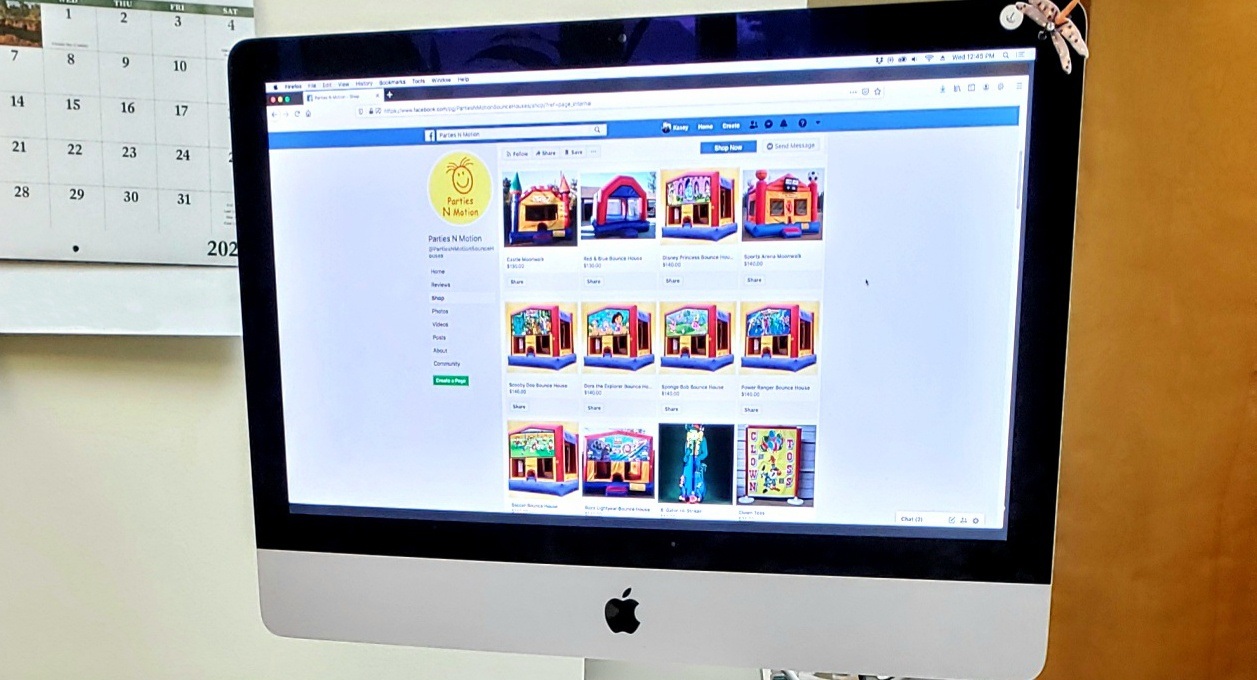
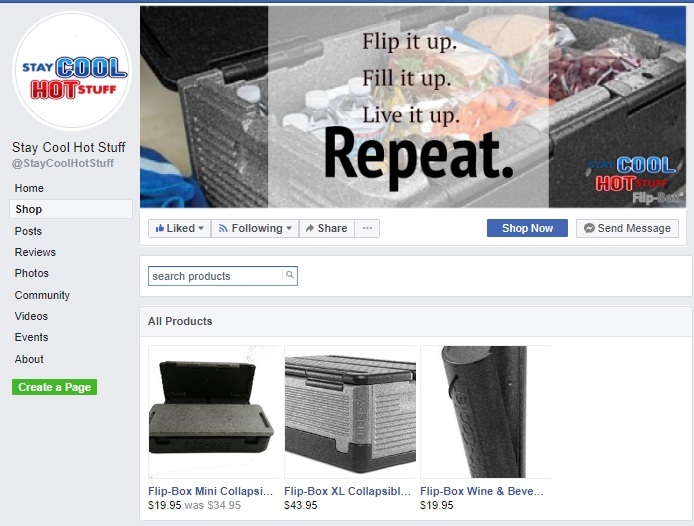
    Online shopping has become bigger and more adaptable over the past few months. Now Facebook & Instagram are getting in on the action by providing a simple and free feature to help sell your products. Let’s dive into how this shop feature works and why it’s a great step forward to provide your customers with the convenience of shopping where they are.

    Let’s look at shops on Facebook and Instagram.

    The feature provides you the functionality to sell on both platforms from one easy to manage location. Along with managing your shop in one place, it provides you with the ability to customize your shop how you want so you can reach customers around the world. We’ll cover some parts of how the shop feature works for you in slightly more detail.

    If you want to create your own shop, you’ll first have to check out the commerce manager on Facebook. It should prompt you to fill out required information to start the set up. Commerce manager will also be the main place where you’ll manage your sales, data, and other options later on.



    Commerce manager also lets you create collections. This is an important feature to not only pull customers in, but also help them find the product they’re looking for. Collections allow you to set three main things. First is a title name, then a description of what’s found in the collection. Finally, the cover media which lets you provide photos of different products within that collection. Once you’re satisfied with the collection you made, it will be checked through commerce policies and will take about 24 hours to be reviewed.

    Once you create a collection, or even multiple collections, this is where you’re opened up to a wider availability of customization options. In commerce manager, you can edit the layout and the style of your shop and collections. You want to edit your shop to look attractive, but also match the type of business you’re presenting yourself as. The commerce manager is the main location for all of your shop options and customization needs.

    We recommend linking your Facebook shop and Instagram profile to provide a user-friendly experience for potential customers across both platforms. To target more individuals, linking your accounts allows them the opportunity to find your business if they reside on a specific platform or use one more heavily than the other.

    This is a quick and easy overview of what Facebook and Instagram shops are. For more information, contact us to assist in taking a deeper look into more in depth details and step by step guides to getting started and creating your shop. We’ll help you to learn more about their unique features.

    Share this article:

    [DISPLAY_ULTIMATE_SOCIAL_ICONS]


  • How to Respond to a Negative Review Online

    How to Respond to a Negative Review Online

    AARGH!!! A NEGATIVE REVIEW!

    You’ve discovered a negative review left about your business, oh no, what do you do? It’s best to act swiftly and accordingly to help the disgruntled customer and find out what went wrong. When responding, you should be very mindful when responding to a negative review. It is best to take a positive direction with your response because of the fact that visitors to the site can see the negative review. Along with your reply and remediation of the problem at hand. Situations we’ve experienced with clients have created a few do’s and don’ts to responding to negative reviews and how to overcome this unforeseen obstacle.

    First, we want to let you know what you shouldn’t do when responding to a negative review.

    • Ignore the Review – This allows the negative review to grow and create a bigger problem, even possibly pushing into your personal life on a social media platform.
    • Fight Fire with Fire – Never reply to a negative review with criticism about what they said. This could escalate the situation and push potential customers away who see your reply.
    • Disregard the Customer’s own Online Reputation – Some users get a rise out of purposely leaving negative reviews without valid reasoning. Check their background on the internet and see if they have a tendency to leave harsh reviews for others. In most cases, these “internet trolls” aren’t worth dealing with.

    Next, we want to let you know what we consider some of the best reactions to negative reviews.

    • Encourage Reviews – You want to efficiently gain more positive reviews to overlook the negative ones and to hopefully form a better impression of your business.
    • Interact with Users Positively and Professionally – Always respond with a positive reply that keeps your interest in the customer and focuses on the problem at hand.
    • Leave a Reply that Satisfies Other Potential Customers – Since other potential customers can see the negative review, make sure you provide a thoughtful response that engages how you’ll solve the issue and thank the reviewer for their time.
    • Respond to Spam – Some individuals may leave dozens of negative reviews on different sites for all sorts of businesses, whether the person had any interaction with them or not. If it seems you have been spammed, acknowledge that you don’t know them and indicate you will be contacting them to let them know they might have the wrong business.

    Customers are a major priority in business and you should always be aware and focused on the response they leave for your business. A good step is setting up a Google My Business Profile that allows customers to leave reviews. You can even provide them with a link that directs them to where they can leave a review. Remember, encourage all customers to leave a review and let them know how appreciative you are of any feedback! If you have any problems with negative reviews and are stuck trying to handle them, let us know and we have helped others in the same situation and certainly can help you!

    Share this article:

    [DISPLAY_ULTIMATE_SOCIAL_ICONS]


  • 10 Ideas in just 10 Minutes

    10 Ideas in just 10 Minutes

    We’ll keep it simple. There are certain marketing tasks that can be done in just 10 minutes or less. Well, we wanted to give you some quick marketing ideas that you can read through in less than 10 minutes. Let’s go!

    Social Media Tips

    1. Social and search marketing have a price
    2. Videos of the benefits in a fun way sell when shown on social media.
    3. Use stories on Facebook and Instagram. Stories can sell.
    4. Know when to post.
    5. Engage. Engage. Engage.
    6. Create a social media calendar to determine the content you will share.
    7. Post images. Remember the 20% rule.
    8. Create a Facebook Group or two.
    9. Know your competition and who they are following, what they are posting, and who is following them.
    10. Create a strategic alliance with like-minded businesses.

    Time Management

    1. Respect the 60-20-20 Rule
      60% of your business comes from current clients = Respect Current Clients
      20% of your business comes from new business = know that
      20% of your business comes from retention = Realize that
    2. Retention is important to the life of your business it take 10 times more money to find a new customer than it does to retain a current client.
    3. Create a prospecting process. 50% of sales time is wasted on unproductive prospecting.
    4. Master your morning. Plan your week based on 3 Goals. Focus.
    5. Prioritize! Prioritize! Prioritize!
      Do what needs to be done, First! Then, Second, Then, Third! Don’t do what doesn’t need to be done.
    6. Set the next meeting when at the first meeting. (but only if you need a second meeting)
    7. Agree if there is not a match to do business. Stop wasting each other’s time.
    8. Create a time log.
    9. Eliminate time wasters
    10. Take time off.

    Sales

    1. The goal is to solve the problems of your potential clients
      70% make a decision to purchase based on solving a problem
      30% make a decision on gaining something
    2. Testimonials sell! Use these stories.
    3. People buy from you when they are ready, not when you think they should be ready.
      3% Actively Buying | 40% Poised to Begin | 56% Not Ready | 1% Other
    4. Less is more. Giving too many details often kills the deal.
    5. Be unique about beginning the conversation by asking unique questions.
    6. Three options sell!
    7. Make one more call. 92% of salespeople give up after four “no’s” four times before they say “yes”. – Marketing Donut
    8. People buy from people.
    9. Do you have your elevator speech?
    10. Do you have a sales goal?

    Management

    1. Why are you meeting? If there is reason, don’t meet.
    2. Engage young entrepreneurs. You will be surprised about their skills, abilities, and energy to acheive.
    3. Outsource – Use your time wisely. Outsource data clean up, email campaigns, directory sales, appointment setting. 
    4. Know your customer buying cycle. Go with the flow.
    5. A confused buyer says “no”.
    6. People buy based on emotion, ego, and then logic.
    7. Cold calling? First 3 seconds are important to share the pain for your prospective client.
    8. When leaving a voicemail, share your message first, then your name. 
    9. Do you have a business plan?
    10. Score with SCORE. Take advantage of having a mentor with SCORE.

    Email Marketing

    1. Curiosity opens emails. 57% of emails received are considered Spam emails.
    2. Use only one topic in your eBlasts
    3. Make your emails to prospects relevant and personal.
    4. Email when it’s the perfect time  for your client
    5. Less is more…only 3 words, no more, in a subject line, period!
    6. Make it easy to subscribe
    7. Think about mobile.
    8. Keep and eye on your statistics
    9. Keep the look of your email as simple as possible
    10. Be friendly and use a casual tone.

    If you find that you need any marketing assistance, contact us today.

  • Benefits of Blogs on Websites

    Benefits of Blogs on Websites

    If you have worked with us to build your website, chances are we may have talked to you about blogs. Blogs are a great way to insert keywords on your website as well as keep it fresh with new content, which are two important ways that will help your website be found on Google.

    Google loves websites that are fresh and current, and by adding blogs to your website you are showing Google that your business is alive and active. In the end, your blogs will help with your Google rankings.

    When writing blogs, there are a few things you need to use as rules:

    • Make sure it is at least 300 words.
    • Make sure the keyword you are focusing on in each blog is mentioned not more than 5% of the whole content. If it starts to be repeated too often, Google may flag your website for keyword stuffing.
    • Make sure the keyword appears in the title.
    • Make sure the keyword is in the first sentence.

    Adding blogs to your website offers more ways than just getting content on your website. One blog can be repurposed in a multitude of ways.

    A few examples include:

    • Social Media Posts – Take your blog and divide it into a variety of posts. Encourage people to go back to your website to read the rest of the blog.
    • Email Marketing – Blogs can be added to your monthly emails to customers. Provide a snippet of the blog or a description that leads them back to read more.
    • Videos – Turn your blog into a video to share on social media or vice versa.
    • Infographic – If the topic of your blog can be turned into an infographic for people to share, do it!

    In the end, if you’re not blogging, you should be! They can provide you with so many benefits and help increase your search on Google.

    If you’re not a writer, we can help! Here at Interlace Communications, we ghost write for a variety of industries. Contact us today to discuss your own blog ideas.

    Share this article:

    [DISPLAY_ULTIMATE_SOCIAL_ICONS]


  • How to Have Your Website Be Found On Google in a Sea of Websites

    How to Have Your Website Be Found On Google in a Sea of Websites

    (Updated in April 2024)

    When it comes to building a website, you can’t just build it and hope it will start coming up in Google Searches. Ranking high in results takes time. Generally for a new website, we find it takes anywhere from 6 months to 18 months to appear in the first 15 results.

    Many people ask us why this is, your site is one in millions upon millions of websites on the internet. With that, everyone is trying to get the first position for their keywords. This is why it takes time and energy to be found on Google.

    In this blog, we’re going to share three ways your website can be found on Google in a sea of competition.

    Positioning Your Business for Organic Searches

    When being found in organic searches, it’s all about SEO or Search Engine Optimization. We like to describe SEO like the Match Game. The Match Game has you turning over pairs of cards in the goal of memorizing the matches. The person who gets the most matches at the end wins. Just like the Match Game, try to match the content on your website to the keyword phrases potential clients search. The better you do at matching the searches to your website content, the better you will move to the first page.

    Something you can do on your website to better help your keywords to be found is blog writing. Watch for our upcoming blog on “Blog Writing” for more details on the does and don’ts of blog writing. Should you need assistance, don’t hesitate to contact us!

    Google My Business Profile – Get Your Business Online

    Google wants to help you be found and one thing they offer is a FREE profile. This profile helps you be found on Google Maps as well as searches. If your business has been in business for several years, there is a possibility there is a profile already created for you. All you need to do is simply claim it. It’s very easy to claim it! Check out our blog on “How to Claim your Google Listing” and everything you want to do within your Google listing to utilize it to its max!


    At Interlace Communications we are here to help you build your website and to be found on Google. Contact us today to discuss how we can assist you in any way with your website and how to be found on Google.

    Share this article:

    [DISPLAY_ULTIMATE_SOCIAL_ICONS]


  • Are You Ready to Reopen?

    Are You Ready to Reopen?

    As states start to slowly reopen and many businesses can open, while staying within the guidelines, you want to make sure your customers know you are open and ready to serve them! Being proactive with announcing your open and what you have to offer, will help draw more customers your way. We wanted to share with you a few things you’ll want to do to announce you’re open.

    Banners & Signs

    People need to know you’re there and that your business is reopen for business. Have a banner or sign created to show you are open. If you’re a restaurant, you want to make sure your banner or sign includes if you are offering take out or delivery.

    Turn To Your Repeat Customers

    If you have customers that already love you, spread the news to them! Through flyers announcing specials to email marketing, let your repeat customers know about your specials or products. Encourage them to share your information to their friends with an incentive of sorts.

    Restaurants You Need Menus!!

    If you’re a restaurant make sure you have paper menus that you can include with every order that leaves your restaurant. Include a coupon to encourage return customers. Also, if you have an outdoor seating area, and will be providing the ability for your customers to enjoy a meal at your location, you want to have throw away menus that are one-time use.

    Utilize Print Publications

    Many local papers are not only printing their publications, but they are also all available online. Utilize their circulation to help spread the word about your business and what you have to offer.

    Get Postcards Out

    The USPS offers the ability to send out postcards to certain routes within towns through their Every Door Delivered program. This is a great way to hit potential new customers within your area, at an affordable cost.

    If you need help getting your name out there or need design assistance, we are here to help! Contact us today and let’s discuss what would be best for your business.

    Share this article:

    [DISPLAY_ULTIMATE_SOCIAL_ICONS]


  • Setting Up Your Google My Business Profile

    Setting Up Your Google My Business Profile

    Google offers a great opportunity to be found through your Google My Business profile, which is absolutely FREE to set up and manage! This is the profile that helps you to be found on Google Maps and can also help you to be found in Google searches.

    If your business has been in business for quite some time, chances are there is already a profile set up for you, all you have to do is claim it. This is easy to do. All you need to do is follow these three simple steps:

    Step 1 – Claim your listing.

    You must have a Gmail email account to do this. Hey, it’s a Google Freebie, don’t expect them to let you use your AOL account. And, guess what, your Gmail account is FREE, too. Note, if you have a GSuite account for your business, you can also use this email to set up your Google Profile.

    Step 2 – Complete ALL your information.

    Must include a physical address even if you are a home based business. No Post Office Box and not the address of the Post Office, either. Sorry, they want to know that you are really a business.

    Step 3 – Claim your listing

    Once you claim the listing, Google will send you a postcard in the mail to validate your address. Yes, it will arrive in your mailbox. When it arrives, add the code provided to your GYBO account.

    Your Listing Is Complete…Now What?

    Go through your profile and add as much information as you can. Depending on your business type will depend on what sections they have available for you to complete. Below are ones you may find on your Google Profile:

    • Hours of Operation (Note they also allow you to add hours for holidays. Keep these up-to-
      date as well.)
    • Service Area
    • Phone Number
    • Website Address
    • Menu Link
    • Menu (This is where you can input your menu right within your Google Profile.)
    • Products
    • Services
    • Attributes: Accessibility and Amenities
    • Business Description

    Once you have all of your information completed, add photos to your profile. Again, what type of business you are will depend on what type of photos you want to add. Every business should add their logo. Restaurants, be sure to add photos of your menu items. If you’re a business with products, you can add photos of your products. If you’re a business with services, find ways to add photos showing your services at work.

    The more information you add to your Google Profile, the more information that is delivered to potential customers! Should you find you need assistance with set up or editing your Google Profile, give us a call. We provide Google assistance to businesses throughout the United States!

    Share this article:

    [DISPLAY_ULTIMATE_SOCIAL_ICONS]


  • Is it Time to Set Up an Online Store?

    Is it Time to Set Up an Online Store?

    During COVID-19, online shopping is becoming a bigger deal and companies such as Amazon, Walmart, and many more, are trying to keep up with the high volume of customers they are receiving. You most likely had to make adjustments while running your business, too. One of the smartest moves retail owners have made is to transition their sales to online stores. Let’s focus attention on you and your business, what would this mean for your business if you were to do the same and what can you and your business do to provide an efficient, effective and swift experience to your customers.

    What should you consider key points to building an online store?

    You should note that you want to optimize your site so it will draw customers in and ensure they have a smooth transaction on your site with minimal hassle. There are several ways to do this and use technology to your advantage to provide a better online experience for daily customers and potential future customers.

    This can start from simply boosting the speed of your site, as well as creating bots that can help your customers. No customer wants to waste time waiting for a website to load, especially if it takes them longer to load pages then to actually takes to buy the product. Keeping a stable and quick speed on your website, with a fast checkout, will drive home initial purchases from customers.

    If a customer does stumble upon an issue or has a question about something specific, you can use technology to support them. By creating support bots or an FAQ page you can help customers solve their issue, no matter how insignificant it is. Remember to include your contact information and respond to any emails or calls as fast as you can to let the customer know you’re listening to their needs.

    Besides having a well-designed site, you want to use it to enhance the vision of your business and provide benefits for your shoppers. Let them know how your business is adjusting due to the situation, and what your online store is providing in terms of services, products, and extra deals that could be available for them. There’s no point in bringing customers to your site if you’re not going to seal the deal when they finally arrive.

    Some helpful information to include on your site is letting customers know what your physical locations are doing since social distancing went into effect, what products may be running low, and if there are any delays in delivery time. All of these tips and more can reassure customers of the safety measures you have in place as well as how you can help them while they’re stuck at home trying to make ends meet.

    Nobody knows how long our current pandemic will last, but the best thing for you to do as a business owner is to adapt to the situation and learn from it for the future. Should you need any help with your current website to add COVID-19 messages to the site or would like to talk about building a Ecommerce website or need any help, please contact us!

    Reference – https://www.thinkwithgoogle.com/marketing-resources/experience-design/coronavirus-retail-website-strategy/


    Share this article:

    [DISPLAY_ULTIMATE_SOCIAL_ICONS]


  • Marketing Through COVID-19

    Marketing Through COVID-19

    It is without a doubt different times. The changes that are happening during the coronavirus pandemic will stay with us and affect our business for more than several months. Keeping your business afloat and profitable during these times may not seem possible some days. But it is!

    During this time, our staff has taken some extra time to continue training and learning on how we are to approach the coming months for marketing. If you think marketing is going to be the same after all of this is over, think again. Businesses will be run differently. Consumers will react differently. With this, we need to evolve with our marketing and find new ways to get your name out there.

    In all of our training, one thing is consistent, don’t stop advertising! Many of our customers are finding more traction on their online advertising because of the fact that more people are at home and either finding projects they need to do around the house, just making purchases in their free time, or dreaming and planning of things they want to do in the future.

    Too Many Calls…
    One of our customers is a landscaper, he markets his business on home advisor. He started noticing such an increase in good leads that he had to pause his account because he couldn’t keep up with the response.

    Keeping Your Name Out There…
    Another one of our customers does permanent make-up and skin care, even though she can’t continue working, when we asked if she wanted to pause her Google Ads, she was persistent in saying absolutely not! She understands the importance of keeping her name out there.

    While you may be thinking, my business is closed, I am not making any sales, I can’t really be spending money on marketing. Get creative in finding ways to bring money in now!

    Launch The Ability To Purchase Gift Cards…
    One of our customers is a local orchard, they recently launched the ability to purchase gift cards online. With these gift cards they are offering discounts after you spend a certain amount. By doing this, they are bringing money into their business now so they can keep their business running, and this guarantees they will have customers coming when they open their summer events.

    Even if you can’t afford to spend extra money, take this extra time to do some marketing yourself. One way is to keep yourself on social media:

    • Do a post telling your customers you miss them.
    • Share something that happened in your daily life.
    • Keep your customers updated with changes you are making due to new regulations.
    • Share thank you posts for our frontline workers.
    • Do checking in posts to see how your customers are doing.

    In the end, while marketing will be changing as we start the enter re-opening, one thing holds true don’t let your customers (and potential customers) forget your name!

    If you find you need assistance with your marketing, contact us today.

    Share this article:

    [DISPLAY_ULTIMATE_SOCIAL_ICONS]


  • Automate Your Engagement Funnel

    Automate Your Engagement Funnel

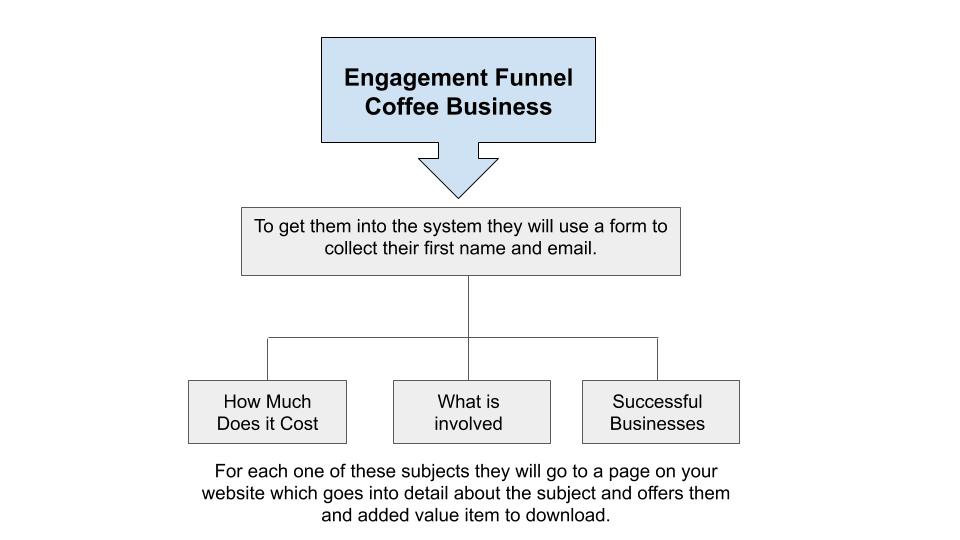
    Needless to say, to create an engagement funnel requires a strategic plan to determine the funnels and what will be offered to further engage with them and eventually do business with you. A good email marketing system is necessary to make this all work.

    Ask yourself these questions:

    What is the goal of my email and how do I want them to engage? Think of three different needs your clients have to use your product or service. Within the email provide them the ability to choose which one makes sense for them.

    Next, make certain when they have engaged with you, you are able to deliver something that provides added value. Allow me to expound on that thought. We work with a franchise company whose vertical is coffee shops. For them when a person discovers them online, they want them to learn about their business model and to become a business owner of their franchise. We have the goal, now let’s look at what they might want to know more about.

    Let’s take you down one of the three funnels.

    My favorite one is How much does it cost

    For this page they could go into detail on what the various investments and expenses are involved with owning a coffee business. Their added value item from this could be a worksheet for them to use to calculate their own expenses.

    What could follow as subsequent emails
    to this subject to engage with them going forward might be:

                            • Ideal credit score and how to improve theirs.
                            • Where to find funding for their Coffee Business
                            • How to get started

    What if they lose interest in this subject?

    Take them down another path by offering them another three choices and an added value item. Make sure that one of the three choices is still within the wheelhouse of what was their initial choice.

    Do this until one of three things happens:

                            1. They decide to get started and contact you
                            2. They refuse to engage
                            3. They opt-out of your engagement funnel.

    Do not overwhelm them with too many emails. These two steps could deliver an email each day for 2 to 3 weeks. If they aren’t engaging and they didn’t opt-out. Engage with them once a month after the initial engagement funnel campaigns. Keep yourself top-of-mind.

    We hope you have found this article to be helpful in creating your own engagement funnel. If you want to learn more about email marketing, we can help you with that!

    Share this article:

    [DISPLAY_ULTIMATE_SOCIAL_ICONS]

  • The Power of Words Through Blog Writing

    The Power of Words Through Blog Writing

    Hello and thank you for joining us to learn more about how to blog effectively to help your business be found in Google searches.

    Let’s first review the article which led you here.

    First, did you watch the YouTube video we mentioned in the article?

    Power of Words by Purple Feather Media. If you didn’t, please do.

    www.youtube.com/watch?v=Hzgzim5m7oU .

    Next, did you purchase the book “They Ask You Answer” by Marcus Sheridan? Please do that as well. I was fortunate to be able to attend his two-day class. I make no royalties in recommending either one of these to you. Just the satisfaction of knowing you will learn some very important facts about inbound marketing.

    So how do you go about discovering what questions to write about?

    Ask Google.

    Some of you might be saying, I have no idea what questions people are asking.

    So here are the steps:

    1. Write down a list of your products or services you offer. Let’s use our business for example.
      1. Website Design
      2. Blog Management
      3. Social Media Marketing
      4. Digital Marketing
      5. Email Marketing
      6. Direct Mail
      7. Logo Design
    2. Do a search on Google with just these three words and the service or product you have.
      1. how
      2. what
      3. should

    See the results of these three searches. Google provides actual searches people have done using these three words.

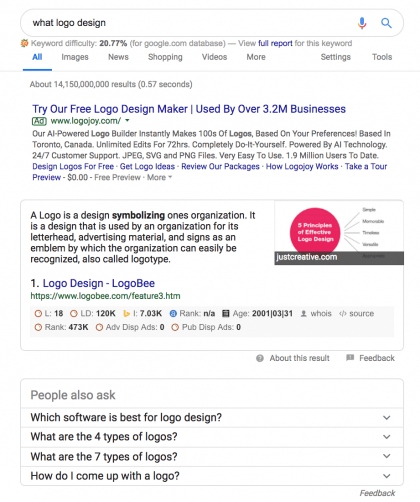
    What you see in the first search of “What Logo Design” is the following:

    First is a paid ad for logojoy.com. They are serious about being found for searches like this and are willing to pony up some money for the search.

    Me…

    I’d rather write a blog and attract people to my website.

    power of words, ask google, blogging


    So, what is in this search that will provide you with the titles for your blogs?


    Below LogoBee you see a section in the search entitled:


    People also ask. That’s where the gold is. You will find your titles there. But what if there isn’t anything that makes sense to write a blog about for your business? Let’s move onto the next series of screenshots.


    So what if there isn’t anything in these suggestions that will work for your business?

    If you click on the last suggestion’s down arrow and close the window, Google will provide more choices. Nothing there that you like? Continue to click on the down arrow and close the window and Google will continue to provide even more suggestions.

    See what I mean with these three screenshots.

    Interested in learning about our blog writing service? Contact us today.

    Share this article:

    [DISPLAY_ULTIMATE_SOCIAL_ICONS]


  • Small Business Saturday — Ideas #21 to #25 — Marketing Secrets

    Small Business Saturday

    Ideas #21 to #25 — Marketing Secrets

    This week’s theme includes some marketing secrets and tips for Small Business Saturday as well as marketing your business everyday. Some I don’t agree with using and others I actually promote and provide.

    #21 – Ladders  

    Let’s start with Ladders. Yes, Linking Ladders, to be precise. If all you want to do on Facebook is have a huge amount of likes but don’t care about the return of involvement. Join a Liking Ladder group.
    Won’t find me there or ever recommend it to any of our clients. No sir. For our clients, we want quality not quantity, even if it is only 100 or 200 fans. Since I know about it, I feel the need to make you aware that something like it exists.  wanted to share this with you, if interested.

    #22 – A Twitter Shortcut

    The number 1 rule with Twitter is to follow first and then be followed. But who do you follow? Take a short cut by finding an active company or organization and look who they are following or have as followers. Then begin to follow who is on their twitter following. It’s a great way to build who you’re following quickly.

    Make sure to be involved in at least three different social medias

    #23 – Every Door Direct Mail or EDDM

    16¢ a piece for postage? Yes, you can. Get the word out through a mass mailing of your area with the Post Office by using the Every Door Direct Mail. There’s no mailing list. Just a few rules on printing. Try out the Post Office tool to create a campaign and give Jackie a call to create your flyer and assist you with the paperwork for the Post Office.But wait, there’s a way to distribute for only 6¢* a piece. 

    #24 – Inserts. Yes, Inserts.

    You thought inserts were only for big box stores? Think again. With a minimum of 5,000* households at an average rate of $60 per thousand households, your distribution cost is only 6¢ per household. Check out MACnet for a list of publications in the Mid-Atlantic Region. They are a great choice for marketing your business.

    *Check on the minimum. Your cost may vary based on the minimum rate.

    #25 – Remnant Space

    Do you know that from time to time publications will offer remnant space? This happens only at the 11th hour of deadline when sales are light. To take advantage of these deals you need to be ready with your ad copy and money. Savings on remnant space can be 50% or more. All you need to do is ask.We hope you enjoyed the 25 Ideas to prepare your business for Small Business Saturday.
    Need help with any of these ideas? Contact Jackie at jackie@gomaava.com

    Share this article:

    [DISPLAY_ULTIMATE_SOCIAL_ICONS]

  • How much does it cost to build a website?

    How much does it cost to build a website?

    How much, you ask? As I was thinking about the answers to this question, my first thought is to thank you for reading this. You realize there should be a cost to building a website. With all the website building programs available where they say, “You can build your own website.” The fact that you want to learn what’s the difference between building your own website or using a professional website developer is important to you.

    Let’s first address the value of YOUR time. You know your business, you have a passion and skills which is your strength and where you should focus your time. When you are drawn into building your website, is it a good use of your time? That is a question only you can answer.

    A Website is Your Online Marketing Presence

    So, let’s look at the difference between a professional building a website and you building your website. First, and foremost, when meeting with our team, we will ask you questions to dig into what makes your business unique. They will become your USP (unique selling proposition) which will set you apart from your competition. When we build your website, it is not just pages of content, this content will be unique to you. When we discover websites where information has been copied from another source we are quick to point out how this affects your positioning on the internet and how search engines, like Google, will actually penalize you for copying the information. We build your website with marketing your business at the core of its content.

    Beyond the website build

    When building your website, you worry about the look of it but what about all the other elements you need to be concerned about? You say, “What other elements?” Well, if you are recreating your website to replace your current website? Are there going to be new pages to replicate the pages on the current website? Are you going from html to php? If you don’t take care of these changes properly you will tumble down in your current ranking on Google. You’re finished building your website. You’re ready. But are you? Google, Ask, Bing, Yahoo, and all those directories that are out there to know you build a website have no clue. Are you going to rely on them to find it or do you push it? There are many procedures that need to follow and be done once a website is built. You can either take your chances the Google will find your website or rely on the professionals to take care of them.

    How much will it cost?

    Now that you know why you should consider a professional to build your website, let’s talk about the cost. I’m sure you will agree the only single answer for this question is, “It depends.” There are several different types of websites to consider for your business. There are landing pages when featuring a single product to market. There are one-page websites if you are just getting started and don’t have a lot of content for a multiple page website. A website with multiple pages is the most popular style on the internet. And, last but certainly not least, an ecommerce website.

    So, let’s look at each of these types of websites styles.

    Landing Page: A landing page can be a single page on your current website. It can also be a subdomain. The best solution is decided upon once we discuss the goal of the landing page and how people will react to the page once there. If it is meant to collect data, a single page on your website will be the best solution. If there are multiple steps taken once they arrive at the page, setting up a subdomain will be the best solution. The cost for a landing page could begin as low as $202 and increase based on the goals you have for the landing page.

    One-Page Website: A one-page website can have the look and feel of a normal website. How it works is that all the content is on one page and the menu jumps to the area that it refers to. It’s a great solution for a business that has a limited amount of products or a single service. Websites of this nature have the look and feel of a large website from information about your business, information about your product or service, your social media connections and a way to contact you. Along with this information, we include all the procedures needed to be found by the search engines. So, along with the one-page build and preparation to be found by the search engines, you are looking at a cost of anywhere from $680 to $1200.

    Business Website: Have enough products and services to support building a business website? We will sit down with you, look at your current website and make suggestions should it need to be consolidated to less pages. Mobile devices have affected the structure of websites. What would be considered as part of a business website? It would include: a home page to feature you and your products, product and service pages, about page, and contact page to mention just the major pages. Of course, along with building the website it will be very, very necessary to reach out properly to the search engines and announce your website’s existence. The cost for a business website can range anywhere from $1200 to $4000.

    Non-Profit & Religious Website: Our websites for many of our nonprofit and religious websites are very similar to our business websites with a couple of features from handling membership dues and the ability to restrict pages just for members. It also provides the ability to build in an event calendar to share what’s happening with the organization or church. Their newsletter can be provided directly through the website with flip page programs allowing them with a way to save money on postage and still providing its members with the look and feel of a printable newsletter. Nonprofits and religious websites benefit from our discounted fees making the site very affordable.

    Ecommerce Website: Ecommerce websites, this is a major website build for your business. There are a variety of products and services from single products, multiple styles and types of products, as well as products with multiple choices to build the products. A lot of details go into building an ecommerce website which includes shipping and taxes. Like the business website it will include the normal pages as mentioned above. Talk about a website that will depend on what it will include. We are looking at the cost of the website on the low side costing $2000 and more. There will be additional costs for security, hosting, and marketing.

    Let’s get together and discuss your website needs by filling in the below form.

    [gravityform id=”11″ title=”true”]


    Updated: August 2020


    Share this article:

    [DISPLAY_ULTIMATE_SOCIAL_ICONS]

  • Monthly Website Maintenance to Monthly Optimization for your Website

    Why the change?

    by Alyse Mitten, Owner of Interlace Communications, Inc.

    For the past four years we have dubbed our monthly focus on your website’s integrity and SEO as Monthly Maintenance. Recently, we have included some speed checks and added even more search engine optimization to your site to what we are doing on a monthly basis and have really ramped up the optimization portion of what we do.

    Then came the dah moment.

    The other day we were explaining monthly maintenance to a new client and they said, “If you are building my new site, why do you already need to maintain it?” Wow!!!! You are right, why do we call it monthly maintenance when merely 5 to 10 minutes is spent to update plugins, themes, and software while the majority of the time is spent optimizing your site to be found in searches. With that said and to better represent what we do for you each month we have changed its name to Monthly Optimization or MO for short.

    So, what is it that we add to your website? It’s words, photos, videos, new blogs, changes that make sense to attract all the search engines to your website. The most important thing is that each month we are doing something and making little changes here and there. Yes, Google likes that. They like to see changes on your site. It doesn’t need to be every day or every week. Just once a month is VERY IMPORTANT!

    So how do we find out what to add to your website? Sometimes, it’s just asking you what you would like to see changed on the site or receiving a note indicating that you want to add some information*. When you don’t have anything to add we turn to some tools that provide us with actual facts about when and for what your website is coming up in searches. Doesn’t mean you are coming up on the first page but it does guide us with the right keyword phrases that will move you up in those searches. It’s information directly from Google. Recently, we set up keyword phrases for a new client straight from the Google Search Engine Console. My feeling is it will give us better feedback than had we asked the client to give us his feedback. It’s sort of like reverse engineering the research for keyword phrases. Another tool we use to check your own website is called SEO Quake. What this does is provides us with the check and balance to make sure we are matching what is provided in the Google Search Engine Console. 

    Our Monthly Optimization program is a very unique way of checking on the effectiveness of your keyword phrases. Yes, we could take short cuts with tools like Google Analytics and Yoast but, frankly, this actually is how people are finding you and I can’t justify providing you with information that you can’t replicate. The way I see it is a search is proof. Oh, and for those living outside of Berks County, rest assured we take all measures to make sure when doing the searches that Google has no idea where we are living by using what’s called the Private Window” on Firefox. You can use that, too. Try it. Go to the three dots to the extreme right side of your search menu bar. Click and you will see that you can choose a “Private Window”.

    *About adding information, allow me to stress something here that is very, very, very important. If you find an article or information on another website that you would like it included on your site, leave it there and link to it. DO NOT INSIST THAT WE NEED TO USE SOMEONE ELSE’S CONTENT. Google frowns on that. Instead write your own words describing whatever it is and backlink to their article.

    So Monthly Maintenance is no longer the name for what we do with your website on a monthly basis. It’s all about Monthly Optimization.

    Share this article:

    [DISPLAY_ULTIMATE_SOCIAL_ICONS]


  • Getting a Jump Start for Marketing Your Business in 2018

    It’s that time again. Time to take a look at your marketing program from 2017 and create a plan for 2018. One of the things we do with our Pick Your Own Marketing Plan clients is meet with them in November or December to look at any change they may want to do for 2018. We discussed their goals and plans for growth? We review what is currently working and tweak what may not be working or needs improvement.

    One of the tasks I do to prepare for these meetings is get a feel for what others may be saying about marketing trends for the new year. Here is a preview of what’s trending for 2018:

    Expiring Content

    One that I hope becomes a trend on all social media channels is the option to expire content. For those on Snapchat, it already happens. There is so much noise out there and old content. Imagine being able to choose what you want to save. I know, for me, past event notifications would be perfect to expire with the exception of the photos from the events. How about you? What would you like to see removed from those things you post?

    Live Streaming Videos

    Video was the major trend in 2016. 2017 saw more social media channels specialized in live streaming videos. In 2018 live streaming videos will continue to become more fine tuned. Last year at this time I really liked Periscope. Then I began to experience Facebook Live. Besides some of the glitches with Facebook Live, I have to admit it is lots of fun to not only use, but also to experience.

    You have to Pay to Play

    Way back when the internet was a baby, it was free to market your business on social media channels like Facebook, LinkedIn, and Twitter. Now, with all the algorithms in place to determine when your posts will be seen, it’s now more difficult for your posts to be seen without investing in boosts and ads. Yes, social media is and will become part of your paid marketing expenses. Plan on it!!!! What I find clients frustrated about is how to manage this new marketing investment, when to continue and when to pause. To explain what I mean by this, recently, we had an experience with a Facebook Boost for a local fundraising event. We wanted to sell tickets for the event on Facebook. We decided to spend $50 to boost the event. Our boost was set to sell tickets for 12 days to fans and friends of fans within a 50 mile radius of where the event was being held. The boost began. Day one it reached 1,000 people and not one ticket purchased. Day two it reached another 1,000 people and again no tickets purchased and day three was the same scenario. Most people set their boosts and just leave things ride. Not me, the goal is to sell tickets. By the third day there should have been ticket sales. So, what did we do? Paused the current boost and researched the organic reach of our posts to see which ones were doing well on their own. I choose one, took the remaining amount of money and applied it to this new boost. What happened is what we wanted to have happen with the initial boost. Ticket sales kicked in the very first day and continued. The rule is never put your Facebook marketing on autopilot.

    Artificial Intelligence

    Recently, I was introduced to artificial intelligence when discussing online advertising through banner ads with some of our publisher’s websites. Imagine having a computer provide the current stats for your favorite major league teams. No, maybe you don’t even need to imagine that because it is always happening. Yes, artificial intelligence is around us. We just take it for granted. Here’s a great example: You post a photo of your friends on Facebook and go to tag the photo. Well look at that, their faces on the photo are already tagged because of facial recognition. You didn’t tag them, artificial intelligence did it. Pretty scary!!! There are more examples I’m sure you can come up with on your own which are delivered to your inbox from LinkedIn, Twitter, and Pinterest. They learn about you and your interests to deliver exactly what you want to receive.

    Text Messaging Increases

    The use of text messages will continue to grow as more and more people opt in to accepting them. How many of you already accept reminders to doctor’s appointments? Text messaging will begin to expand beyond the obvious to include payment reminders, alerts, and offers. Does your business or organization entertain the masses? You have a great opportunity to send text messages to your fans to announce competitions, sell tickets for concerts and events, and announce surveys. Like email marketing, text messaging can only be sent with permission from the individual receiving your messages.

    Email Marketing Continues To Be Effective

    Keep your emails simple. The evolution of emails has gone from multiple columns with a heavy slant on graphics to one thought, one graphic, one call to action, one column emails with everything above the crease. Why? You compete with the multitude of emails in the inbox. Your subject line may be the only key to your email being read. Create a reason for your email to be opened. Segmenting your email lists is key. With less is more, you need to make sure the audience wants to receive the email.

    With these trends in mind for 2018, we’ll be discussing how to implement these marketing changes and ideas into our client’s monthly marketing plans. We hope you do the same for your business.

    Share this article:

    [DISPLAY_ULTIMATE_SOCIAL_ICONS]