Interlace Communications

Category: Marketing Tips

  • How to Grow Your Email List

    How to Grow Your Email List

    Email is one of the best ways for your business to interact and market to customers and potential customers. That means for you, there should always be ideas and strategies in your mind to grow your email list. Do you know how to efficiently grow your email list though? We want to recommend a few ways that may help you increase your email list!

    There is a variety of ways to grow your email list through utilizing tools and assets available to you and at your disposal. Whether it be as simple as creating a sweepstakes, or branching out to new platforms.

    Your Website

    First of all, a great way to increase your list is by providing a sign up form on your website. You can even give them an extra nudge by offering them the chance to win a prize if they sign up or a percentage off their next purchase! Taking advantage of your own assets to grow your email list should be your first priority before diving into other methods.

    Promotions

    Next, you can create promotions that make users want to join! Before creating promotions, you should acknowledge what your potential customers want to see and who would be signing up. This includes creating sweepstakes users would want to join, activities they may enjoy such as a bracket, or the ability for them to share their opinions and answers with polls. This is an easy way to introduce new members into your email list, but you have to consider if they will stick around.

    Other Platforms

    Lastly, you should be using other platforms to attract people outside of your general audience. Social media has grown into a huge community, with billions of users spanning across the globe and across multiple different platforms such as Facebook, Instagram, and LinkedIn. You should be sharing content on these platforms to attract more users to visit your website and sign up for your email blasts. On a similar note, make sure you track data and conduct various testing to see if the platform is worth it. If you continue to collect and analyze data, this can introduce new opportunities or diminish other ideas you had.

    Growing an email list a continued process and is a crucial way for you to keep in contact with your audience and reach out to prospective customers. Be patient. Give all your systems time. At first it may appear nothing is happening, don’t stop. Keep the systems in place and, as you come across new and different options set them up and try them as well. Also, improve some faults you may see on current systems, and keep going! If you need help to grow your email list or want additional clarification on any of the ideas shared, don’t hesitate to contact us!

    Share this article:

    [DISPLAY_ULTIMATE_SOCIAL_ICONS]

     

  • Coming Up With Blog Topics

    Coming Up With Blog Topics

    Trying to decide what you should write your blog about can be difficult sometimes. Finding the right topic that will entice people to read your blog can take some thought, but you also need to view your blog as a way to get more fresh content and keywords on your website. Let’s discuss a few ways on how to come up with a blog topic.

    Keywords

    Like we had mentioned above, blogs are a great way to get keywords onto your website. When working with us to market your business, we help to create a list of keywords for your website. Making sure you have a blog that is focused on these keywords can help increase your search engine optimization (SEO) and how your website is found in searches. Through research, we identify those keywords which need support. Then we create topics for those keywords to write an article which is called a blog. It is important to note, that you need to your keyword mentioned a few times within the blog but don’t use it to heavily. Google will see it as what is called keyword stuffing.

    Time of Year

    The time of year can help you determine what type of blog to write. For example we work with a cleaning company. Their blogs will sometimes be focused around the season and holidays that are coming up. Another blog we work with is an insurance firm, again depending on the season will depend on what type of blogs to write. You don’t want to write a blog about grilling safety in the middle of winter!

    What is Happening in the World

    A few months ago when COVID-19 was a hot topic, we wrote many blogs for our customers about COVID-19. Be timely with your blogs. If something major occurs that you feel would be good to write a blog for your company with mentioning it, do it. Examples for COVID-19 include cleaning tips on how to deep clean, or for an insurance company what you need to do to protect your business as businesses start to open.

    In the end determining what type of blog topics you want to write can come from several factors. If you find you don’t have time to write a blog or your need help, contact us today. We work with many local businesses to ghost write their blogs. We can provide the same for you.

    Share this article:

    [DISPLAY_ULTIMATE_SOCIAL_ICONS]

     

  • Using Emojis for Marketing Purposes

    Using Emojis for Marketing Purposes

    Emoji’s are a nifty way of communicating with friends and family while using funny facial expressions. Ever since 2010, they’ve been used more and more since most people have access to a variety of them from phones and computers. Although, just because emojis are funny and popular doesn’t mean they are always used in the right way or overused. We want to give you a few tips on using emojis and what you should also avoid when using them.

    Before trying to use them, you should decide for yourself if the platform you’re on and the audience you appeal to would like them or not. Using emojis can improve open rates of emails, improve engagement with users, and can help interactions on content. However, if your audience would find them off-putting or childish, it’s best to refrain. At the end of the day, it may take some time to decide if emojis are making an impact, but you’ll need to test them out in different scenarios to determine that for yourself.

    Now we should cover the do and don’ts of using emojis:

    Dos Don’ts
    – Connect the emoji with the topic of your content or business.
    – Use the right ones to engage with your audience.
    – Use to tell a story.
    – Create a game for users.
    – Overuse them in every online marketing piece.
    – Avoid using ones that don’t make sense for your business.

    A few websites we like to use for getting emojis:
    emojipedia.org/ (our #1 choice)
    getemoji.com/

    Emojis are a great addition to how we communicate over the internet nowadays. However, if you’re new to them, you should be paying close attention. Your message may seem clear to you, but that doesn’t do anything if the recipient is confused on what you were trying to say. We’ve used emojis on guides and videos before. So, if you want us to take a look at something you want to send out or you have more questions about emojis, we’re a phone call away!

    Share this article:

    [DISPLAY_ULTIMATE_SOCIAL_ICONS]

     

  • Why you shouldn’t just take a photo from a Google search

    Why you shouldn’t just take a photo from a Google search

    You heard all throughout school about the penalties of plagiarizing your work. Well, the same rules apply for business owners, social media promoters, and content creators. Whether you’re trying to create a nice thumbnail, finding a photo for a blog, or more, you need to identify if you have permission to use the image. We want to cover why using a picture without permission isn’t a risk worth taking.

    The first thing you need to know is: using a picture without permission could leave you with hefty fines or worse. As great as the internet is, it reveals opportunities to steal work. It’s often difficult to tell if a site has permission to use pics/art. Other than a nice request for you to take the image down, there are other consequences that could result in much worse than embarrassment.

    Some of these include, but are not limited to, a lawsuit, SEO rankings being negatively affected, ruining of your brand and reputation, and more! Depending on the situation, some photographers won’t be as hard as others, but that doesn’t create any excuse for you to steal their work. Fines can range from small fees to thousands of dollars, along with possible time in jail. Do you really think it’s worth the risk of finding yourself in a troublesome situation when stock photos can be purchased for a few dollars or even free?

    What are stock photos?

    What are stock photos? Stock photos are images available for use from certain distributor websites. All you have to do is pay a fee for the photos. What sounds better to you, paying a very small price for photos, or dealing with the penalties we stated above?

    We want to recommend a few stock photo websites for you to use.

    Two stock photo websites we personally have experience with include Pixabay.com and Depositphotos.com. We’ve used these for plenty of projects. They both have a wide variety of images you can choose from. Pixabay.com offers free stock photos, so you are free to use them without paying for them, but if you’re looking for a specific photo, you may not find it on Pixabay. Depositphoto.com does charge a fee, and offers more professional photos to purchase. It’s best for you to check these websites and see what they have to offer. Some other popular stock photo websites include Shutterstock, Getty Images, and there are more you can find online with an easy Google search.

    Unless you took the photo yourself or you paid for it, we recommend avoiding using any photo without permission.

    Share this article:

    [DISPLAY_ULTIMATE_SOCIAL_ICONS]

     

  • Creating Facebook Events

    Creating Facebook Events

    Facebook is one of the, if not the most, largest social media platforms available throughout the world. With this platform comes the ability to promote and create events for others to attend. This is a great way to attract attention and get some information out about your event. We want to share with you how you can create a Facebook event.

    Creating a Facebook event is fairly easy. There are two different types available, private and public. The main difference with a private event is that as a host, you need to invite guests and they can accept or decline the invitation. Outside of the invitations you sent out, other users can’t respond or interact with the private event. On the other hand, public events are available for anyone to view and learn about. With both types of events, you’re able to invite other users, edit the event details such as time and date, and promote each one to your own desire.  You can find the events option in the left menu on Facebook and once you click “create event” it’s straightforward from there.

    Now that you know how to create an event, what would you use this feature for? Well, there are plenty of events you can promote with Facebook. Personally, I’ve seen car meets, festivals, graduation parties, and plenty more! One of the biggest concerns when creating a Facebook event is monitoring the responses. When a user finds an event, they have two options to respond. This can either be that they’re interested, or they’re going. Although, even if a user responds, we know life can be unpredictable and something may come up or they don’t feel like going.

    Don’t worry about users who can’t make it though, if you want a strong gathering, you’ll need to promote your event! Promoting is just as important as setting up the event itself. Besides from posting, there are more ways to spread awareness about your event. This includes creating a hashtag for your event, asking others to help share your event, sharing content related to your event, and boosting your event. The earlier you get started only improves your chance of having a bigger attendance at the event.

    Remember, the responses don’t determine how many people are in attendance, you do! Invite guests and keep promoting it. If you need some help trying to promote your event, contact us! We’re glad to work with you and try to improve advertising for your event.

    Share this article:

    [DISPLAY_ULTIMATE_SOCIAL_ICONS]

     

  • Understanding Facebook Premiere

    Understanding Facebook Premiere

    Live streaming has become such a huge way to interact with your audience. It’s also a creative way to share information when engaging with the community. So much so that we have an entire blog to cover the reasons why you should go live on social media! We want to teach you what Facebook Premiere is and how it’s a useful way for you to “go live.” You can even go live without having to actually be on a live video.

    Essentially, Facebook Premiere is a way for you to record a video, edit it, upload to Facebook, and schedule it. It acts very similar to Facebook Live. Firstly, it gives you the ability to interact with users in the comments or through direct messages if you see them reacting to your video. Even if users cannot tune in, it turns into a post that can be seen over and over again. Most Facebook Premieres also allow your audience to set up a Watch Party and invite their friends, family, customers and coworkers to preview the Facebook Live at their convenience.

    The only real difference between Facebook Live and Facebook Premiere is that you don’t have to be present for the video to play. Although, we do recommend you tune in to see reactions and possible comments users will have. It really isn’t necessary.

    What reasons would you have for using Facebook Premiere over Facebook Live though? Well, there are several reasons why this may be a better option for you!

    Pros of Using Premiere

    • Going live can sometimes cause anxiety for people and fear they will stumble over the topic. Facebook Premier gives you the opportunity to create your video ahead of time and eliminate that anxiety.
    • Facebook Premier allows you the ability to record your video ahead of time and schedule it, which will save you the pressure of feeling you need to go live at the exact time you told your viewers you would be presenting a FBLive.
    • Having the ability to edit the video ahead of time gives you the time to remove any unnecessary sections, as well as add transcripts and filters as you see fit.

    If you need to know more about Facebook Premiere, don’t hesitate to give us a call. We’re here to help with all of your marketing needs, including video creation!

    Share this article:

    [DISPLAY_ULTIMATE_SOCIAL_ICONS]

     

  • Importance of Using Videos

    Importance of Using Videos

    Having a variety of content on your website is a great way to increase traffic and keep users on your site. Using the same style of content time after time — again — gets boring. Although other forms of content may take time to create, they provide more benefits to your business. One form of content we recommend using on your website is videos. If you’re worried about time spent trying to create them, just know that the benefits they bring to your site can outweigh the time needed to create them.

    Over the years, we’ve started to consume information in a faster and easier way than simply reading text. That’s easily proven by YouTube being the second largest search engine on the internet, even though it’s the largest online video network. More people find it convenient to consume information through videos. That’s why creating videos may drive more traffic to your website and help users remember you!

    The Pros of Videos

    If someone has the option between a video and written post, they’re more likely to open the video. For many people, it takes more effort to read a post when they could watch a quick video about the topic. Additionally, a visual component can help with retention. That means if you include videos on your website regularly, you may drive people to keep coming back which will ultimately have a benefit on your SEO. Another great part of videos is that it gives you the opportunity to edit and fine-tune with the video to increase the quality.

    With a better quality of production, videos have the ability to spark more thoughts and even emotions to the viewer. Same as television shows and movies, videos have the power to change how we feel whether it be for better or worse. Videos are a powerful tool and if you don’t have any on your website, what are you waiting for? You could even branch out and create a channel on YouTube so you can post your videos there, too!

    Videos of All Types

    Videos will give you the ability to bring to life dozens of different business opps. Besides introductions, you can create tutorials, tell stories, show off ways to use a product, and how your service works. There are plenty of ways in which you can use videos to show users information or express a certain message you want to get across. With this article is a video showing a variety of website styles we create. This is a great tool for us to use to help provide a visual for interested clients.

    If you’ve never tried your hand in creating a video, we have a team who can help you from production, editing, and distribution of your videos! Contact us today and let’s get started!

    Share this article:

    [DISPLAY_ULTIMATE_SOCIAL_ICONS]

     

  • Adding Content to Your Website

    Adding Content to Your Website

    Content is a very important part of your website and you need to ensure it’s one of your top priorities. That being said, it may be difficult to write a blog if you’re unsure of what to include. Let’s help you identify the types of content that should be found on your website and what to include.

    Blogs

    One of the most common types of content is blogs. Blogs provide a great way to improve search engine optimization while also providing solutions or information to readers. Many websites dedicate an entire section of their site for the blogs they create overtime. This lets users check out older blogs which still provide valuable content worth the read. Remember though, for blogs to help with SEO, you need to increase keywords located in them, link to other websites, and have a minimum of 300 words for them to be found. We highly recommend having monthly blogs to focus on different topics that you consider important for users to know.

    Video Content

    If you want something more creative, there are plenty of other forms of content for you to create. This includes memes, videos, animations, and slide shows. You can use these forms of content to not only present a product or service and how it works, but to also tell a story, address changes to the website, tutorials, and more! They may take longer to create depending on the topic, but many users will enjoy a nice and clean visual.

    FAQ Pages

    When talking about tutorials, sometimes customers may have questions about a product or service and with that comes an FAQ Page. FAQ pages are great especially if you find you are having the same questions being asked often. Condense these questions into one page on your website and include your answer with each question.

    Reviews

    While you don’t necessarily need to have a full page dedicated to reviews. (They can be featured on the homepage or even your sidebar.) Reviews are still a great way to get extra content on your website not only for SEO but also for potential customers to read reviews from your customers and their experience with your product and service or just working with you.

    When trying to discover what you can add to your website, there is much more than the basic pages that define what your product or service is. One last note, an about page is insightful for users to read into how your business was created and what goals you have! If you need more help to add content to your website, give us a call. We have a team who can help you with ideas! Check out our website for more information and contact us when you feel the need.

    Share this article:

    [DISPLAY_ULTIMATE_SOCIAL_ICONS]

     

  • Why Should You Encourage People to Engage?

    Why Should You Encourage People to Engage?

    In our last blog, Engaging with Your Audience, we covered why and how you should engage with your audience. In this blog we want to discuss why you should encourage people to engage with your content.

    Do you often wonder why you have so few interactions with your posts? While many people can view your post, only a few may actually consider commenting. That’s why you need to take extra steps to encourage people to engage with your business!

    The more interaction your post receives, the more engagement and reach it will have. This means you should encourage your audience to react, comment, or share your posts daily! Try not to spam their feed with the same message. An example might be, you are viewing a lot of videos on YouTube, you may have seen a video where the creator asks people to like, comment, and share the video. In a sense, this is the same thing you want to do.

    A creative way to ask for reactions and shares might be to ask them questions in posts where they may want to express their opinion. It could be simple and minimal questions such as, what’s your favorite movie right now, how are you doing, and what do you like doing on the weekends. These questions may seem unimportant, but it is a simple way to engage with your audience to have them share their answer and drive more engagement.

    At times, you might want to include more important questions. These questions should focus on receiving feedback about your content and what your audience wants to see next! Ask them what they thought about your blog or what they want to see next. This could even give you more ideas of what you want to work on for the future. See what works best and hopefully you’ll get some slight increases in engagements on your posts.

    It isn’t only a direct question that can drive engagement on your post. Quality content that has messages or information for your audience can be enough to generate comments or questions. Not every post will be a smash hit. Always make an effort to provide a message for your audience to trigger engagement.

    If you’re having trouble getting your audience to engage with your content or you need help figuring out what to post, let us know! We know writer’s block can be a major obstacle. We can help.

    Share this article:

    [DISPLAY_ULTIMATE_SOCIAL_ICONS]

     

  • Engaging with your Audience

    Engaging with your Audience

    As a business, you should be giving your all to interact and engage with your audience as it grows. That’s one of the biggest accomplishments when marketing your business, growing your name, and when you’re just starting out it may be hard to engage with a small audience. That’s why we want to focus on how to find your target audience and what you should do when engaging with them!

    Importance to respond to your audience?

    It doesn’t only create a better outlook of your business for the individual you’re engaging with, but it also shows others what your response may be. You want to do your best to ensure you’re committed to focusing on what they have to say in a positive and professional way.

    Before trying to engage with your audience, are you sure you’re on the right platform?

    With the dozens of different social media platforms created, you want to stick to those which provide you with the correct audience. One question to ask yourself is, are you business-to-business or business-to-consumer? If you’re business-to-business you should create an account and business page on LinkedIn, if not you are free to find a social media platform which will work best for you!

    Now that we’ve addressed those questions, we can discuss how to interact with your audience.

    No matter what content you provide on your social media, whether it be pictures, videos, or a livestream, you should always reply to a question, reaction or comment. Not only is your reply going to be seen by the person who commented, but everyone who reads the reply. This means you should be focused, professional, and concerned with what your audience has to say. If it’s a major issue, you can even privately message them to discuss with them in a less visible setting. Minimal as it may seem, one bad reply could develop into a major issue if not addressed.

    Remember, you want to also encourage your audience to engage with your posts and you should use hashtags. Interested in knowing more about hashtags? Learn more at Understanding Hashtags and Why They’re Important.

    Need help to choose the right social media platform or to find your own audience? We have experience on multiple platforms and how to reach your audience.

    Share this article:

    [DISPLAY_ULTIMATE_SOCIAL_ICONS]

     

  • Understanding Hashtags and Why They’re Important

    Understanding Hashtags and Why They’re Important

    When you’re posting content, do you ever include a hashtag along with it? If you answered no, you may be missing out on extra attention to your post. If you don’t understand what a hashtag even does, we have you covered. We’re going to discuss what hashtags are and what they can do for your content on social media.

    Depending on the platform, they may help you in the long run! Social media platforms such as Twitter and Instagram group posts that include specific hashtags into a group. These groups and sometimes called folders can be viewed if someone searches for that specific hashtag, so your post may be found among plenty of others. Other platforms such as Facebook and Snapchat don’t utilize hashtags to their full extent. These platforms do not group together posts which means that if you don’t use hashtags it will not reduce performance.

    Hashtags allow you to stay on top of what’s trending, providing a boost in traffic heading to your posts. Same as encouraging audience members to share posts, hashtags can increase your audience. Identify what may work out in your favor. Do not overuse hashtags for the sake of using them. This can have a negative affect as well.

    When using hashtags, remember to use ones that are relevant to your business and/or the content of your post. Using a bunch of meaningless ones only looks unprofessional and makes your account look like a spam account. You should figure out what hashtags are being searched for and try to connect them to your business if they work. If they don’t work, don’t push them meaninglessly.

    If there is a certain event going on that you want to create a voice for your business, research what hashtags are being used and trending and then include them. Voicing your business’ opinion on certain topics or events may be beneficial to your business!

    If you need any form of social media assistance, don’t hesitate to contact us. We are here to help market your business both through online and print marketing.

    Share this article:

    [DISPLAY_ULTIMATE_SOCIAL_ICONS]
     

  • The Pros and Cons of Advertising on Facebook

    The Pros and Cons of Advertising on Facebook

    One of the biggest platforms online is Facebook, which is used by billions of individuals all over the world. Not only is it for daily social media users and organizations, it also can be used by your own business to take advantage of their advertising options and reach the audience you want. Although other social media platforms may work better depending on the audience you want to reach, Facebook may be the platform you want to choose to round out your marketing.

    Facebook provides two options when it comes to advertisements: Facebook Ads and Facebook Boosts. We’ll discuss each of the options and their pros and cons.

    Facebook Ad

    When creating a Facebook ad, there are several options to define and explore to reach the specific audience that you want.

    • Placement – Decide where to place your ads. Locations can include the Facebook News Feeds, Facebook Messenger, and Instagram.
    • Lookalike Audiences – Depending on the size of your audience, you can find a similar audience with demographics Facebook can provide to you by matching your current audience.
    • Scheduling – Choose the time and days when you want to deliver your ad. You can test this to find out what time works best.
    • Customer Conversion Tracking – Allows the ability to follow tracking of clicks that come to your website.

    Facebook Boost

    After posting to Facebook, if you notice a post is doing better than others, you can decide to “boost” it. Boosting will push your post to more users who may enjoy your content. Quick note, some posts don’t have the option, such as events, controversial items such as tobacco and guns, and political candidate endorsements, just to name a few. When you decide on a post to boost, before you finish confirming the boost, you can edit options such as what your budget will be and how long you want it to appear. You can even add more to your budget and extend a boosted post if you see it is doing very well and want more of a reach. Note, once a post is boosted you can not edit the content of the actual post.

    Pros and Cons

    So, is Facebook advertising right for your business?  Here are a few pros and cons.

    PROS CONS
    • Ad Tracking
    • Audience Options
    • Easy to Use
    • Improves Audience Engagement
    • Budget Settings
    • No Guaranteed Reach
    • Users Ignoration
    • Possibly High Costs
    • Running out of advertising space

    When looking at Facebook, it’s a very populated platform for you to get started on, but success may vary. You can’t always expect a successful return when advertising or boosting posts, so you have to work with it to find out what your audience likes while also trying to reach new people. Test it out and see how it works for your business, explore your options and mess around with the content you provide your audience.

    If you want to get started, but think you may need extra help taking that first step, contact us and we can help. Even if you’re stuck or have certain problems you can’t find a solution, let us know and we can be of assistance!

    Share this article:

    [DISPLAY_ULTIMATE_SOCIAL_ICONS]

     

  • Waze for Business

    Waze for Business

    When discussing online marketing platforms, we all know the usual ones. That includes Facebook, Google, and similar social media platforms. Another platform that is available for you, that may not have thought of, is Waze, the popular GPS app. What you may not have thought of is how it can help get your business’s name out there.

    For the average user, Waze is a classic GPS application that also allows the ability to communicate with other users by marking on the map where police are sitting, where construction is occurring, where a car is left, and more. On the business aspect, there are advertisements available on the app that act as “mini billboards” to direct individuals to your establishment. Before diving into more information about Waze, this platform may work better for some businesses than others, so you may need to perform a test run to see if it’s worth your time and money.

    With Waze they provide three different advertisement options, with different functions depending on which one you decide to use.

    Pin

    This ad pops up when someone is driving close to your business. If someone clicks on the pop up, it will provide your business name, logo, a short description, and even a button that calculates the best route if they decide to come to your business.

    Search

    This ad is able to help you stand out before other surrounding businesses. When searching for nearby businesses, Waze will provide more details about your location and you may appear first out of the handful of businesses that are in the area.

    Zero-Speed Ad

    With this option, it’s only available for Local Plus Waze users. With this your ad will pop up along with a button to calculate the best route when an individual comes to a stop for 3+ seconds near your business. This works well if you’re located near a traffic light or an area with high traffic.

    A helpful function of Waze is that you can set your own cost to fit the budget for your business, see your ads in real time and the potential they have to increase the number of people traveling to your location or clicking on your website.

    They provide a multitude of statistics about your ad. From our own experience with Waze, they calculated the overall views our ad received, how many clicks it received, and the number of people that clicked on the button to calculate the best route to get to our location. Another helpful tip is that you can set it to only show when your business is open and you can check out the activity you had during the days you were open.

    Depending on the business, Waze could be a new platform for you to consider. If you’re unsure about Waze, take a test run and see how it performs. If you have more questions about Waze you can contact us or check out further details on their website. It’s a platform different from Facebook and Instagram which may bring more people into your business! As a Waze Certified Partner we can help you set up your account and get started.

    Share this article:

    [DISPLAY_ULTIMATE_SOCIAL_ICONS]

     

  • Last Minute Holiday Tips

    Last Minute Holiday Tips

    Among the dozens of different businesses trying to make the most out of the holiday, you want to create ways to market your business and create top-of-mind awareness about your business. You’re not the only person trying to take advantage of the holiday season, To help you plan your marketing for the holidays we put together a booklet of helpful last-minute holiday tips.

    For those last-minute shoppers

    Create a plan on what type of sales you plan to offer for last minute shoppers and how you’re going to attract more customers into your establishment!

    Below are a variety of ideas:

    • Choose a cause for your business to support for the holidays and include a donation button on your website for the charity
    • Create interesting specials that intrigue the shoppers
    • Create a 12 days of special deals event
    • Put together a mystery box, shoppers will gravitate towards the offerings

    Remember to push, push, and push! The more you market your business holiday activities, the more likely people will see them. In our Last-Minute Holiday Tips Booklet, we provide you with templates to use for these ideas and more! All you have to do is print them out and fill them out!

    On one last note, make sure you involve your team and get their feedback. Multiple heads are better than one, your team can even think of more ideas that we may not have thought of! If some of your strategies work, mark them down as successful and use them next time. Experimenting with different ideas helps show you what works with customers and what you should stay away from.

    The holiday season is busy enough as it is, with all the shopping, cooking, cleaning, and other priorities we have, but we only have 24 hours in a day! Fill out the form we have provided to receive our Last-Minute Holiday Tips booklet to help ease some of that holiday crunching. If you need more help, you can give us a call. We’re here to help you.

    The more you get into the holiday spirit and spread your name around, the more chance you’ll see new faces at the store and more purchases online!

    Download Your Copy of our Last Minute Holiday Tips

    [gravityform id=”7″ title=”false” description=”false”]

    Interested in learning more about how we can assist you with marketing? Contact us today.

    Share this article:

    [DISPLAY_ULTIMATE_SOCIAL_ICONS]

     

  • How to Prepare for a Live Video

    How to Prepare for a Live Video

    If you plan on live streaming, before you jump right into it, we wanted to fill you in on a few key tips and what you can do to prepare. Starting a live stream is as easy as ever, but you still want the quality to be as best as possible, and if you’re a new user you may stumble upon a few issues.

    Before starting, you want to be prepared such as if it’s a business meeting. It may not be that serious, but being prepared only improves your chances for having a professional and high-quality live stream which audience members will want to view. Let’s dive into what you can do, first, get started.

    Topics

    Before you even begin, the first thing you need to decide on is the topic of your livestream, especially if you plan on doing these regularly!

    Where to Stream

    Once you have decided on the topic, the next thing is to decide where you want to stream. There are several platforms you can now livestream on. Depending on the topic may help you narrow down what platform you want to use to stream.

    Equipment to use

    You’ll want to make sure you have the proper equipment for live streaming. Your smartphone may be just fine, but you can also take it up a notch with higher quality items, which will help you produce a higher quality live stream.

    If you want to improve sound and video quality you should consider a few factors. Conduct your stream in a quiet environment, with minimal interruptions or external issues to worry about, such as cars making noise outside or coworkers coming through the door. You should also ensure your internet connection is secure and strong. The worst part of livestreaming is if you start to freeze up or delay while it is going on!

    Prepare for Streaming

    You won’t be reading from a script, you should have notes jotted down on what you want to cover and have it where you can glance at during your livestream, should you need it. You also want to make sure you’re engaging with the audience. Have a topic that allows you to engage with your users and respond to a few of the questions or comments that you may encounter.

    Promote it

    Lastly, create hype around your live stream and promote it before it even occurs. No matter how big your audience is, if you don’t let people know, they may never realize you went live if you don’t tell them! Use posts to promote your live stream and even create an event notification that lets users know what date and time you’ll be live streaming. If you repeatedly tell your audience you’ll be going live, it only improves the possibility that more viewers will tune in once the time hits.

    Not every live stream will go how you want it, there will always be a few problems to take care of, but it’s better to be as prepared as ever. If you need help figuring out how to live stream, let us know! We can help you prepare beforehand and figure out what material you want to cover to keep viewers tuned in.

    Share this article:

    [DISPLAY_ULTIMATE_SOCIAL_ICONS]


  • Why Should I Go Live on Social Media?

    Why Should I Go Live on Social Media?

    Media platforms are always introducing new ways for you to engage with your audience. Overtime, more platforms such as Facebook and Instagram have been introducing the ability to live stream to your audience, whether it be for fun or to cover a topic in mind. There’s been major success in live streaming on popular websites such as Twitch and YouTube over the years. We want to cover why people live stream and how it can benefit you.

    Simple

    Platforms have made it simple and easy for you to live stream to your audience. Even with your phone, you’re given the ability to start a broadcast. You should consider preparations before live streaming to have a more quality driven stream. The main purpose is to attract viewers and show the value of your product and service to them. If they stick around for only a few minutes, it’s worth it!

    Creative

    Not only is live streaming a creative way for you to do something new with your business, it also gives you the opportunity to engage with your audience. If you create a routine, this lets you communicate and discuss with users what they want to see and what you may be able to cover the next time you live stream. The biggest obstacle however, is trying to start or keep users tuned in. Not everyone may work out how you planned, but you can focus on certain information you want users to know or just check in on your audience.

    Plenty of Reasons

    There are plenty of other reasons for you to go live too! You can use live streams to introduce a new product or service you have coming up, promote special events, conduct a Q&A, demonstrate how to use your product, and more! The opportunity for live streaming is endless, you just have to focus on pulling in users with your exciting idea. Even if users don’t get to watch it while you’re live, they can still check it out later when they have more time. You can even encourage users to check out other content relating to what you’re performing, which can let them learn more and get your content more attention.

    Drive engagement for your business

    If you want to drive more engagement for your business, live streaming is a great new idea for you to put in the works. On Facebook, it’s shown that it increases engagement and interactions from users, so what are you waiting for? In another blog, we’ll cover what you should do to prepare for a live stream, but when you’re starting out you can test what works for you. It’s not rocket science when starting out, platforms provide plenty of further information on how to stream to your audience.

    If you need help implementing live streaming into your business, you can ask us for help. We have experience, so we can help you improve your equipment set up or help figure out more ideas to stream about.

    Share this article:

    [DISPLAY_ULTIMATE_SOCIAL_ICONS]


  • Social Media Image Sizes

    Social Media Image Sizes

    When adding photos to your social media page, you want them to look as clear and professional as possible. This means your photos shouldn’t look blurry and they shouldn’t be cut off at the wrong spots. That’s why it’s important to understand the pixel dimensions of each social media platform.

    We want to share a list of photo dimensions of the popular social media platforms you may use, but we must note that sizes may change depending on the platform. Should you notice a social media platform made changes, revisit our website for the updated information. When viewing the dimensions, they are set by width x height. If there is a byte storage capacity next to the dimensions, that means the image file size can’t be greater than that.

    Google My Business

    Profile Image: 250 x 250
    Cover Image: 1080 x 608
    Post Image: minimum size of 400 x 300

    The maximum file size that can be used is 5 MB.

    Facebook

    Cover Image: 820 x 312 (minimum 400 x 150)
    Profile Image: ≥180 x 180
    Shared Post Image: 1200 x 630
    Shared Link Preview Image: 1200 x 628
    Event Image: 1920 x 1080

    For desktop images, your profile image will appear 170 x 170. As a thumbnail for your Facebook posts, it will appear 32 x 32.

    Twitter

    Header Image: 1500 x 500 with a maximum file size of 5 MB.
    Profile Image: 400 x 400 with a maximum file size of 2 MB.
    In-Stream Image: 440 x 220

    Even though your profile image will appear as 200 x 200 on most devices, try to upload a photo that is 400 x 400. It will provide a better quality image.

    Instagram

    Profile Image: 110 x 110
    Image Thumbnail: 161 x 161
    Shared Photos: 1080 x 1080
    Shared Videos: 1080 pixels wide

    Instagram Stories: 1080 x 1920 (minimum 600 x 1067) with a maximum file size of 4 GB.

    Pinterest

    Profile Image: 165 x 165 with a maximum file size of 10 MB.
    Board Cover Image: 222 x 150 (minimum 55 x 55)
    Pinned Image Preview: 236 pixels wide

    LinkedIn

    Banner Image: 1584 x 396 with a maximum file size of 4 MB.
    Profile Image: 400 x 400 (minimum 200 x 200) with a maximum file size of 10 MB.
    Company Cover Image: 1536 x 768
    Shared Image: 350 pixels wide
    Shared Link Preview: 180 x 110
    Company Logo Image: 300 x 300 with a maximum file size of 4 MB.
    Company Cover Image: 1536 x 768 (minimum 1192 x 220) with a maximum file size of 4 MB.
    Company Page Banner Image: 646 x 220 with a maximum file size of 2 MB.
    Square Logo (appears in company searches): 60 x 60 with a maximum file size of 2 MB.

    YouTube

    Channel Cover Images: 2560 x 1440 with a maximum file size of 4 MB.
    Channel Icon: 800 x 800
    Video Thumbnail: 1280 x 720

    Images at 2560 x 1440 will be optimized for TV screens, while desktop computers will display them at 2560 x 423. Mobile devices will display YouTube cover art at 1546 x 423, while tablets will display them at 1855 x 423

    We hope this quick and easy list is helpful when deciding what image to use next. Remember, dimensions may be changed at any time depending on the platform! If you need any help with your business and post marketing feel free to contact us!

    Share this article:

    [DISPLAY_ULTIMATE_SOCIAL_ICONS]


    Interested in more Creatives Assistance? Get your copy of our Creative Assets Handbook! It is full of information for creating posts and images!

    [gravityform id=”6″ title=”true”]

  • Importance of Proofing and Proofing Tools to Utilize

    Importance of Proofing and Proofing Tools to Utilize

    As youth, we’ve always been told to check our work and proof-read. You may recall hearing it for the first time in English class during your early years of elementary school. Well, guess what? That phrase hasn’t changed and when marketing your business and sharing content it is just as important to remember to double or even triple check the content you plan to share publicly.

    If you haven’t been proofing your content, you need to re-evaluate the process you’re following. Nothing is worse than searching online for a specific topic, and the blog or post you come across may be littered with errors or mistakes.

    Proofing is a sense of ensuring your work is up to par. You take a sense of accomplishment in the content shared. Just as you write the content, you should be thorough in checking for any errors.

    Luckily, you don’t need to simply rely on the minimal built-in tools provided by Microsoft Word or Google Docs. There are plenty of tools online that can make it fast, easy, and efficient to check your work. Don’t forget though, having your team members preview content beforehand is a great idea to receive feedback or thoughts to improve your work.

    Below is a look at two proofing tools that can be used online. Some may provide upgrade plans depending on what you’re looking for.

    Grammarly

    Grammarly is most likely one of the easiest proofing tools to use. You can simply copy and paste in the content and it will evaluate the work and highlight errors and adjustments that may be necessary. It even goes further by providing different tones it can search for and can make corrections while writing emails, social media content, or other projects!

    Hightail

    Another unique tool is Hightail. Hightail allows you to easily collaborate with other users and work together. In one location you can share your files and team up with friends or coworkers to work together on a project at hand. This tool also includes the ability to manage what projects your team is on task, the ability to work with mobile devices, and multiple plans to choose from which upgrade storage and add more features.

    There are plenty of other tools on the market, but these two are some of the most well-known and highly rated tools that can be utilized for your proofing needs.

    Having a writer’s roadblock? We are also here to help you determine what you should share to market your business. Give us a call.

    Share this article:

    [DISPLAY_ULTIMATE_SOCIAL_ICONS]


  • Benefits of Using Hootsuite for Social Media Scheduling

    Benefits of Using Hootsuite for Social Media Scheduling

    Social media is a major part of marketing your business and creating a vision for your brand. Hundreds to thousands of people see your business online so you want to be able to keep up with your social portrait. One tool that is efficient and helpful to use across multiple social media channels is Hootsuite!

    These are the benefits of using Hootsuite and the reason why we recommend using it!

    Track Social Media Channels
    It’s hard keeping up with all the different platforms your business may be found on. Hootsuite allows you to keep your eye on multiple platforms at the same time! This means you can check in on major platforms such as Instagram and Facebook, but at the same time look at other platforms you may be just beginning to use. This includes the ability to schedule posts for certain channels, engage with your audience you have on each platform, and hold all your social content in one place!

    Connect with your Audience
    Besides scheduling posts, you can even converse with and support customers that may initiate a connection with you or have a problem about a product or service. Instead of needing to open various windows and log into multiple accounts, you can use Hootsuite as your home hub to not only reply to individuals, but to also track your audience across each platform.

    Involve your Team
    If you think you need to manage Hootsuite alone, you’re mistaken! It may be tricky to learn at first. Once you learn it you can bring your team into the mix to help manage your social media and provide a single voice for your social media message. One key detail when inviting other members on your team is that you can not only work together with them, but you can set up a mini calendar of sorts for tasks you’ve given them, you can make sure they’re working on the right content by locking access to areas they don’t need to be, and you can communicate together to help improve workflow and connect ideas!

    Hootsuite provides several payment plans for you to choose, along with a free trial for the first month if you want to explore the “professional” or “team” option! Before you make any final decision, make use of the free trial and compare the different plans they provide to figure out which one fits your needs! Let us know how it goes and if you have more questions about Hootsuite or how to manage your social media profiles contact us to discuss your marketing strategies!

    Share this article:

    [DISPLAY_ULTIMATE_SOCIAL_ICONS]


  • Photo & Image Tools To Use

    Photo & Image Tools To Use

    Picture Your Post…

    Tools to create a variety of posts

    When creating your marketing posts or presenting any content to possible customers, you want to be creative and ditch any bland or dry aspect. This should include adding lively photos to help spruce up content! With that said, we wanted to give you two options to choose from if you don’t know where to start. Although there are plenty of image tools online, we recommend you check these out before editing any pictures.

    Canva
    The first tool we want to share with you is Canva [canva.com] Canva has a plethora of capabilities and design possibilities for you to create. One great note about Canva is that it lets you create graphics for a variety of layouts, such as an Instagram post, a restaurant menu, an average presentation, and more! It gives you the ability to not only edit pictures, but use dozens of shapes and fonts to bring your design to life. Of course, it also adds the function to upload your own photos, too.

    Although you can use Canva for free, they have a pro option at $9.95 per month and an enterprise option at $30 per month. Essentially, the more expensive the payment, the more you have access to in regards to creatives and storage. If you’re interested, we encourage you to check out their website, which has plenty of information on how to use Canva, more in depth analysis of pricing options, and plenty of graphics to look at which were made on Canva itself!

    PicMonkey
    The next tool we want to share is PicMonkey [picmonkey.com] Picmonkey has more options editing techniques outside of graphic design, such as branding, events, and social media. Unfortunately, there is no free version available, but you can try a 7-day free trial! The basic version is $7.99 per month, pro is $12.99 per month, and the team version is $33.99 per month. The best part is that many imagery tools aren’t only for professionals, and the same is said for PicMonkey!

    On their website, you can find dozens of tutorials, tips, and advice to help you grow your business and improve the quality of your posts. From the most general of questions, to the very specifics, you can find a multitude of information within their community of users. Don’t let the price scare you away!

    These two tools are some of the most creative, helpful and explorative image tools when it comes to learning how to edit photos and introducing your own style. Users love flare and with both of these tools you can learn, in depth, how to use them and what possibilities you have at hand. If you have questions about these tools or need our help with marketing purposes, give us a call, we’re always here to help!

    Share this article:

    [DISPLAY_ULTIMATE_SOCIAL_ICONS]


    Interested in more Creatives Assistance? Get your copy of our Creative Assets Handbook! It is full of information for creating posts and images!

    [gravityform id=”6″ title=”false” description=”false”]

  • The Importance of a Subject Line for Email Campaigns

    The Importance of a Subject Line for Email Campaigns

    That’s it!

    Three to Five Words

    When working on creating an email to send to customers, one of the most important parts of the email is the subject line. You need to think about how to engage with your audience to encourage them to open it? Most times, this most important part of an email is overlooked and all the focus is placed on the message within your email.

    Are you curious as to why we make this statement?

    We’ll let you in on some information to help you realize why the subject line can be considered the most important part of your email and how to create them.

    First, what do you think your recipients of your emails will notice right off the bat when receiving your emails? The parts of an email that land in your inbox and can be seen are: the sender of the email, the subject line, and the preheader. The subject line should provide a minimally worded phrase as to what the email contains. It should be interesting enough for a person to want to open it. Also, such as the little brother of the subject line, the preheader is presented to help support it. When typing up your email you definitely don’t want to overlook these two crucial parts.

    One rule we follow here at Interlace Communications is ‘The Rule of 3.” The first three words in your subject line should be riveting enough to push an individual to open the email. If you use a boring line that you may use several times such as “Our Monthly Newsletter,” the recipient is likely to trash it. Remember, although you want a compelling subject line, don’t make it too long. Often, the user will be viewing their inbox on a mobile device, which pushes you to find that “short and sweet” phrase.

    If the individual isn’t convinced enough to open the email already, they will read the preheader to gain further insight. Although it acts as a little brother, it’s important to help clarify what’s contained inside the email. However, don’t summarize the email entirely. Remember, you shouldn’t simply copy and paste the subject line or change out a few words. Create a preheader that works together with the subject line to push them to open it.

    You can even ask a few family members, friends, or coworkers what they do when checking their inbox. It may seem like a small part, but you’d be surprised to hear how many may check the subject line and come to a decision of reading or trashing it right then and there. If you have any more questions about email marketing or need help creating impactful email templates, contact us today!

    Share this article:

    [DISPLAY_ULTIMATE_SOCIAL_ICONS]


  • What Email Marketing Platform Should I Choose?

    What Email Marketing Platform Should I Choose?

    Eeny, meeny, miny, moe —
    Which one stays and which ones go?

    Email marketing is one of the main ways to communicate with customers and to increase the number of users who reach your site and use your services. With more users gaining access to the internet daily, you want to take advantage of email marketing. There are a multitude of platforms you can use and they each offer a variety of benefits for reaching out to your customers.

    Each email platform may include similar or different features and tools when comparing one another. With our past experience, we want to focus on three that we consider effective, with plenty of features and benefits you can use to help market to customers.

    Constant Contact

    Here at Interlace Communications, we have a certified solutions provider for Constant Contact on staff. Constant Contact allows easy functionality to help you reach a wider audience. Their pricing is based on the amount of contacts you have as well as the additional features you would like to add. The minimal price to start is only $20/month and has simple and easy actions to help grow your email audience.

    Constant Contact also includes exclusive features such as event marketing, social media marketing, and surveys, These additional features help you reach a much wider audience that may be on other online platforms such as Facebook, Instagram, and LinkedIn. If you’re new to email marketing, Constant Contact is well known to be beginner friendly. They also have mobile capabilities, automation to add individuals to your email list, tracking your emails, and much more! If you’re interested in learning more about Constant Contact give us a call at 484-709-6564.

    Mailchimp

    Mailchimp is a cloud-based email solution. This platform works to centralize your marketing needs in one place and to help focus on the audience at hand. When dealing with email marketing, you want to analyze your data and use this to fine-tune your email messages so it appeals to future customers. MailChimp is a great all-in-one tool to use to grow and progress. The ability to promote your business on a platform that connects to other platforms helps grow your email marketing. Mailchimp is great for those just starting out because they do offer a free version. Keep in mind the free version is limited but maybe what you need to get started! If you would like to discuss Mailchimp further, contact us today.

    Robly

    Robly is an innovator in using AI software to help boost your email marketing audience. It also includes an exclusive feature of photo editing. The AI they use has separate functions that help deliver your email to your audience at the time they normally check their mail. This is so the email isn’t ignored and buried upon dozens of others. The other technology used, OpenGen, allows you to resend an email if it wasn’t viewed the first time. This is a great tool as it helps your open rate increase. They also provide helpful tools to share your emails on social media and how to fine tune the appearance for mobile users. If you’re interested in learning more about Robly or want to sign up, contact us today.

    These three aren’t the only email platforms available for usage, but we highly recommend to check these out first. Whether you’re new to email marketing or have been doing it for some time now, these platforms provide efficient and helpful ways to increase the number of individuals who open your emails. If you need any help, you can contact us. We are here to help you make the best decision for your email needs!

    Share this article:

    [DISPLAY_ULTIMATE_SOCIAL_ICONS]


  • Why do customers abandon their cart?

    Why do customers abandon their cart?

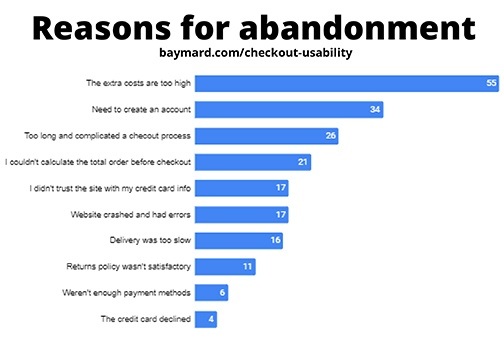
    In a report from Baymard Institute we learn the reasons why customers abandon their cart on mobile checkout. This report was distilled and disseminated from 7 studies, 9,221 participants, and 37,000+ hours of ecommerce UX research. I would say the facts shared have been studied and processed to provide us with solid reasons to fine-tune and make changes to your ecommerce experience for your clients.

    This article is only a snapshot of their findings. I encourage you to read through their whole report to learn all the facts they shared.

    70% of mobile carts are abandoned

    Oh my, why?

    https://view.highspot.com/viewer/5d5dacd1b7b7394d30e3573c

    Let’s look at the number one reason. It’s not that the ordering experience is the problem or the website is too clunky, no. It’s because of those end fees for taxes, service charges, and shipping.

    Fees are Too High

    55% of those in the study indicated that their number one reason for abandoning the cart was because of the extra costs being too high. These are fees you have complete control over.

    Here’s an example of exactly this. As we began to work with a client who wanted an ecommerce site, he complained how people would leave his site to go to Amazon to complete their purchase even though the items on Amazon were more expensive. The reason was clear to us that the reason they were doing this was because of their Amazon Prime accounts and free shipping. When we increased their price to reflect Amazon prices and eliminated shipping on their site, we created no reason to buy from Amazon.

    Creating Accounts

    The next reason, having to create an account. They want to shop as a guest just like when they are in any brick and mortar store. Think about it, when you shop at any store, you don’t need to share any personal information with them, not even your email address. When you go to check out and swipe your credit card, there is no need to provide a phone number or email address. Depending on your type of product, it may be a once and done experience. Let them shop as a guest.

    A Complicated Process

    The third reason, too long and complicated a checkout experience. Again, this is something you can control for them. Categories of items, individual items with sizes and colors, when selling products with variables like that keep it as simple as possible. Test it with some of your best clients before going live with the final checkout experience. Keep everything relevant, too. Don’t bog down the customer’s experience with products that might not apply to their interests. Less product choices of the right products = more products in the cart.

    The fourth reason goes back to the number one reason, they couldn’t see those additional prices and be able to calculate what they were going to be before they checked out. That, frankly, is an error in the set up of the checkout process, point blank. You need to discuss this with your website developer to finetune this process. Again, think about your experience at a brick and mortar store. You know there will be tax, yes, but what about the shipping cost. Oh, there isn’t any.

    The fifth reason is, lack of trust in your credit card processing system. By making certain the set up for the information required for their credit card appears like it would on their card, they will feel more comfortable completing the process of payment. Having logos of the credit card processing choices such as Authorize.net, Paypal, Stripe, and Square also reassures them of the process. More important as well is having a privacy policy and readily accessible to them to see is another reassurance that you are in compliance with GDPR Privacy Laws. We make a point of including the privacy page for all clients without any cost for the build of the page on their site.

    Other reasons for abandonment include:

    • Website had errors and crashed
    • Delivery was too slow
    • Return policy wasn’t satisfactory
    • There weren’t enough payment methods
    • The credit card was declined

    Checklist to finetune your customer’s buying experience

    This report also identified ten ways companies can improve a shopper’s checkout experience on mobile web and app.

    1. Offer Guest Checkout and Make it Prominent
    2. Provide Appropriate Touch Keyboard Layouts
    3. Auto-Format Space in Credit Card Field to Match with Display on Physical Credit Card
    4. Format the Credit Card Expiration Date Fields to Match Physical Card
    5. Display a Progress Indicator
    6. Set Billing Address = Shipping Address by Default
    7. Show Order Total Before Asking for Payment
    8. Include a ‘Place Order’ Button at the Top of Order Review Step
    9. Don’t Ask for Duplicate Information
    10. Provide Third-Party Payment Options

    Learn more about the additional reasons for abandonment and the ways to finetune your customer experience by downloading their complete report by (1) downloading their report here or give us a call and we’ll meet to discuss these and what we can do to help you.

    1. https://pages.amazonpayments.com/Mobile-Optimization-Report.html

    Share this article:

    [DISPLAY_ULTIMATE_SOCIAL_ICONS]


  • Importance of Online Reviews

    Importance of Online Reviews

    Ever since the internet came about, there have been dozens of ways for you, as a business owner, to market and promote your service to hundreds of thousands of individuals, and, it’s just as easy for customers, clients, and scammers to leave nasty reviews online about your business. Some businesses may think online reviews aren’t a huge deal, but they matter more than you may think. In this article, we will focus on why online reviews are important for customers to leave feedback and how they’re also important for you as an owner to grow your business.

    Online reviews have become an asset for new potential customers to learn from your current and past customers about your business, product, or service before they make an initial purchase. You wouldn’t want to spend money on a product or service and come to find out that it wasn’t worth the money? Neither do your customers. Across the internet there are hundreds of review sites available for people to post on. Some of the big names include Google, Facebook, and Yelp. Whether the review they leave is positive or negative, that review is available to other users to see, and can drastically affect whether or not they decide to purchase or work with you. How many times have you found yourself checking the reviews before buying something?

    Online reviews are also a unique tool for businesses to help grow their business, make improvements, and find out what works. You should push yourself to explore these review sites and learn how to use them so you can reply to customers and help relieve any negative reviews! If there is an issue, you can reach out to the customer to gain further insight into the problem and try to make any fixes necessary. Not every problem has a solution, but it’s always worth it to try and make amends with an unhappy customer. You should also keep in mind that some users may post negative reviews without reasoning to discourage businesses and lower the overall rating. These are defined as “internet trolling”. In our blog entitled “How To Respond to Negative Reviews Online”, we recommend ways to respond to negative reviews and how to reach the best solution.

    As important as it is to learn about online reviews, you should also encourage your customers to leave one! When you receive positive reviews, they provide a better outlook of your business to other potential customers. Should you receive any negative reviews, that provides you the opportunity to make amends and pinpoint any possible issues that may need improvements.

    When it comes to online reviews, by all means, don’t ignore them. Overtime, even a few negative reviews can have drastic results on the outlook of your business. We know you want to look your best for potential customers who may be willing to spend money with your establishment. We hope we gave you further insight into the importance of online reviews and we encourage you to try and use online reviews to your advantage to help improve your business experience.

    Share this article:

    [DISPLAY_ULTIMATE_SOCIAL_ICONS]


  • Great Online Experience for Your Customers

    Great Online Experience for Your Customers

    Over time, technology has evolved and the internet has progressed to various lengths we may never have imagined years ago. The internet has become a global network where businesses can grow and strive to be better. For establishments to do better, they have to improve the experience for customers across a multitude of different platforms. We want to cover why delivering a user-first online experience is so crucial and how you can change to accomplish this.

    The End Result is What Matters Most

    More than ever, our everyday routine and schedule always include a digital connection at some point in our day. It could be doing research with your child for schoolwork, working at your job, relaxing at home, and much more. Wherever it is, you expect swift and easy service to accomplish what you need. As our lives become busier, you don’t think much about the service you’re using, but more so the end results that you desire.

    Delivering a Smooth User Experience

    That’s why businesses and companies want to deliver a smooth user experience for you to accomplish what you’re doing. You have a desire or problem you want to resolve, and these services are made to get you what you need as soon as possible. At the same time though, these establishments need to work as a team to find a common goal. Not every person will have the same idea, but it’s up to the teams in an organization to have an end goal of what they want to complete.

    Google Maps

    One example that we want to note is the changes Google has made to their application, Google Maps. When you hear the name Google Maps, you would assume it’s for helping users find their way to an unknown destination. They are changing and adapting it to not only help you find a location but to improve the experience the user has at that location. This essentially means Google Maps will provide a full online experience for what places are around you and what activities there are for you to do.

    Businesses or companies who embrace what Google is doing with Google Maps will take advantage of the opportunity to engage with the user who may have learned more about their business.

    A few examples might be users who are moving, meeting with friends, or seeing family, Google Maps can now provide them a list of businesses and things to do. They provide them with a way to fill their time and make connections with the people and life physically around them, after a quick browse on the application.

    Prioritize the User Experience

    Similar to the saying, “the customer is always right”, establishments should be looking to prioritize the user satisfaction that is experienced. As we head towards the future, there will always be more demands and more changes needing to be made to suit the next generation of users.

    Interested in learning more about how to position your business for Google Maps, check out more of our articles or contact us.

    Share this article:

    [DISPLAY_ULTIMATE_SOCIAL_ICONS]